Karbon AI: what it does, what it costs, and where it stops.
Karbon AI is the AI layer inside Karbon's practice management platform for accounting firms. It drafts and summarizes client email, turns threads into tasks, answers questions about work in progress, and on the higher tiers runs agents (automated software that carries out multi-step tasks without a person clicking each step) that take multi-step actions inside the platform.
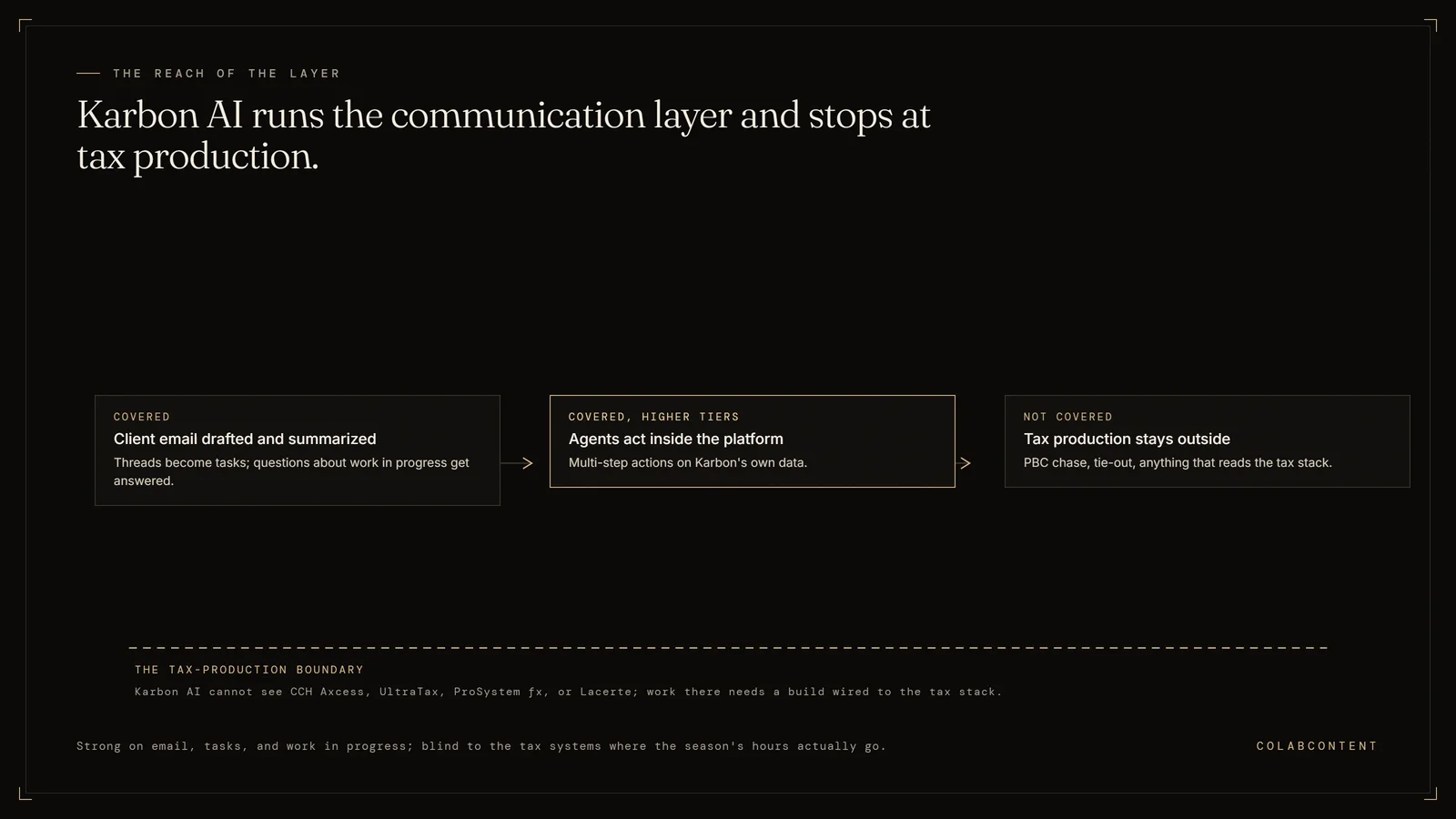
Karbon is a category-leading practice management platform with AI layered in at the higher tiers. For a firm that needs practice management capability and AI features in one product, Karbon is excellent. For a firm whose AI needs sit deeper in the tax stack (CCH Axcess, UltraTax, PBC chase, tie-out automation), the layer that fits is custom-built.
How each alternative handles the workflows that matter.
Karbon and a ColabContent custom build are not directly competitive in most cases. Karbon is a practice management platform; custom AI is a workflow layer. Most mid-market firms eventually run both. The question is sequencing: which problem is more painful, and which solution to commission first.
If practice management is the friction, start with Karbon. If tax production and PBC (the prepared-by-client document list) chase are the friction, start with a custom AI build. Either choice rules out the other for about 12 months (our estimate, based on how these engagements typically sequence); both can be sequenced once cash and operational bandwidth allow.
Key Terms
Tax provision automation: calculating ASC 740 (the accounting standard for income tax provisions) or other tax provisions from trial balance data; a technical workflow where manual spreadsheets introduce material error risk. Client portal integration: connecting document exchange, e-signatures, and status updates with the firm's practice management system. Deadline management: tracking filing dates, extension deadlines, and review milestones across hundreds of simultaneous engagements. Knowledge extraction: mining prior-year workpapers (the working files behind a tax return or audit) and engagement files to surface relevant precedent for current engagements.
The questions below cover how much does Karbon AI cost, is Karbon AI included in every Karbon plan and what are Karbon AI Agents.
Five dimensions that matter.
ColabContent: commissioned custom AI builds, typically sitting on top of the firm's existing tax production stack (CCH Axcess, UltraTax, Lacerte, ProSystem fx) and the firm's existing practice management.
Not the same layer of the stack. Different problems.CategoryDifferent layers
ColabContent: one fixed fee, from $10,000 total. No recurring per-user line.
Over 24 months Karbon runs $106,200 to $160,200 on annual billing at that headcount. A commissioned build is one fixed fee, from $10,000, paid once. The per-seat math favors the build as headcount grows, because only one of the two numbers scales with the org chart.CostCustom wins on TCO (total cost of ownership)
ColabContent: custom builds use the CCH Axcess Open Integration API (the connection one piece of software offers to another) directly. Automation happens inside the firm's existing CCH workflow, not in a separate UI.
For firms whose tax team lives in CCH Axcess and resists context-switching to a separate practice platform, custom is the cleaner answer.IntegrationCustom is in-stack
For the technical detail behind dimension three, see the CCH Axcess AI workflow playbook.
ColabContent: commissions a full PBC automation layer that pre-validates uploads against prior-year request sets, classifies documents by engagement and form type, and writes structured data back to the tax software.
A commissioned PBC layer is built against the firm's own prior-year request sets and its own document taxonomy, which is depth a productized PBC feature is not trying to reach.PBCCustom wins on depth
ColabContent: code, prompts, models transferred to the firm at handoff. System runs inside the firm's tenant (a private cloud account).
For firms with confidentiality requirements (especially audit, attestation, and high-net-worth tax practices), the in-tenant custom build is the right posture.SovereigntyCustom wins
| Dimension | Karbon | Custom build (ColabContent) |
|---|---|---|
| What it is | Practice management platform with AI layered into higher tiers | Commissioned build sitting on the firm's tax production stack and existing practice management |
| Pricing | $59 to $89 per user per month (Team/Business, annual); $53,100 to $80,100 a year for a 75-professional firm | One fixed fee, from $10,000 total, no recurring per-user line |
| CCH Axcess integration | Integrates with CCH Axcess but is not native; most workflow lives in Karbon's UI | Uses the CCH Axcess Open Integration API directly, inside the firm's existing CCH workflow |
| PBC automation | Client Tasks and Client Portal handle request-and-receipt; AI drafts and surfaces requests | Full PBC layer built against the firm's own prior-year request sets and document taxonomy |
| Ownership | SaaS; the firm rents access in perpetuity | $499 AI-Ready Audit first; custom builds from $10,000 as one fixed fee quoted after the audit; working prototype on your own data before payment; code owned at handoff; no per-seat fees |
The decision tree.
The questions below cover how much does Karbon AI cost, is Karbon AI included in every Karbon plan and what are Karbon AI Agents.
- Does the firm need a new practice management platform? Yes: Karbon is the default. The AI features come along for the ride. Stop reading.
- Is practice management working, but PBC chase or tax production is the bleeding bottleneck? Custom build is the default. Karbon does not address PBC chase at the depth a commissioned build does.
- Is the firm consolidating vendors and wants one platform? Karbon. Custom builds add to the stack rather than consolidating it.
- Is the firm 75+ professionals with deep CCH Axcess investment? Custom. The per-seat math runs against Karbon at this size, and the CCH-native build outperforms cross-platform tools.
- Is the firm under 30 professionals? Karbon. Custom builds rarely return their cost at that headcount.
Start that decision with the $499 AI-Ready Audit.
Start with the $499 audit.
The AI-Ready Audit is $499. The report arrives the same day, as a private link and a PDF, with a 5-minute video walkthrough and a 20-minute call. If it has no value you get the $499 back, and every quarter your AI answers, rankings and money leak are re-checked free.
No slides. We walk through PBC chase, partner reporting, and CCH workflow and tell you whether the math favors a commissioned build over Karbon's per-seat path.
Read the CPA offering → Book directly →Related reading.
The pages below continue the argument made here from a different angle: a vendor comparison, a cost breakdown, or a playbook for the software already in place. Each one was written for the same owner-run and mid-market businesses this page addresses, and each ends at the same first step, the $499 AI-Ready Audit.
Where the comparison actually matters.
A side-by-side only helps when it compares the things that decide the outcome. The sections below take each alternative on the workflow it was built for, name where it is genuinely the better choice, and show where a custom system the business owns changes the answer, with the trade-offs stated.
What Karbon AI actually does well.
Karbon AI is a product, calibrated against the largest customer in the category, with a buying model that pays for itself for operators whose workflow matches the calibration target. The strongest use cases are the horizontal tasks the product was built around: research, drafting, review, lookup, summarization. For those tasks, on data the product was trained against, the output is competitive with bespoke work at a fraction of the up-front engineering cost.
For an operator whose workflow is well-aligned with that calibration target, Karbon AI is the right buy. The pricing is predictable. The on-ramp is fast. The roadmap is funded. The category is moving and the product will move with it.
Where Karbon AI loses to a commissioned build.
The misfit shows up when the operator's workflow is not the horizontal task the product was built around. For CPA firms that workflow is some specific combination of PBC reconciliation, tax workflow routing, client-data ingestion, trial-balance reconciliation, 1040 review. The product, calibrated against the average customer, will get thirty to forty percent of the way to that workflow before the operator-specific gap opens up: a matter taxonomy (the way a firm categorises its cases) the product does not know, a part library the product cannot represent, a carrier pool the product cannot reason about, a dispatch logic the product cannot follow.
The commissioned build closes that gap by being built on the operator's actual data, inside the operator's actual stack (CCH Axcess, UltraTax CS, ProSystem fx, Lacerte where relevant), with the operator's specific workflow as the calibration target. The trade-off is up-front cost (one fixed fee from $10,000) versus ongoing SaaS subscription. For operators with a known constraint and a five-to-ten-year horizon, the math favors the commission.
Side-by-side on the six dimensions that decide the buy.
Vertical fit. Karbon AI is calibrated for the average customer in the category, which for most product companies is the largest end of the market. ColabContent commissions are calibrated for the specific operator. Mid-market operators are not the average customer.
Custom versus product. Karbon AI is a product with configuration knobs. ColabContent commissions are custom code, custom prompts, custom data pipelines. Configuration cannot represent what custom code can represent.
Ownership. Karbon AI retains the code, the models, and the data pipeline. ColabContent transfers all three to the operator at handoff. The operator owns the build, can modify it, can run it indefinitely without a vendor relationship.
Pricing model. Karbon AI charges per seat, per month, in perpetuity. ColabContent charges a fixed fee in two installments, one at production-build start and one at handoff. Total cost of ownership over five years usually favors the commission for CPA firms.
Time to working system. Karbon AI is fast to provision but the operator-specific workflow build sits outside the product timeline. ColabContent ships a working prototype on the operator's real data in seven to ten days and a production system in four to seven weeks.
Reference depth. Karbon AI has the larger published reference set, weighted toward larger customers in the category. ColabContent's references are smaller in number but matched to mid-market CPA firms and named with numbers.
When to pick Karbon AI, when to commission custom.
Pick Karbon AI if the operator's workflow is the horizontal task the product was built around, the seat count is small enough that per-seat pricing pencils, the operator is comfortable not owning the code, and the operator does not need integration with a specific stack that the product does not natively support.
Commission custom if the operator has a specific workflow that the product calibrates against, the budget exists for a custom build from $10,000, ownership of the code matters, and integration with the existing stack matters more than vendor brand.
Many operators end up with a hybrid posture: Karbon AI for the horizontal tasks where it dominates, a commissioned build for the operator-specific workflow where it does not. We have shipped commissions that explicitly call Karbon AI as one of their downstream components.
Migration considerations.
Operators who already have Karbon AI in production and are considering supplementing it with a commissioned build face three migration questions: which workflows stay on Karbon AI, which move to the commissioned build, and what the integration boundary looks like between them. The right answer is rarely "rip and replace." The right answer is usually "keep Karbon AI where it wins, build custom where it loses, integrate cleanly at the boundary."
The audit call works the same way for hybrid postures. We will tell the operator honestly which workflows are right to leave on Karbon AI and which are right to commission. The audit is $499 and the report is yours to keep regardless of the outcome.
The questions buyers ask after the first one.
These are the questions that come up once the first one, whether to build at all, has been answered. Each answer below is the one we give on the call that ends the $499 AI-Ready Audit, written down here so it can be checked against your own report before anything is commissioned.
How much does Karbon AI cost?
Karbon publishes seat pricing: $59 per user per month on Team and $89 on Business when billed annually, $79 and $99 when billed monthly, with custom pricing above that. AI capability sits on the higher tiers, so the AI-capable number for a 75-professional firm is roughly $80,100 a year, or about $160,000 over 24 months. Confirm the current tier on Karbon's own pricing page before you model it, because the line moves.
Is Karbon AI included in every Karbon plan?
No. Karbon layers its AI features into the higher tiers rather than shipping them across the whole line, which is why the honest comparison is against the Business tier price, not the entry price. A firm evaluating Karbon specifically for the AI is evaluating the top of the price card.
What are Karbon AI Agents?
Karbon markets an agent layer on top of Karbon AI that takes multi-step actions inside the platform rather than only drafting text: triaging inbound client email, opening and routing work, and keeping the task record current. The capability set is moving quickly, so treat any written description, including this one, as a starting point and get a live demo run against your own inbox before you buy.
Does Karbon AI work with CCH Axcess and UltraTax?
Karbon integrates with the major tax stacks, but the workflow lives in Karbon's interface, not inside CCH Axcess or UltraTax. That distinction decides adoption for tax teams that will not context-switch. An integration moves data between two systems; a build against the CCH Axcess Open Integration API puts the automation where the preparers already are.
What are the alternatives to Karbon AI?
At the practice management product level, Aiwyn, Pixie, Jetpack Workflow, and Canopy compete with Karbon directly; the full priced comparison of seven of them, including Karbon itself, is on our Karbon alternatives page. If the actual pain is tax production rather than practice management, the alternative is not another platform. It is a commissioned build on top of the tax stack the firm already runs, priced once instead of per seat.
Is Karbon AI worth it for a 75-professional firm?
If practice management is what is broken, yes. Karbon is a category leader and the AI comes with it. If practice management is fine and PBC chase, tie-out, and partner reporting are the bottleneck, a per-seat platform bill is the wrong shape of spend, because only one of the two numbers scales with the org chart.
Karbon AI or a commissioned build first?
Whichever addresses the constraint you can name in one sentence. Firms that cannot name it usually buy the platform, use a fraction of it, and still have the original bottleneck twelve months later. ColabContent LLC has run an AI practice since 2024; the first call is a $499 AI-Ready Audit with no slides, and it ends with which of the two is right for you.
What does Karbon AI not do?
It does not prepare a return, tie out a workpaper, classify a client upload against last year's request set, or write anything back into the tax software. Those are the tasks a 30 to 150 professional firm loses its season to, and they sit outside a practice management platform by design.
Who owns the code at handoff?
On a ColabContent commission, the firm owns the code, prompts and models at handoff, inside its own cloud tenant. Karbon AI stays SaaS; the firm never owns the underlying code.
How long does a commissioned build take?
A working prototype ships in seven to ten days, and a production system in four to seven weeks. Karbon AI provisions faster, since it is a subscription rather than a build.
What is expected of the firm during a commission?
A signed NDA (a signed non-disclosure agreement), a slice of real data, and a partner who can name the workflow constraint on the audit call. A principal runs the rest.
Does a commissioned build replace staff?
No. The build targets a named workflow, such as PBC chase or tie-out, so the firm's team keeps the judgment calls Karbon AI also leaves to a human reviewer.
What if the commissioned build does not perform once it is running?
The working prototype runs on the firm's own data for seven to ten days before any build fee is owed. If it does not demonstrate the workflow named on the audit call, the firm owes nothing and keeps the prototype. The $499 audit that leads to this decision carries its own separate money-back guarantee.