Home/ Playbooks/ Lacerte AI Integration

Lacerte AI: How AI Actually Fits Into a Lacerte Practice

Lacerte AI integration for mid-market CPA firms sits at the center of operations: it is where structured data lives and where the AI layer reads and writes. ColabContent commissions custom AI layers on top of Lacerte at fixed fee (from $10,000), with code owned by the operator at handoff. Standard build cycle: 4 to 6 weeks. Integration runs on Intuit's Lacerte SDK for read-and-suggest workflows; the system of record (the one system that holds the official copy of a record) stays Lacerte. Start with the $499 AI-Ready Audit.

This is not the right path for solo practitioners (SaaS economics win), firms whose only need is tax prep automation (Lacerte and UltraTax add-ons cover that), or firms without a named workflow constraint worth $10,000 or more in annual leakage.

The path: (1) the $499 audit call names the workflow and its annual leakage; (2) SDK access is requested through Intuit's own developer portal; (3) a prototype ships in 7 to 10 days; (4) a read-and-suggest build, reading through the SDK's ODBC driver, ships in 5 to 7 weeks; (5) at handoff the firm owns the code and pipeline, from $10,000, with no license or recurring fee. Takeaway: run the four-question sequence above before booking the call.

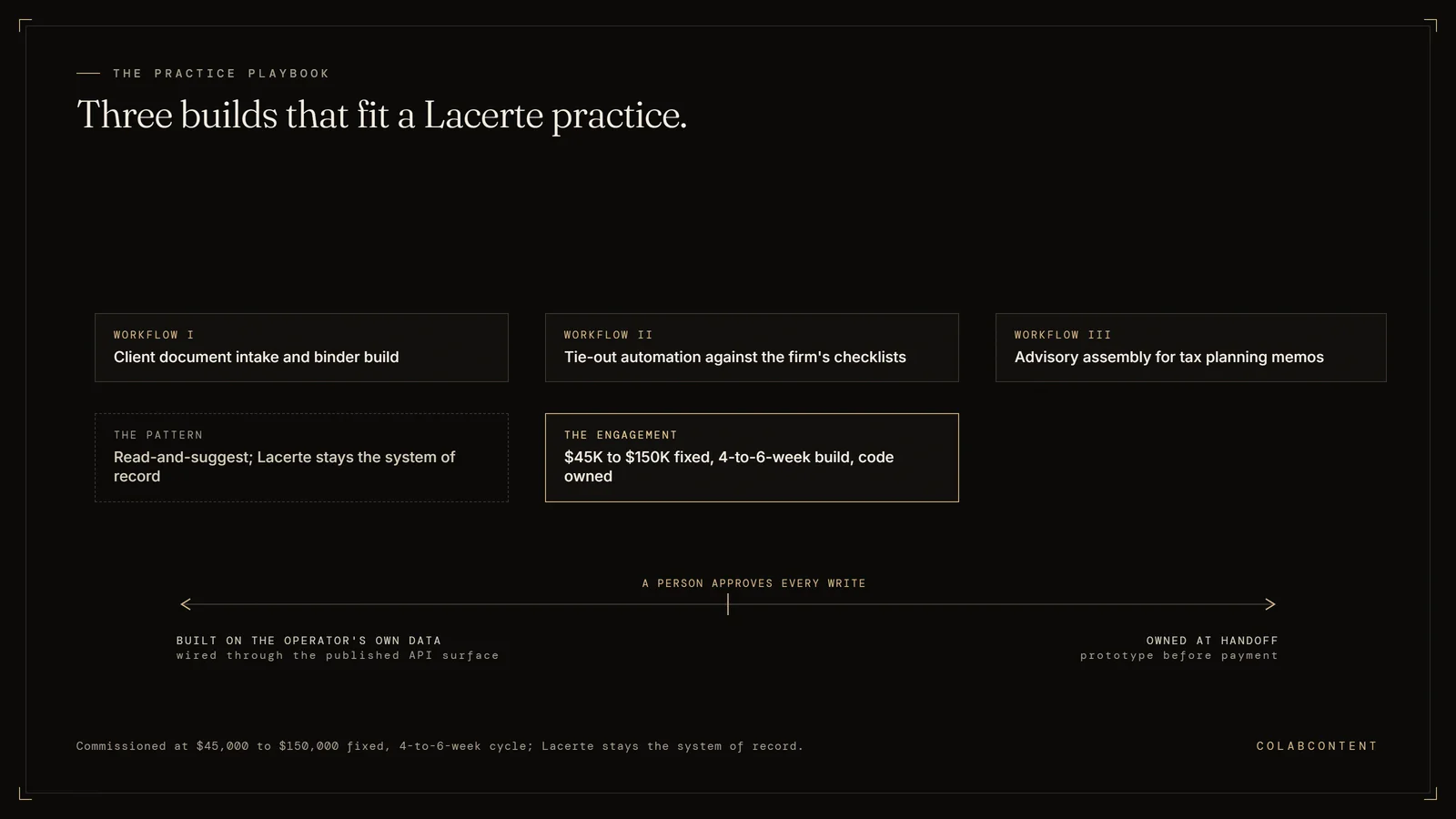
The three AI workflows ColabContent builds around Lacerte for mid-market CPA firms: client document intake and binder build, tie-out automation against the firm's own checklists, and advisory assembly for tax planning memos
Three builds around the return; Lacerte stays the system of record.

Custom AI on top of Intuit Lacerte Tax for mid-market CPA firms (30-150 pros). Tie-out automation, advisory assembly, return-prep AI. Built when Intuit Tax Advisor and the off-the-shelf AI features aren't enough for the firm's specific workflow.

ForManaging Partner / Tax Practice Lead

The decision framework. The choice turns on three questions: (1) does the firm's engagement mix and workpaper workflow match the patterns that existing practice management AI (Karbon, Corvee, CCH Axcess) already automates, or does the firm carry specialty engagements those products cannot represent; (2) does the firm's client data posture allow a SaaS (software you rent by subscription) vendor to process workpapers (the working files behind a tax return or audit) under its own agreements, or do the firm's professional standards require infrastructure it controls directly; (3) over a 24-month horizon, does a compounding per-user subscription cost less than a single fixed payment for a system the firm owns outright. If all three favor a product, the SaaS path is stronger. If any one favors a build, the gap is worth quantifying: the $499 AI-Ready Audit sizes it in dollars and weeks.

StackIntuit Lacerte + custom AI layer
Build cycle5-7 weeks

Key Terms

Workpaper automation: using AI to prepare, cross-reference, and review audit and tax workpapers against source documents; the workflow where mid-market firms see the fastest time savings. Trial balance reconciliation: automated matching of general ledger balances to subledger detail and bank statements; a high-volume task that AI reduces from hours to minutes. Engagement letter compliance: ensuring every client engagement has a signed, current letter that matches the scope of work performed; a risk management requirement manual tracking routinely misses. Staff leverage ratio: the number of staff and senior associates a partner can supervise productively; AI tools that handle routine preparation increase this ratio without adding headcount.

The questions below cover does Lacerte have an API, how do you automate Lacerte without switching tax software and can AI write data back into a Lacerte return.

What this playbook covers and who it is for.

Lacerte sits in a different segment than CCH Axcess and ProSystem fx, biased toward firms with strong individual-return practice and personal/business mix. Intuit's AI investment for accounting is real (Intuit Assist, Tax Advisor) and is shipping useful features for the average Lacerte customer. The mid-market firm with 30-150 pros and a differentiated practice often needs leverage Intuit's roadmap doesn't cover.

The Lacerte surface area we touch.

Lacerte's integration surface is narrower than Axcess's. We work through Lacerte's data exchange (FDX, e-Organizer, Intuit Link) for client documents and prior-year data, the firm's DMS (SmartVault, Doc.It, FileCabinet) for workpapers, and Outlook + Microsoft Graph for the client communication layer. The AI runs alongside Lacerte rather than inside it.

Workflow I: Client document intake and binder build.

The Intuit Link / e-Organizer stream is the chase mechanism. The custom AI watches it, categorizes incoming docs, validates against the firm's expected-document checklist for that client (not Intuit's generic checklist), pings the partner only for material gaps.

The questions below cover does Lacerte have an API, how do you automate Lacerte without switching tax software and can AI write data back into a Lacerte return.

Workflow II: Tie-out automation against the firm's checklists.

The AI reads the in-progress Lacerte return + workpapers + prior-year, surfaces flags against the firm's specific tie-out logic. Catches what your senior reviewer would catch, an hour earlier, every time.

The questions below cover does Lacerte have an API, how do you automate Lacerte without switching tax software and can AI write data back into a Lacerte return.

Workflow III: Advisory assembly for tax planning memos.

The high-margin workflow at most Lacerte firms with strong individual practices. AI assembles client-specific tax-planning briefs, year-end strategy memos, and quarterly check-in deliverables from prior returns + current-year financials. Partner edits the assembled deliverable rather than building from scratch.

The questions below cover does Lacerte have an API, how do you automate Lacerte without switching tax software and can AI write data back into a Lacerte return.

Integration playbook

How a custom AI layer integrates with Lacerte.

A Lacerte build reads client source documents and drafts the routing decision for a preparer to confirm inside Lacerte; nothing files itself. Tax workflow routing is the pattern most firms start with, since it is the easiest to check against a preparer's own judgment.

Why this integration matters.

Lacerte sits at the center of the operational stack for many CPA firms. The workflows that route through it are the workflows where AI investment shows up first on the P&L: PBC (the prepared-by-client document list) reconciliation, tax workflow routing, client-data ingestion, trial-balance reconciliation, 1040 review. A commissioned AI layer that integrates cleanly with Lacerte addresses those workflows without forcing the operator to migrate off the system of record.

Architecture: where the AI layer sits relative to Lacerte.

The most common integration pattern is a read-and-suggest pattern. The AI layer reads structured records out of Lacerte, runs the workflow it was commissioned to run, and writes back a suggested action that a human reviewer approves inside Lacerte's native UI. The system of record stays Lacerte. The AI layer never bypasses the human-in-the-loop step for production-data writes.

For lighter-touch workflows we have shipped read-only layers that extract structured data out of Lacerte, hand it to a reasoning step, and emit a report. No writes back. The operator uses the report as input to their existing decision process. Time to ship is faster, integration risk is lower.

For heavier workflows where the audit trail is structured and the failure cost is bounded we have shipped fully bidirectional integrations that close the loop end-to-end with structured logging. These engagements take longer (six to seven weeks rather than four to five), require more diligence on the read/write permissions inside Lacerte, and ship with a runbook (the written operating instructions) for human review of edge cases.

The integration mechanics, in plain language.

Lacerte does not publish a public REST API (the connection one piece of software offers to another) and does not publish webhooks. Intuit ships a Lacerte Software Developer's Kit instead, and every integration a firm can legitimately run sits on top of it. The level you build at depends on what the workflow needs to read, what it needs to write, and whether the firm runs Lacerte locally or on a host.

The SDK, read path. The SDK ships an ODBC driver and a .NET library. A developer licence is requested through Intuit's developer portal, and Intuit states plainly that SDK support does not come through normal Lacerte support channels. Read access to the Lacerte database is where almost every workflow we scope begins, because reading is where the leverage is and writing is where the risk is.

The SDK, write path. Through the ODBC driver you can update fields on records that already exist. You cannot create a client that way. Intuit's own answer in its SDK forum is that client creation goes through the SDK API rather than the ODBC driver, and commercial tools that populate returns either use the SDK API or drive Lacerte's input screens directly.

The document layer. Where the SDK does not expose what a workflow needs, the honest fallback is the documents themselves: source PDFs, the firm's own checklists, and e-file acknowledgements. Slower to build against than an API would be, but it does not depend on an interface Intuit has not published, so it does not break when the SDK does not move.

One deployment note that decides schedules more often than code does. The SDK install is per workstation rather than per server, ships in 32-bit and 64-bit builds, wants the Visual C++ 2015 redistributable and administrator rights, and the Lacerte sign-in has to be re-entered when the session expires after twenty-four hours. On hosted Lacerte, whether that is Rightworks, Verito or a private cloud image, the host has to be in the room during setup.

Common pitfalls when integrating AI with Lacerte.

Treating the integration as an afterthought. The AI work is the easy part. The integration is the hard part. Operators that under-invest in the integration boundary spend the entire build cycle fighting authentication, rate limits, and edge-case schema. The commission scopes the integration boundary in the first week.

Skipping the human-in-the-loop step too early. Closing the loop end-to-end on day one is a recipe for hidden errors. Every engagement starts with human review of every AI output. Only after the operator has seen the output quality hold for sixty to ninety days does the human-in-the-loop step relax to spot-check.

Underestimating the data-cleanup work. Lacerte contains data the operator has entered over years. Some of it is clean. Some of it is not. The AI layer's quality is bounded by the data it reads. Cleaning happens as part of the build, not as a prerequisite for it. If the data is unworkable we flag it in the audit call.

Building bespoke when a product would suffice. If Lacerte already has a productized AI feature that covers the workflow, the operator should evaluate it before commissioning a custom build. We will tell the operator honestly when that is the right answer.

Reference: prior commissions involving Lacerte.

Specific numbers are bound by NDA (a signed non-disclosure agreement) but the pattern is consistent across the engagement set: the operator runs the workflow faster, with fewer hands, and with a structured record of every AI-generated suggestion alongside the human approval.

What a Lacerte engagement scope looks like.

A typical Lacerte commission scope: one or two specific workflows, read-and-suggest pattern, four-to-seven-week build cycle, fixed fee from $10K depending on integration depth and workflow complexity. The audit call identifies the workflow. The prototype demonstrates feasibility against the operator's real data inside seven to ten days. The production build ships inside the operator's own cloud tenant (a private cloud account) under NDA (a signed non-disclosure agreement).

The operator owns the Lacerte integration code, the AI prompts, the model selection, and the data pipeline at handoff. We do not retain a license, a recurring fee, or a vendor relationship that the operator depends on.

Extended questions

The questions buyers ask after the first one.

Once a CPA firm has had its first call about a Lacerte build, these are the questions that follow. The audit fixes the price, the build runs 4 to 6 weeks, and the firm owns the finished system rather than paying a recurring per-preparer fee.

Does Lacerte have an API?

There is no public REST (a standard way for software to exchange data over the web) API and there are no webhooks. Intuit publishes a Lacerte Software Developer's Kit for third-party vendors and for firms that write their own code against the Lacerte database. The kit includes an ODBC driver and a .NET library, and the developer licence is requested through Intuit's developer portal.

The way to know whether this playbook applies to your own setup is the $499 AI-Ready Audit, which checks it against your actual stack rather than the general case.

This matters before you scope anything. An automation plan that assumes REST endpoints and event subscriptions is planning against an interface that does not exist, and that assumption usually surfaces after a firm has already committed a tax-season date.

How do you automate Lacerte without switching tax software?

Four workflows automate cleanly around Lacerte without touching the return itself: client document intake and classification, chasing missing items, e-file acknowledgement monitoring, and extension batching. Two automate only partially. Prep review can flag against the firm's own checklist but cannot sign off, and inbound K-1 handling extracts reliably while basis and at-risk treatment stay with the preparer.

None of the four require leaving Lacerte, which is the point. The system of record does not move.

Can AI write data back into a Lacerte return?

Partly, and the distinction is the one that decides build cost. Through the SDK's ODBC driver you can update fields on records that already exist. Creating a new client is a different operation and Intuit's own SDK forum answer is that it goes through the SDK API, not ODBC.

A read-and-suggest build, where the layer proposes and a person commits, sits at the bottom of our fee band and ships in five to seven weeks. Anything writing back through the SDK API sits higher, because the testing burden against live client tax data is real and it is not optional.

How much of the buy decision should the operator make versus delegate.

The right shape of the buying motion has the operator-owner or operating partner in the room for the audit call. The constraint identification is too consequential to delegate to a department head. The implementation work that follows can and should be delegated; the decision on which constraint a commission addresses cannot.

How to evaluate references the consulting house presents.

Three questions per reference. First, what was the named constraint the commission addressed at this operator. Second, what was the measured result twelve months post-handoff, in dollars or hours. Third, does the reference operator still run the system. Vague references on any of those three are flags. ColabContent provides direct introductions to past commission operators for any prospect that asks; a fifteen-minute call to the operator is the most honest signal a prospect can get.

How a fixed-fee commission scopes overage risk.

The fixed fee is set after the $499 AI-Ready Audit, after the integration depth is named, and after both sides have written the constraint in a sentence. Overages occur when the operator changes the scope mid-build (a different workflow, a different integration, an additional system). Either side can pause the build to renegotiate; neither side absorbs hidden overages without explicit agreement. The default is to ship the original scope and address scope expansion in a separate engagement.

What happens to the system one year after handoff.

The system continues to run inside the operator's cloud tenant. Models, prompts, and integration code are versioned and the operator has the source. When the underlying foundation model improves (a new release from the model vendor, a new open-weight option), the operator can swap the component without renegotiating the engagement. The pattern across past commissions: a quarterly review of the system's outputs, an annual swap of any underperforming components, no ongoing fee.

When the right call is not a commission.

The right call is sometimes a product (when the workflow matches a product's calibration target), sometimes an internal hire (when the operator has a five-year horizon and a $5M AI runway), sometimes a Big Four engagement (when the operator is large enough that the strategy-then-build separation makes sense), sometimes no AI right now (when the operator's leading constraint is not actually addressable with AI). We tell prospects when their constraint falls into one of those buckets and route them to whichever path fits. The never-overbook rule is real; the firms that get one of those four slots are the firms where the commission is the right buying motion.

The five-minute fit-check worksheet.

Operators who want to test the fit before ordering the $499 AI-Ready Audit can run a five-minute self-check on six questions. First, is the business established enough that a $10,000-plus system pays for itself inside a year. Second, is there a named workflow where time or money is leaking measurably. Third, has the operator tried an off-the-shelf product and either rejected it or hit a misfit ceiling. Fourth, is the operator comfortable running the system inside their own cloud tenant under NDA. Fifth, can the senior operator commit to the 20-minute call that ends the $499 AI-Ready Audit. Sixth, is the budget for a custom build from $10,000 real this quarter.

Six yes answers means the $499 AI-Ready Audit is worth ordering. Three or fewer yes answers means the right next step is probably one of the alternatives. Four or five yes answers means the call surfaces whether the missing one is addressable.

What to bring to the audit call.

Two artifacts make the call substantially more productive. First, a one-page description of the leading constraint, written in the operator's words, naming the workflow and the rough dollar or hour leakage. Second, a list of the systems the operator uses for the workflow (the system of record, the related tools, the integration boundaries). Neither artifact has to be polished. The point is to surface the constraint quickly so the audit call's twenty minutes are spent on the findings, not exposition.

The technical companion to this memo goes deeper on exactly what the Lacerte SDK and ODBC driver expose and how far each tax-season workflow automates: read the Lacerte AI automation write-up.

Buyer worksheet

When to commission and when to stay on the off-the-shelf product.

Not every Lacerte firm needs a custom build. Sometimes the software already does the job and the real gap is a process fix, not code; this section is about telling the two apart before anyone commissions anything or signs off on a fee.

The four-question sequence operators run before booking.

Operators who arrive at the audit call having run the sequence usually commission the build that same week. The sequence asks four questions in a specific order. First, is the leading constraint actually addressable with AI, or is it a process problem, a staffing problem, or a stack problem that AI would not solve. Second, if AI is the right intervention, is the right buying motion a custom commission, an off-the-shelf product, or an internal hire. Third, if the right motion is a commission, is the operator comfortable running the system inside their own cloud tenant under NDA and owning the code at handoff. Fourth, is the budget for a custom build from $10,000 real this quarter.

Operators who answer yes to all four book the call. Operators who answer no to any one of them either change the question (the leading constraint is different, the budget moves, the cloud posture changes) or take a different path. We do not push operators who land at a "no" on any of the four into a commission they will not be served by.

The three signals operators watch for after handoff.

Twelve months post-handoff, three signals tell the operator whether the commission performed against the target written down after the audit. First, the dollar or hour delta on the workflow the commission addressed, measured against the pre-engagement baseline. Second, the percentage of the workflow the AI layer now handles autonomously versus the percentage that still routes to a human reviewer. Third, the number of times the operator's team has modified the build's prompts, models, or integration code on their own without ColabContent involvement. All three should be improving over time. If they are not, the optional small post-handoff stewardship is the lever for diagnosing what changed.

The honest comparison against the alternatives.

A commission is not the right answer for every operator. The mid-market operator with a workflow that matches a horizontal SaaS product's calibration target is better served by the product. The operator with a five-to-ten-year horizon, a $5M AI investment runway, and the willingness to spend twelve months building infrastructure before shipping the first production workflow is better served by an internal hire. The operator at $500M-plus revenue with stakeholder counts that justify a Big Four engagement is better served by that motion. We will tell the operator which of those alternatives fits if a commission does not.

The honest case for a commission is narrow on purpose. Established operators with a named workflow constraint, with stack systems that the product market does not represent well, with the budget runway for the fixed fee, with the cloud posture to run the system inside their own tenant. Operators in that narrow band are where the math works.

Why we publish the comparisons, the rankings, and the boundaries.

Most consulting houses do not publish ranked comparisons against their competitors, do not publish the boundary of what they will not build, and do not publish fixed-fee pricing bands. We publish all three because the operators we want to commission for are the operators who reward that transparency with a faster booking. The never-overbook rule means we are not optimizing for top-of-funnel volume. We are optimizing for the right four operators each quarter. Publishing the comparisons, the rankings, and the boundaries selects for those operators.

What is Intuit Assist, and does it work with Lacerte?

Intuit Assist is the generative layer inside Intuit Tax Advisor, and it is the closest thing to Lacerte AI that Intuit itself ships. Intuit describes it as using generative AI in Intuit Tax Advisor to suggest client-specific tax strategies from ProConnect Tax or Lacerte returns. In practice Tax Advisor pulls client data out of Lacerte without manual re-entry, shows which tax-saving strategies apply to that client, and applies them in one click with the projected saving attached. Two things to be clear about before you compare it with anything else. It is a planning and advisory layer, not workflow automation: it helps a preparer advise, it does not chase organizers, move documents or clear diagnostics, which is where most of the hours actually go. And Intuit ties AI availability to specific products and tiers, so confirm what your own Lacerte licence includes rather than assuming the marketing applies to it. Read on accountants.intuit.com, 16 September 2026.

Integration question

Stuck on the Lacerte integration? Send the question.

Tell us which Lacerte workflow is the actual bottleneck, not the whole tax season. Someone who has shipped a Lacerte build replies by email within a day, with either a cost range or a direct no.

Start with the $499 audit.

Custom AI on your Lacerte instance.

The questions below cover does Lacerte have an API, how do you automate Lacerte without switching tax software and can AI write data back into a Lacerte return.

Next step

Start with the $499 audit. Bring the firm's engagement mix, the practice management platform, and the workflow where staff hours leak most visibly. The call identifies whether a custom build, an existing product, or a process change addresses the constraint. The call is part of the audit; no obligation after it.

Related reading: Lacerte AI Automation: What Actually Works at Tax Season.

Related reading: AI Consulting for CPA and Accounting Firms: How to Buy It.

The questions below cover does Lacerte have an API, how do you automate Lacerte without switching tax software and can AI write data back into a Lacerte return.