Home/ Comparisons/ Sage 300 CRE Alternatives

Sage 300 CRE Alternatives for Contractors: 7 Options, Priced

There are seven credible alternatives to Sage 300 Construction and Real Estate for a mid market contractor: Sage Intacct Construction, Procore, Foundation Software, Premier Construction Software, Acumatica Construction Edition, Vista by Viewpoint, and CMiC. The eighth option is the one almost nobody puts on a construction software comparison, because no construction software vendor can sell it to you: commissioning the job cost system your company actually needs and owning it outright, one fixed fee, no per user licence, no annual maintenance percentage on a licence somebody else holds. Sage publishes no price for Sage 300 CRE anywhere, so every Sage cost figure on this page is labelled reported rather than verified, and the only thing labelled verified is the absence itself, read off Sage's own page. Contractors report a full setup of $50,000 to $150,000 or more and annual maintenance of 15 to 25 percent of licence cost. Run that through a 15 user contractor and staying costs $201,614 cumulative over five years against $192,500 for a commissioned build at $110,000, and the two lines cross in year four. One more thing worth knowing before you read anyone else's list: Sage has publicly and repeatedly denied any plan to end of life Sage 300 CRE, so if you were told the clock is running, check who told you and what they sell.

A note on names, because the searches split. Sage 300 Construction and Real Estate is the on premise construction product formerly sold as Timberline Office. It is not the same thing as Sage 300 or Sage 300cloud, which is a general business ERP with a similar name and a different price sheet. People search Sage 300 CRE alternatives, Sage 300 Construction competitors, Sage 300 CRE replacement and migrating off Sage 300 CRE, and they all mean the same decision. This page is the comparison for all of them.

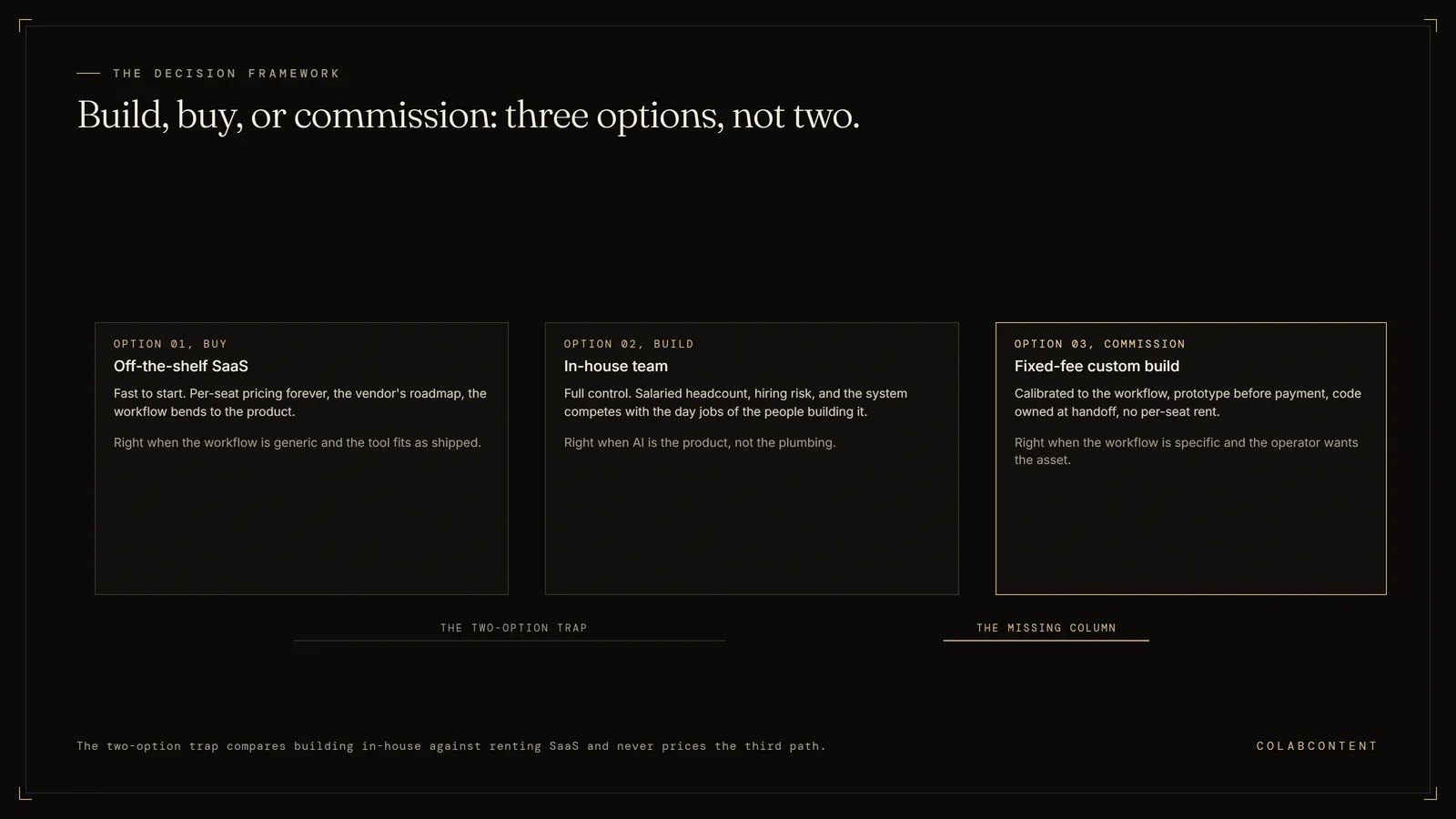
Three options, not two: buy off the shelf software with per user pricing forever, build with an in house team and carry the hiring risk, or commission a fixed fee custom build calibrated to the workflow and owned by the operator at handoff
Most construction software comparisons price two of these three columns.

Written for the contractor who already pays for Sage 300 CRE. We do not sell construction ERP, we take no referral fee from anyone in the table below, and we will say plainly which companies should stay exactly where they are.

For$10M to $20M contractors on Sage 300 CRE
StanceNeutral. We sell no construction ERP.
Incumbent cost$50K to $150K setup, reported
Our fee$45K to $180K, one time
Prices readAugust 27, 2026

The short answer.

If you are on Sage 300 CRE and the reason you are reading this is money, the honest first move is not a different construction ERP. It is to find out what you are actually paying, because the annual maintenance line on your invoice is a percentage of a licence cost that most contractors have not looked at in years, and that percentage is the number that compounds. Every alternative in the roundup below is a subscription or a licence with its own maintenance percentage attached, which means switching changes who receives the money and rarely changes the shape of the bill. If the reason you are reading this is that somebody told you Sage 300 CRE is going away, read the next section before you spend a dollar, because that claim does not survive contact with what Sage itself has said in public.

So the verdict splits three ways, and the split is by size. A contractor with fewer than about six Sage users should not commission anything: our own floor is a $45,000 fixed fee, which costs $78,750 across five years once flat maintenance is added, and at that user count five years of modeled Sage cost does not reach it, so the right move is negotiating the maintenance renewal or looking at a narrower accounting only swap like Foundation Software. Between six and about ten users the build edges ahead on this model, but by a margin thin enough that it should not be the reason you move. A contractor in the range this page is written for, roughly $10 million to $20 million in revenue with a dozen to two dozen people in the system, is where the arithmetic actually flips: the cumulative curve on a per user licence with a compounding maintenance percentage overtakes a one time build inside five years, and every new project manager you hire pushes it further. And a contractor whose real dependency is a decade of Sage customization, macros and My Assistant automations that encode how the company actually costs a job should probably stay, and we spend a whole section further down arguing that case as hard as we know how.

Is Sage 300 CRE being discontinued?

No, and this matters more than anything else on this page, because it is the claim that gets contractors to move on somebody else's timetable instead of their own.

Sage says the opposite, in public, on its own community hub. Sage's Senior Product Manager for Construction, posting as Phillip W, wrote that there are absolutely no plans to end of life Sage 300 CRE and that it is a core product to the Sage construction product family. A second Sage representative posting as Erzsi_I wrote the same thing, adding that it continues to be a core product relied on by thousands of construction companies. A community member in the same thread reported Sage's own Director of Construction and Real Estate Strategy telling CFMA National in May 2025 that Sage 300 CRE is not going away for years and years and years, and that Sage is still investing in backend support, maintenance staffing and keeping the product current. Sage 300 CRE 25.1 shipped in 2025 with new features across modules, which is what an actively developed product looks like rather than a frozen one. VERIFIED from communityhub.sage.com, the end of life for Sage300CRE thread in the Sage Construction and Real Estate forum, read August 27, 2026.

So where does the pressure come from? From the certified partner and reseller channel, which is a different thing from Sage. Alta Vista Technology and ERP Advisors Group, both cited elsewhere on this page, implement Sage Intacct Construction and are paid to run the migration off Sage 300 CRE. ERP Advisors Group, which explicitly sells ERP selection, implementation and data migration services, states on its own site that Sage has not publicly indicated any intention to bring Sage 300 CRE to end of life and that customers have time to plan. The same firm also runs support window messaging, noting that Sage actively supports between two and three versions of a product at any time, which is true and which also creates urgency that happens to point at its own service line. VERIFIED from erpadvisorsgroup.com, the Sage 300 CRE end of support post, read August 27, 2026.

Read the loudest voices accordingly. Alta Vista Technology is a Sage and Microsoft partner that implements Sage Intacct Construction and explicitly recommends Sage 300 CRE to Sage Intacct Construction migrations. Its own review of Sage 300 CRE, written by its Construction Technologist, says that cloud access, approvals, automation, reporting, user experience and infrastructure support need close review before staying, buying net new, or migrating away, and that a cloud native system assumes remote access, workflow routing and dashboards from the start while bridging that distance is what falls to your team. Those are fair observations. They are also written by a company that gets paid when you act on them. VERIFIED from altavistatech.com, the Sage 300 CRE review, read August 27, 2026.

None of that means you should stay. It means the deadline is yours to set, not a reseller's, and a decision made on a real cost curve holds up better than a decision made on a rumour of a sunset.

What Sage 300 CRE actually does well.

A comparison page that treats the incumbent as a punching bag is useless to the person actually holding the contract, so here is the fair version. Sage 300 CRE is a mature construction accounting and operations platform, and the things it is good at are the things that are genuinely expensive to rebuild.

Job cost accounting that contractors trust. The underlying job costing, payroll and general ledger engine is not the complaint you hear from contractors who want to leave. Anterra Technology's product review is blunt that certain interface elements look like they belong to the early 2000s, and it is equally clear that the accounting engine underneath is not the problem. That distinction is the whole decision for a lot of companies.

Module breadth that the cloud successor does not fully match. This is a specific, sourced point and it cuts against the migration pitch. Alta Vista Technology's own comparison, written by a partner that sells the Sage Intacct Construction migration, notes that Sage 300 CRE still has capabilities Sage Intacct Construction does not, including project management, service management, assets and inventory. If you use those modules, moving to Sage's own cloud product means giving something up, not just gaining cloud access.

Certified payroll, AIA billing and the compliance furniture. The unglamorous obligations of construction accounting are already handled and already tested against your state's requirements. Rebuilding that is not hard because the logic is clever, it is hard because it is long, and every line of it has to be right.

A decade of institutional logic already encoded. The macros, the My Assistant alerts, the custom reports, the cost code structure. None of it is glamorous and all of it is how your company actually operates. It is also the single largest hidden cost in any migration, which is why it appears again in the migration section further down.

Why contractors start looking for a way out.

Four patterns, in roughly the order they come up.

The maintenance renewal. Contractors report annual maintenance running 15 to 25 percent of licence cost REPORTED by projul.com, and that percentage is charged against a licence value most companies have never renegotiated. It is the one line where the incumbent's cost compounds without anyone deciding it should, and it is the number this page's model is built around because it is the number you already recognise from your own invoice.

Cloud access that arrived late. Anterra Technology's review calls the interface outdated and describes cloud access as something that often feels like an afterthought. Alta Vista Technology, from the other side of the table, describes the gap the same way: a cloud native system assumes remote access, workflow routing and dashboards from the start, and bridging that distance falls to your team. Two sources with opposite commercial interests describing the same gap is about as close to consensus as this category gets.

A migration somebody else scheduled. Projul's guide cites a Reddit thread from a contractor stuck mid migration after twenty five years on the product, with the move driven by pressure toward Sage Intacct. That is a real experience and it is worth taking seriously as a warning about how migrations go, not as evidence about Sage's roadmap.

The thing the company needs is not an accounting problem. Field reporting that does not require a project manager to retype anything. A daily cost to complete that is current rather than a month old. Change order status that the estimator, the PM and the controller all see the same way. None of these are general ledger problems, and no amount of licence spend on any product in the roundup below will make them one.

What you are actually paying

Every number on this page, with its source.

Start with the fact that governs everything below: Sage does not publish a price for Sage 300 CRE anywhere. No rate card, no pricing page, no per user figure on sage.com. Anterra Technology's own product review states it outright, that Sage does not list Sage 300 pricing on their website, and a direct read of Sage's own Sage 300 CRE product page on August 28, 2026 found a live page that markets the product and offers subscription pricing on request, with no rate card and no figure of any kind. That absence is VERIFIED because we read it off the vendor's own page and it is checkable in ten seconds. Note what that page does tell you: Sage now advertises subscription pricing for this product, so a new quote may arrive as a subscription rather than as the licence plus maintenance percentage the third-party sources below describe for the installed base. That changes the shape of the model, not the absence of a published number.

That has a consequence worth stating plainly. Because no vendor in this category publishes a price, every dollar figure on this page below the Sage row is a third party estimate. We label each one REPORTED when a named third party states it and the vendor has not confirmed it, MODELED when we computed it from a reported range and are showing our work, and VERIFIED only when we read it directly off a primary source. Where we could not stand a figure up, we dropped it rather than printing it, and there is a list of what we dropped at the bottom of this page.

Sage 300 CRE, the cost components

ComponentFigureLabelSource
Vendor published priceNone existsVERIFIEDRead off the vendor's own page: the sage.com Sage 300 CRE product page, August 28, 2026, markets the product and offers subscription pricing on request with no figure published. anterratech.com states separately that Sage does not list Sage 300 pricing on their website.
Full setup, all in$50,000 to $150,000 or more, covering licence, implementation, training and first year maintenance and supportREPORTEDprojul.com, 6 Best Sage 300 CRE Alternatives, which states contractors regularly report this range. Projul is itself a construction software vendor.
Annual maintenance15 to 25 percent of licence cost, every yearREPORTEDprojul.com, same source as above.
Sage 300 general ERP per user rate$75 to $200 per user per monthREPORTED, product match uncertainerpresearch.com/pricing/sage-300. The article does not distinguish Sage 300cloud, the general ERP, from Sage 300 CRE, the on premise construction product. Shown here as a caveat, not as a Sage 300 CRE figure.
Sage 300 general ERP maintenanceApproximately 20 percent of licence costREPORTED, same product match caveaterpresearch.com/pricing/sage-300. Consistent with the construction specific 15 to 25 percent range but not a substitute for it.

What a reference contractor is actually paying

Per user rates and percentage maintenance are not comparable until you fix a company. So here is one, and it is worth being precise about what it is: a modeled reference profile, not a client and not a case study. A mid market general contractor, revenue in the $10 million to $20 million range, running Sage 300 CRE across roughly 15 named users spanning accounting, project management and field administration. That profile sits inside the reported setup cost range above and inside the size of company that can write a $45,000 cheque, which is why we chose it. Nobody's actual invoice is being reproduced here.

InputValueLabel and reasoning
Sage 300 CRE setup, one time$90,000MODELED point inside the REPORTED $50,000 to $150,000 or more range from projul.com, sized for a 15 user multi module deployment and deliberately below the top of the range because this profile is mid market rather than enterprise.
Annual maintenance rate22 percent of setup, which is $19,800 in year oneMODELED point inside the REPORTED 15 to 25 percent range from projul.com.
Annual maintenance escalation6 percent a yearASSUMPTION, stated as one. No source ties Sage 300 CRE maintenance to a published escalation rate. This is a general enterprise software maintenance escalation assumption and it is not attributed to Sage. Set it to zero in the calculator and watch what happens.
Commissioned build fee$110,000, one timeASSUMPTION, an illustrative point inside our actual $45,000 to $180,000 fixed fee range, sized for a job cost and reporting rebuild at this user count. Real quotes are scoped per engagement after a diagnosis call. This is not a quote.
Build maintenance15 percent of build fee a year, flat, which is $16,500ASSUMPTION, our standing modeling figure. No escalation is applied to it, which is the modeling choice most favourable to the incumbent that we could reasonably make and still call the model honest.

Cumulative spend, year by year, with the arithmetic shown

Both columns are cumulative, meaning every year includes everything spent before it. The Sage column is $90,000 at year zero and then adds a maintenance payment that grows 6 percent a year. The build column is $110,000 at year zero and then adds a flat $16,500 a year. Nothing is hidden in a footnote; the multiplication is printed so you can check it.

YearStay on Sage 300 CRE, cumulativeCommissioned build, cumulativeWho is ahead
0$90,000.00$110,000.00Sage, by $20,000.00
1$109,800.00$126,500.00Sage, by $16,700.00
2$130,788.00$143,000.00Sage, by $12,212.00
3$153,035.28$159,500.00Sage, by $6,464.72
4$176,617.40$176,000.00The build, by $617.40
5$201,614.44$192,500.00The build, by $9,114.44

The maintenance payments behind the Sage column, if you want to check them: year one is $90,000 times 0.22, which is $19,800.00. Year two is $19,800 times 1.06, which is $20,988.00. Year three is $22,247.28, year four is $23,582.12 and year five is $24,997.04. Add them to the $90,000 setup in sequence and you get the column above. The build column is $110,000 plus $16,500 repeated, which needs no explanation and is the entire point of the comparison.

Now read the honest part of that table. For four full years, staying on Sage 300 CRE is cheaper. At year one it is cheaper by $16,700 and at year three it is still cheaper by $6,464.72. A page selling you a build would start the axis somewhere that hides those rows. If your planning horizon is three years, the model on this page says stay, and we would say the same thing on a call. The argument for owning only starts working in year four, and it only keeps working because one line has a slope and the other does not.

The crossover

Where the two lines meet.

The same reference contractor, five years out, both paths plotted from the table above. Nothing in this chart is a new number; every point is a row you can already check.

Cumulative five year cost: staying on Sage 300 CRE versus a one time commissioned build Line chart comparing cumulative cost of staying on Sage 300 CRE against a one time ColabContent custom build, years zero through five, for a modeled 15 user mid market contractor. Sage 300 CRE starts lower at $90,000 but its maintenance bill compounds each year, reaching $109,800 at year one, $130,788 at year two, $153,035 at year three, $176,617 at year four and $201,614 at year five. The ColabContent build starts higher at $110,000 but adds only a flat $16,500 a year, reaching $126,500, $143,000, $159,500, $176,000 and $192,500. The two lines cross in year four, where Sage 300 CRE cumulative cost reaches $176,617 against the build's $176,000. By year five Sage 300 CRE has cost $201,614 cumulative against $192,500 for the owned build, a gap of $9,114. $0 $50K $100K $150K $200K $250K Year 0 Year 1 Year 2 Year 3 Year 4 Year 5 Crossover, year 4 Sage 300 CRE $201,614 Owned build $192,500 Sage 300 CRE, $90,000 setup, 22% maintenance, 6% escalation Commissioned build, $110,000 once, 15% maintenance

The crossover lands inside year four, at roughly $174,600 of cumulative spend on each path. Before that point the incumbent is cheaper and a build is the worse financial decision, which is exactly what you would expect and exactly what a vendor comparison chart usually hides by choosing a horizon that flatters its own product. After that point the gap widens every year, because the Sage line has a slope that compounds and the build line is flat. At year five the difference is $9,114.44, at year six it grows again, and nothing in the model makes the maintenance line bend back down.

Change the build price and the crossover moves, which is the whole reason the calculator below exists rather than a static claim. At the $45,000 floor of our range it happens in year one, because $45,000 plus one year of flat maintenance is $51,750 against $109,800 of cumulative Sage cost at the same point. At the $180,000 ceiling it does not happen within five years at all against this profile, and you should not commission a build at that price on cost grounds alone. Change the escalation assumption to zero and the crossover moves out past year five, which tells you that the assumption is doing real work in the model and you should replace it with whatever your last three renewal notices actually said.

Your company, your numbers

The Sage 300 CRE total cost calculator.

Every default below is the figure from the table above, and every one of them is editable, because our defaults are a market estimate and your maintenance invoice is a fact. Nothing is submitted anywhere. There is no email gate, no external request and no stored value. The arithmetic runs in your browser and stops there. If your inputs make the build lose, the tool says so in plain words rather than quietly hiding the result.

Accounting, project management and field admin. Reference profile is 15.
Default is the $90,000 modeled setup divided by 15 users. Replace it with your own original licence and implementation total divided by your user count.
Contractors report 15 to 25 percent. Default 22. Your renewal notice beats our default.
Stated assumption, not a Sage published figure. Set to 0 to remove it entirely.
Both cumulative totals are calculated over this horizon.
ColabContent fixed fee range, $45,000 to $180,000, set after the diagnosis call. It is a slider rather than a per user figure because a build fee is not priced per seat.
Our stated modeling assumption, not a contract term. Replace it with a real quote before deciding.
The roundup

Seven alternatives, plus the option most contractors never price, in the order we would look at them.

One note on the roster before the list, because it changes how you should read every other Sage 300 CRE comparison you find. Several of the most visible guides on this subject are published by companies that appear in their own lists. Premier Construction Software publishes an eight best Sage 300 Construction alternatives guide and ranks Premier first in it. Projul publishes a six best Sage 300 CRE alternatives guide and names Projul as the top recommendation. Neither of those guides discloses the conflict in the piece. They are not worthless, and this page cites Projul for the only construction specific Sage cost figures anyone publishes, but you should know who wrote a shortlist before you shortlist from it. ColabContent sells commissioned builds. We do not sell construction ERP, we take no referral fee from anyone below, and the eighth entry is ours, disclosed as ours, priced in public.

None of the seven vendors below publishes its own pricing. Every price in this section is therefore reported by a third party rather than quoted by the vendor, and each one says so.

1. Sage Intacct Construction

What it is. Sage's own cloud native construction financial management platform, positioned by the Sage reseller network as the successor product for Sage 300 CRE customers. It is the destination in almost every migration conversation a Sage partner will start with you.

Price. REPORTED at roughly $400 to $800 per user per month, with typical annual licensing of $15,000 to $35,000 and implementation of $40,000 to $100,000, from erpresearch.com, rklesolutions.com and bangertinc.com. Sage publishes nothing, and two of those three sources are Sage partners who implement the product.

Best for. Contractors who want to stay inside the Sage ecosystem and genuinely need multi entity accounting, dimensional reporting and real cloud and API access that Sage 300 CRE does not offer.

Where it falls short. Two things, and the second one is rarely said out loud by the people selling the migration. First, it is still per user, still a subscription, still rent, so the cost curve keeps its slope and every hire raises it. Second, you lose capability in the move: Alta Vista Technology, a Sage partner that sells this exact migration, states in its own comparison that Sage 300 CRE still has capabilities Sage Intacct Construction does not, including project management, service management, assets and inventory. If you use those modules today, price replacing them before you price the licence.

Verdict. It solves the cloud access complaint, it keeps every dollar as rent, and it is being sold hardest by the firms that get paid to run the switch. If you go this way, go on your own timetable. Our Sage Intacct integration playbook covers what the published API surface actually supports if you land there.

2. Procore

What it is. Cloud construction project management, increasingly used alongside a legacy accounting ERP for field coordination, document control and drawing management, with financial integrations rather than a general ledger of its own.

Price. REPORTED at roughly $15,000 to $80,000 or more a year depending on annual construction volume, with implementation adding $50,000 to $150,000 or more in year one, by scanmanifold.com, which puts the subscription at $15,000 to $30,000 a year for contractors doing $10 million to $50 million of annual construction volume and $30,000 to $80,000 at $50 million to $200 million; projul.com's separate Procore pricing analysis puts contractors above $250 million of volume higher again, at $100,000 a year and up. Procore's own site is quote gated. Contractors also report annual renewal increases of 5 to 14 percent, with 10 percent or more described as common, REPORTED by projul.com.

Best for. Contractors whose real pain is field coordination, submittals, RFIs and document control rather than job cost accounting itself.

Where it falls short. It is not a full accounting or job cost replacement on its own. Most Sage 300 CRE shops that adopt Procore still run a separate financial system, which means the practical outcome is paying two subscriptions instead of one. Pricing against annual construction volume also means a good year raises your software bill.

Verdict. Strong for field and project management, not a standalone Sage 300 CRE replacement for accounting. The full comparison lives on our Procore alternatives page.

3. Foundation Software

What it is. Construction accounting and job costing built specifically for the trades, positioned as an accounting first alternative rather than a full ERP suite. It is the narrowest real swap on this list.

Price. Not published. A direct fetch of foundationsoft.com/pricing/ on August 27, 2026 confirmed the page states that standard pricing is not offered and routes to a sales call, which makes the absence VERIFIED. Third parties including softwareconnect.com estimate $500 to $2,500 a month depending on configuration, REPORTED.

Best for. Contractors whose only genuine complaint about Sage 300 CRE is the accounting and job cost workflow itself, not project management, service or equipment.

Where it falls short. Narrower scope than Sage 300 CRE's full module set. If you use service management, equipment or inventory today, you will be shopping for those separately, and the total stops looking cheap once you do.

Verdict. A credible narrower swap for the accounting core, and the most sensible option on this page for a contractor too small to justify a build.

4. Premier Construction Software

What it is. Cloud construction ERP covering job costing, project management and accounting, marketed directly at companies leaving Sage 300 CRE and publishing a good deal of why leave Sage content.

Price. REPORTED at $125 to $249 per user per month across tiers, plus a $15,000 to $50,000 implementation fee by tier, from third party aggregators including Capterra, TrustRadius and marginlock.app. Premier's own pricing page was fetched directly on August 27, 2026 and shows no numbers at all, only a quote builder, so none of those figures are vendor confirmed.

Best for. Mid market general contractors who want a fast implementation. Premier markets real time job cost visibility in as few as 60 days, which is its own marketing claim rather than an independent finding.

Where it falls short. Premier is the publisher of one of the most visible Sage 300 alternatives guides, in which Premier is the first recommendation and the conflict is not disclosed. That does not make the product bad. It does mean the comparison content is marketing, and you should get a second read on any claim in it.

Verdict. A legitimate cloud ERP option. Read its own comparison content knowing Premier wrote it to sell Premier.

5. Acumatica Construction Edition

What it is. Cloud ERP with a construction edition covering project management, subcontractor management, compliance tracking, change orders and AIA billing. Licensed by resource consumption rather than by named user, which makes it structurally different from everything else here.

Price. REPORTED at roughly $30,000 to $120,000 a year subscription with $60,000 to $100,000 or more implementation for mid market construction deployments, from erpresearch.com, proteloinc.com and pricingnow.com. Acumatica does not publish it.

Best for. Multi entity contractors who want to add users without a per seat tax. This is the one product on the list whose pricing model actually addresses the headcount problem rather than restating it.

Where it falls short. Consumption based pricing is harder to forecast year to year than a flat per user quote, so you trade one budgeting problem for another. And the mid market implementation number still lands in six figures before the first subscription invoice.

Verdict. A real modern ERP contender, priced and licensed differently enough that it needs its own budget conversation rather than a line in a comparison table.

6. Vista by Viewpoint (Trimble)

What it is. Enterprise construction ERP from Trimble, common at larger general contractors and at the upper end of the Sage 300 CRE installed base.

Price. Not published by Trimble. REPORTED at roughly $50 to $200 per user per month with implementation from a few thousand dollars to over $100,000, and a first year total commonly $100,000 to $400,000 for 50 to 200 employee firms, per erpresearch.com and related aggregators.

Best for. Larger contractors who have genuinely outgrown Sage 300 CRE's on premise architecture and need enterprise scale multi entity accounting.

Where it falls short. For a mid market contractor this is a lateral move in cost structure rather than a reduction. You are exchanging one licence with a maintenance percentage for another licence with a maintenance percentage, at a larger number.

Verdict. Enterprise grade and enterprise priced, worth it only at real enterprise scale. The full comparison lives on our Trimble Viewpoint alternatives page.

7. CMiC

What it is. Enterprise construction ERP built for large, nationally ranked contractors with dedicated IT organisations.

Price. Not published, and we print no figure. The dollar ranges that circulate for CMiC could not be confirmed at any publisher we could name and check, so this page leaves them out rather than repeat them. What holds without a number: CMiC sells to a larger class of contractor than Sage 300 CRE, and it is bought as an enterprise implementation rather than a quick migration.

Best for. Large contractors with the IT resources and the budget to support a complex enterprise deployment and the patience for a multi quarter implementation.

Where it falls short. For the mid market contractor this page is written for, the cost to value is hard to justify. That is the consistent theme across the pricing research sources checked rather than a single quoted source, and we are labelling it as a theme rather than dressing it up as a finding.

Verdict. Too much ERP and too long an implementation for most companies leaving Sage 300 CRE at this size.

8. A commissioned build you own

What it is. Not a drop in replacement for a general ledger. A custom system built for the specific job cost, reporting and field to office workflows that are actually costing you money, sitting on top of or alongside whichever accounting system you keep, owned by your company at handoff. In practice that means things like a cost to complete that updates from the field instead of from a month end scramble, change order status that the estimator, the PM and the controller all read the same way, or a reporting layer that answers the questions your current system makes you export to a spreadsheet to answer.

Price. A fixed fee of $45,000 to $180,000, set after a free 45-minute diagnosis call and after the integration depth is named. You own the code, the prompts, the models and the pipeline at handoff, running in your own cloud tenant.

Best for. Contractors in roughly the $10 million to $20 million band with an accounting engine that basically works and a named workflow that burns senior hours every week.

Where it falls short. It is a bigger single cheque, it needs a tighter scope than buying software does, and at the top of the range it loses the five year cost argument outright against this reference profile, as the table above shows. It also does not make your accounting obligations disappear. If what you want is to stop paying Sage entirely and run everything somewhere else, a build is not that, and one of the seven options above is your answer.

Verdict. The option nobody in the table above will show you, and the only one where the bill stops going up.

The ownership case

Nine arguments for owning it instead.

Each of these is either arithmetic you can check on this page or a structural fact about the two models. Where an argument does not honestly apply to your company, the section immediately after this one says so, and it is longer than most vendors' entire objection handling page.

One. The math, restated. A maintenance percentage never ends. The reference contractor pays $201,614.44 cumulative over five years to stay, against $192,500.00 to own, and the lines cross inside year four. Year six starts with the incumbent charging maintenance again and the build charging the same flat figure it charged last year. That is the entire argument, and it is why the chart sits on this page rather than in a sales deck where you cannot check the inputs.

Two. Per user pricing taxes growth. Every option in the roundup above except Acumatica prices by named user, which means every project manager, estimator and accounting hire raises the software bill by a fixed amount whether or not that person generates proportional margin in year one. The decision to hire quietly contains a software decision that nobody is asked to approve. An owned system has no marginal user cost at all, so the two decisions come apart again.

Three. Asset versus expense. A subscription is rent and it leaves nothing behind. A commissioned build is a piece of the company: transferable, valuable in a sale or a succession conversation, and sitting on the balance sheet rather than only on the expense line. For a construction business where the owner is thinking about a five to ten year exit, that difference is not cosmetic, and it is the argument that lands hardest with the person who actually signs.

Four. Built around your cost codes, not the average contractor's. Every product in the roundup is calibrated against the median customer in its category, which means you pay for the full module bundle and adapt your process to the fraction of it you actually use. Ask your controller how many Sage 300 CRE modules the company genuinely touches in a normal month, then compare that to what is on the maintenance invoice. A commissioned system starts from your cost code structure, your billing cycle and your field reporting reality, so nobody gets retrained into somebody else's assumptions.

Five. AI at the core rather than as a per user add on. This is concrete and it is checkable. Every vendor in this category now sells an AI or automation capability as an uplift on an existing licence, priced against seat count, at a number none of them publish. That means the AI capability you are being sold arrives as a second per user charge stacked on the first, benchmarked against nothing. In a commissioned build the AI is the system rather than a module beside it, there is no separate AI licence, and adding a user costs nothing.

Six. Unlimited users. Office staff, field supervisors, seasonal crews, and where it makes sense the owner's own dashboard. Zero marginal cost per person changes the question from who needs a licence to who needs access, which is a better question and one most contractors currently answer wrong for budget reasons rather than operational ones.

Seven. Data ownership and no exit negotiation. Your job cost history, your cost codes, your export path, in your own cloud tenant, under an agreement you wrote. Compare that to the migration section below, where the hard part of leaving Sage 300 CRE is not the tables, it is the macros, the attachments, the My Assistant automations and the report definitions, all of which live in a structure the vendor designed. Owning the structure removes the negotiation from leaving.

Eight. Vendor risk you stop carrying. Be precise here, because this page has already spent a section arguing that Sage 300 CRE is not being sunset and it would be dishonest to turn around and imply otherwise. The risk in this category is not a specific announced deadline. It is that a support window, a product strategy, an acquisition or a partner channel's incentives can change the timetable of a system you depend on, and none of those decisions are yours. ERP Advisors Group notes that Sage actively supports between two and three versions of a product at a time, which is normal and which also means your upgrade calendar belongs to somebody else. A system you own has no support window and no roadmap other than the one you write.

Nine. Change speed. A change request to your own system is a scoping conversation and a deployment. A change request to a vendor is a feature request in a queue behind every other customer, with no committed date and no obligation. When the thing you need changed is the thing that makes your company competitive on a bid, the queue is not an acceptable answer.

What we can actually prove, and what we cannot

The arguments above are worth exactly as much as the evidence behind the company making them, so here is ours, with nothing rounded up and nothing borrowed. Jim Glaser Law is our nameable reference and the principal takes reference calls. The LELF platform is the fullest example of what commissioning looks like at operational scale: a 47-attorney litigation firm runs its matter, invoice and trust accounting operation on it, with trust reconciled byte identical against the system it replaced. Across our practice we have handled more than 6,000 AI calls and delivered more than forty commissions.

Now the part a vendor would leave out. Those references are from the legal vertical, not construction. We are not going to attach them to a construction case study, because we do not have one to attach them to, and inventing a contractor client to sit alongside them would be the single fastest way to deserve none of your trust. What that evidence supports is a specific claim: we can build and run a system that carries real operational volume in a regulated, detail intensive back office and reconciles to the penny under audit. Job costing is that kind of problem. What the evidence does not support is a claim that we have decommissioned a Sage 300 CRE installation for anybody, because we have not, and the migration section below says so in plain language rather than around it.

The honesty section

Who should stay on Sage 300 CRE.

Six situations where every argument in the previous section fails, and where we would tell you to stay put on a call rather than take the engagement.

Contractors under roughly six users. The arithmetic simply does not work. At five users the modeled Sage setup is about $30,000, and five years of it comes to about $67,205 against $78,750 for a $45,000 build carrying the flat 15 percent maintenance assumption. On this model the two paths do not meet until year nine, which is past any horizon a contractor can plan against. At that size the honest moves are negotiating the maintenance renewal and pricing Foundation Software's narrower accounting swap. Between six and about ten users the build does edge ahead across five years, by about $1,896 at six users, which is far too thin a margin to be anyone's reason for moving. Run the calculator above at your real user count before you read another word of this section.

Contractors who are not actually in danger of losing support. If your only reason to move is that Sage is shutting the product down, you do not have a reason to move. Sage has publicly and repeatedly denied any end of life plan for Sage 300 CRE, including a named Sage product manager on Sage's own community hub and a Sage strategy director speaking at CFMA National in May 2025. Acting on reseller urgency instead of a real deadline is how contractors end up mid migration in year two of a project nobody budgeted.

Contractors with heavy investment in Sage 300 CRE customization. Migration complexity rises sharply for companies running file attachments, macros and My Assistant automations built up over a decade, and Sage's own migration guidance recommends a Sage Consultant on site for exactly that reason. If those customizations encode years of institutional job cost logic, any replacement has to replicate all of it, which raises both the cost and the risk of a build to the point where the crossover math stops applying. Scope the cost of replicating that logic before you assume a clean break is cheap.

Contractors whose real complaint is the interface, not the engine. Anterra Technology's product review is direct that certain interface elements look like they belong to the early 2000s while the underlying job costing and payroll engine is not the complaint. If that describes you, the actual pain is reporting, dashboards and field visibility, and a reporting layer on top of Sage 300 CRE solves it for a fraction of a replacement. Anterra itself sells exactly that kind of add on rather than a rip and replace, which is worth knowing on both counts.

Contractors who need a working system next quarter. A commissioned build is a scoped project with a real timeline, and a data migration on top of that is longer. If the deadline is genuine and near, buying something that exists is faster than building something that does not, and it is not close.

Contractors where nobody internally will own the system. An owned build needs a named person who cares about it, even lightly. A controller, an operations manager, somebody. Companies without that person are better off renting, because the alternative is an orphaned system that decays quietly and then gets blamed for decaying.

Decision tree

Six questions, in order, with stop points.

1. Are you moving because you were told Sage 300 CRE is being discontinued? If yes, stop here and go back to the second section of this page. Sage denies any end of life plan in public and on the record. Confirm who told you otherwise and what they sell before you spend anything. Then come back and start again at question two for the right reasons. If no, continue.

2. Do you have fewer than about six people in the system? If yes, stop. Price Foundation Software, negotiate your maintenance renewal, and spend the energy elsewhere. Below six users, five years of modeled Sage cost stays under the $78,750 that our $45,000 floor plus its flat maintenance assumption costs over the same five years, so no build we would scope returns its cost at your volume, and we would tell you that on the call rather than take the engagement. If you sit between six and about ten, run the calculator before you go further, because the build wins there by a margin too thin to be your reason. If no, continue.

3. Do you know your actual maintenance percentage and what your last three renewals did? If no, stop and go find the renewal notices. Every decision after this one depends on that number, and the reported 15 to 25 percent range on this page is not a substitute for your invoice. If yes, continue.

4. Run your numbers in the calculator above. Over your real planning horizon, is staying still cheaper? If yes, stop, and take the total to your Sage renewal conversation as leverage. That is a genuinely useful outcome of reading this page and it costs you nothing. If no, continue.

5. Is the thing that actually costs you money a general ledger problem? If yes, meaning the accounting engine itself is wrong for how you cost jobs, then another construction ERP may genuinely help, and Foundation Software, Acumatica or Sage Intacct Construction are where to look depending on your size. Stop here and go price them. If no, continue.

6. Can you name the workflow in one sentence with a rough dollar or hour figure attached, and is a $45,000 to $180,000 fixed fee real this quarter? If no to either, park it and revisit at your next renewal. Every failed build we have seen started with an unnamed constraint. If yes to both, the diagnosis call is the next step, and a meaningful share of those calls end with us telling the contractor to stay where they are.

Next step

Book the 45-minute diagnosis.

Bring your last maintenance renewal notice and one sentence describing the workflow that burns hours. You leave with the constraint written down either way, and a meaningful share of these calls end with us telling a contractor to stay where they are.

Free · 45 minutes
Under NDA
Owner to owner
No follow-up unless asked
Migration reality

What leaving Sage 300 CRE actually involves.

Almost nobody writing about Sage 300 CRE alternatives answers this question with specifics, which is strange, because it is the question that decides whether a contractor ever acts on any of the rest. Here is the honest shape of it.

Data export is not a one click affair. Sage 300 CRE ships a Migration Tool for moving the application and its data, meaning company data folders and the shared program data directory, between servers. Sage's own guidance treats this as a technical operation best performed with a Sage Consultant on site rather than a self service export. Migration difficulty rises materially for companies that rely on file attachments, macros or My Assistant automations, each of which has to be accounted for individually rather than swept along with the underlying tables. If your controller has built a decade of My Assistant alerts, that is not metadata, it is business logic, and it does not come out in a table dump.

You are not moving records. You are moving five things. The transactional data is the easy part and it is the part every migration page talks about. The other four are where projects overrun. Your cost code structure, which encodes how your company actually thinks about a job. Your custom report definitions, which are how everyone above the controller reads the business. Your macros and automations. Your attachments, which are usually contracts, lien waivers and signed change orders, and which are legally the last thing you want to lose. And your open job history, which has to reconcile to the penny across the cutover or your work in progress schedule stops being defensible.

The parallel run is not optional. The standard pattern across the sources checked, including Sage's own community guidance and general ERP switching commentary from the pricing research sites, is: back up, validate on a test environment, run the new system alongside Sage 300 CRE through at least one full reporting cycle, and only then decommission. For a contractor, one full reporting cycle means at least one month end close and ideally one WIP review, because the gaps in a construction data migration do not surface when you go looking for them. They surface when somebody needs a 2019 change order on a Thursday because a claim came in.

Timeline honesty. Third party timelines in this category vary so widely that quoting a single number would be dishonest. Premier Construction Software markets real time job cost visibility in as few as 60 days, which is its own marketing claim and belongs at the optimistic end. CMiC deployments are reported at 6 to 18 months. Sage Intacct Construction implementations are commonly quoted at $40,000 to $100,000 in services, which by itself implies a multi month project rather than a weekend. A custom build's timeline should be scoped against the specific workflows being replaced, not assumed from any of those ranges, and anybody who quotes you a construction ERP timeline before scoping your customizations is quoting a number they cannot hold.

What we do and do not do here. We have not decommissioned a Sage 300 CRE installation for anybody, and we are not going to imply otherwise. What we build is the workflow and reporting layer that sits on top of or alongside whichever accounting system you land on, which is a different job and one we have operational evidence for. If your project genuinely needs a full ERP data migration partner, that is a specialist engagement, and any of the construction ERP vendors above will name two or three.

The option most contractors do not consider. You do not have to leave to fix the problem. In a large share of the cases we see, the accounting engine is fine, the maintenance bill is defensible, and the leak is in a workflow that sits beside the ledger rather than inside it. That path keeps Sage 300 CRE, keeps the certified payroll and the AIA billing and the ten years of cost code structure, and builds only the missing piece. No migration, no parallel run, no cutover reconciliation, and a much smaller cheque.

Deep dive

The dimensions the price table cannot show.

Six dimensions, side by side.

Price transparency. Not one vendor on this page publishes a price. Sage does not, Trimble does not, Procore does not, CMiC does not, Acumatica does not, Premier's own pricing page is a quote builder and Foundation Software's page states plainly that standard pricing is not offered. That is a category norm rather than an oversight, and it has a practical consequence: every number you are quoted is quoted against you rather than against a rate card, and you have no way to know whether the contractor down the road is paying half what you pay.

Cost slope. Every option in the roundup rises with headcount, with renewal, or with your annual construction volume. A commissioned build is a one time fee plus a flat maintenance line. The slope rather than the starting point is what decides a five year comparison, which is why the chart above plots cumulative spend instead of an annual figure.

Who is telling you to move. Sage says it is not sunsetting Sage 300 CRE. The certified partners who implement Sage Intacct Construction say the review is urgent. Both statements are on the record and both parties have an interest. Notice which of them gets paid by your decision and which does not, then weight accordingly.

Module coverage in the obvious upgrade. The one specific capability loss anybody has documented in the Sage 300 CRE to Sage Intacct Construction move comes from a Sage partner who sells that move: project management, service management, assets and inventory. If those are live modules for you, that is not a footnote, it is a second procurement.

Ownership at exit. Every vendor here retains the code, the structure and the pipeline. A commission transfers all three at handoff, running in your own cloud tenant. That is the difference between an export and a handover, and you only notice it on the day you want to leave.

Where the AI charge lands. Across this category the automation and AI capability is sold as an uplift on the existing licence, scaling with user count, at a price none of these vendors publish. On a commissioned build there is no separate AI licence, because the AI is the system rather than a module priced beside it.

When to pick which, in one paragraph each.

Stay on Sage 300 CRE if you are under about six users, if your customizations encode years of job cost logic, or if your real complaint is the interface rather than the accounting engine. Take the cumulative total from this page into your maintenance renewal conversation as leverage rather than as a reason to leave.

Move to Sage Intacct Construction if cloud access, multi entity accounting and dimensional reporting are the actual constraint and you accept that the cost curve keeps its slope. Price the replacement of project management, service management, assets and inventory before you sign, because a Sage partner has documented that those do not come with you.

Move to Foundation Software if the accounting and job cost workflow is the whole complaint and you do not depend on the wider module set. It is the cheapest credible swap on this page.

Move to Acumatica Construction Edition if headcount growth is what is killing you, since it is the only option here that does not price by named user, and you can live with consumption based forecasting.

Add Procore rather than replacing with it, if field coordination and document control are the pain. Just price it as an addition to your accounting spend, not a replacement for it.

Look at Vista or CMiC only if you are genuinely at enterprise scale with the IT organisation to match. Below that, the implementation number alone should end the conversation.

Commission a build if the accounting engine is fine, the constraint is a named workflow beside it, and the cumulative total on this page is comfortably above what a scoped build would cost over your real horizon. Most of the contractors in that position keep Sage 300 CRE and build alongside it rather than replacing it.

Migration considerations nobody quotes you.

Open jobs do not pause for a cutover. A construction migration is harder than a general business ERP migration for one specific reason: your jobs are multi year and mid flight. Committed costs, retainage, change orders in various states of approval and billing to date all have to land on the other side reconciling exactly, or your WIP schedule stops being defensible to your surety and your bank. Ask any vendor how they handle a job that is mid flight and part billed on cutover day, and listen to whether the answer is specific.

Certified payroll and compliance history has to survive. If you run prevailing wage work, the historical reporting is not optional and it is not something you can promise to reconstruct later. Confirm in writing what comes across and what stays behind in a read only copy of the old system, and budget for keeping that old system alive longer than anybody plans to.

Your custom reports are the real user interface. The screens are not what your team uses. The reports are. Count them, rank them by who reads them, and make somebody rebuild the top ten before cutover rather than after, because a migration that lands with no reporting reads to the business as a failed migration regardless of how clean the data is.

Budget for running both systems longer than planned. The parallel run is where the surprises surface, and the surprises are the reason the parallel run exists. Every contractor who compresses it to save a month spends that month later at a worse time.

What a build alongside Sage 300 CRE actually looks like.

Three shapes come up repeatedly with contractors, and they share a property: none of them is a general ledger problem, which is why replacing the ledger does not fix them.

A cost to complete that is current. Not a month end export into a spreadsheet that somebody reconciles by hand, but a projection that updates from field entry, committed costs and approved change orders, with the assumptions visible so a PM can argue with it. The value here is not the report, it is finding out about a job going sideways in week three instead of week nine.

Field to office capture without retyping. Daily reports, quantities, T and M tickets and photos captured once, in the field, landing structured against the right cost code without a project manager transcribing anything on a Friday evening. The dollar figure here is usually easy to name because somebody in your office can tell you exactly how many hours a week they spend on it.

Change order and RFI status everybody reads the same way. One record of what has been submitted, what has been approved, what has been billed and what is stuck, visible to the estimator, the PM, the controller and the owner without three people maintaining three versions of the truth.

The integration posture is read and suggest by default, with a person approving every write, relaxing to spot checking only after the output has held for a sustained period. Integration happens at the published API layer where one exists and through supported export and import paths where it does not. We do not replace your general ledger, we do not touch certified payroll calculation, and where an off the shelf product genuinely covers a need better than a build would, we say so and point you at it. Our off the shelf versus custom commission comparison is the general version of that judgment call.

Questions

The eight questions Sage 300 CRE users actually ask.

Is Sage 300 CRE being discontinued?

No. Sage has publicly and repeatedly denied any plan to end of life Sage 300 CRE. A Sage employee posting as Phillip W on Sage's own community hub, who identifies themselves in that thread as Sr. Product Manager for Sage Construction, wrote that there are absolutely no plans to end of life Sage 300 CRE and that it is a core product to the Sage construction product family. A second Sage representative posting as Erzsi_I wrote the same thing, adding that it continues to be a core product relied on by thousands of construction companies. In the same thread a community member reported Sage's Director of Construction and Real Estate Strategy telling CFMA National in May 2025 that Sage 300 CRE is not going away for years and years and years, and that Sage is still investing in backend support, maintenance staffing and keeping the product current. Sage 300 CRE 25.1 shipped in 2025 with new features across modules. The pressure to migrate comes from the certified partner and reseller channel that implements Sage Intacct Construction and gets paid to run the switch, not from Sage. That does not mean staying is right for you. It means the deadline is yours to set.

What does Sage 300 CRE actually cost?

Sage does not publish a price for Sage 300 CRE anywhere, and that absence is the most reliable fact available. Anterra Technology states outright that Sage does not list Sage 300 pricing on their website, and a direct read of Sage's own Sage 300 CRE product page on August 28, 2026 returned a live page that markets the product and offers subscription pricing on request without publishing a single figure. The figures that do exist are third party. Projul reports that contractors regularly see a full setup of $50,000 to $150,000 or more covering licence, implementation, training and first year maintenance and support, with annual maintenance running 15 to 25 percent of licence cost thereafter. Treat both as reported rather than verified, and note that Projul is itself a construction software vendor. For a modeled 15 user mid market contractor we put setup at $90,000 and maintenance at 22 percent, which is $19,800 in year one, and both of those are our modeled points inside the reported ranges rather than quoted figures. A separate reported range of $75 to $200 per user per month exists for Sage 300, but that source does not distinguish Sage 300cloud, the general business ERP, from Sage 300 CRE, the on premise construction product, so we do not use it as a Sage 300 CRE figure.

What are the best Sage 300 CRE alternatives?

Seven real ones, plus the option most contractors never price. Sage Intacct Construction is Sage's own cloud product and the path the partner channel pushes hardest, reported at roughly $400 to $800 per user per month with $40,000 to $100,000 implementation. Procore is the field and project management platform, reported at $15,000 to $80,000 or more a year by annual construction volume, and it is an addition to an accounting system rather than a replacement for one. Foundation Software is the narrower accounting first swap, quote gated with third party estimates of $500 to $2,500 a month. Premier Construction Software is a cloud ERP marketed straight at Sage 300 CRE leavers, reported at $125 to $249 per user per month plus $15,000 to $50,000 implementation. Acumatica Construction Edition prices by resource consumption instead of named users, reported at $30,000 to $120,000 a year. Vista by Viewpoint is the enterprise option, reported at $50 to $200 per user per month with a first year total commonly $100,000 to $400,000 for 50 to 200 employee firms. CMiC is the largest of them, and the one figure we will not print, because no publisher we could check stands behind the numbers that circulate for it. Not one of those seven vendors publishes its own pricing, so every figure is third party. The eighth option is a commissioned build the company owns outright at a one time fixed fee of $45,000 to $180,000, which is the one no construction software vendor will put on its own comparison page.

What is the difference between Sage 300 CRE and Sage Intacct Construction?

Sage 300 CRE is the on premise construction product formerly sold as Timberline Office, with a broad module set covering accounting, project management, service management, assets and inventory. Sage Intacct Construction is Sage's cloud native financial management platform, built around multi entity and dimensional accounting with real API access. The honest summary of the move is that you gain cloud architecture and lose module breadth. That is not our characterisation; Alta Vista Technology, a Sage partner that sells and implements this exact migration, states in its own comparison that Sage 300 CRE still has capabilities Sage Intacct Construction does not, specifically naming project management, service management, assets and inventory. On cost, Sage Intacct Construction is reported at roughly $400 to $800 per user per month with typical licensing of $15,000 to $35,000 a year and implementation of $40,000 to $100,000, none of it published by Sage. So the move solves cloud access and keeps every dollar as rent, and it may require you to buy back capability you already have. Price that second procurement before you sign the first one.

Is Sage 300 CRE the same as Sage 300 or Sage 300cloud?

No, and confusing them will cost you money in a budgeting conversation. Sage 300 Construction and Real Estate is the construction specific, historically on premise product that used to be called Timberline Office. Sage 300 and Sage 300cloud are a general business ERP line with a similar name, a different feature set and a different price sheet. This matters practically because most of the pricing content on the internet for the phrase Sage 300 is written about the general ERP. One widely cited research page reports $75 to $200 per user per month and $30,000 to $250,000 implementation for Sage 300 without distinguishing the two products at all. We flag that source on this page rather than using it, because applying general ERP per user rates to a construction deployment produces a number that looks authoritative and is not. When you are gathering quotes or benchmarks, confirm which product every figure refers to before you put it in a spreadsheet.

How do I migrate my data out of Sage 300 CRE, and how long does it take?

Sage 300 CRE provides a Migration Tool for moving the application and its data, meaning company data folders and the shared program data directory, and Sage's own guidance treats that as a technical operation best done with a Sage Consultant on site rather than a self service export. Difficulty rises sharply if you rely on file attachments, macros or My Assistant automations, because each of those has to be accounted for individually rather than swept along with the tables. Practically you are moving five things, not one: transactional data, your cost code structure, your custom report definitions, your automations and your attachments, plus open job history that has to reconcile to the penny or your work in progress schedule stops being defensible. The standard pattern is back up, validate on a test environment, run the new system in parallel with Sage 300 CRE through at least one full reporting cycle including a month end close, and only then decommission. On timeline, we will not quote a single number, because the honest third party range is enormous: Premier markets as few as 60 days as its own marketing claim, CMiC deployments are reported at 6 to 18 months, and Sage Intacct Construction implementations are commonly quoted at $40,000 to $100,000 in services, which implies a multi month project by itself. Scope your own timeline against your customizations, not against anybody's brochure.

What is the best Sage 300 CRE alternative for a small contractor?

Foundation Software, in most cases, and possibly nothing at all. Run the number rather than guessing at it. At the $6,000 per user setup rate this page models, five years of Sage 300 CRE costs about $13,441 per user, while the $45,000 floor of anything we would scope costs $78,750 across the same five years once its flat 15 percent maintenance assumption is added. Those two meet at about six users. Below six, the modeled Sage cost never catches the build inside a horizon anyone plans against: at five users the calculator above puts the crossover in year nine, and at four users it never arrives inside ten. So under about six people in the system, commissioning is off the table on cost grounds before the conversation starts, and between six and about ten the build wins by so little across five years, roughly $1,896 at six users, that we would not move on that margin alone. The enterprise options are worse: CMiC, Vista and Acumatica all carry implementation figures in the same range as your entire current investment. Foundation Software is built for the trades, is accounting first rather than a full ERP suite, and is reported at $500 to $2,500 a month depending on configuration, though the vendor's own page confirms it does not publish standard pricing. The other move worth making before you shop at all is negotiating your maintenance renewal, because a percentage charged against a licence value nobody has revisited in years is the cheapest dollar you will find this quarter.

Why does Sage 300 CRE look so outdated, and is that a reason to leave?

Because it is an older on premise application with a long history, and the interface shows it. Anterra Technology's product review says certain elements look like they belong to the early 2000s, and describes cloud access as something that often feels like an afterthought. Alta Vista Technology, from the opposite commercial position, describes the same gap: a cloud native system assumes remote access, workflow routing and dashboards from the start, and bridging that distance is what falls to your team. Two sources with opposing interests agreeing is about as solid as this category gets. Whether it is a reason to leave depends on what the interface is costing you. If the complaint is that people cannot get at the data remotely, or that reporting requires an export and a spreadsheet, that is a real operational cost and it is fixable in two ways: replacing the system, or building a reporting and access layer on top of the one you have. The second is dramatically cheaper and does not put your open job history through a cutover. Anterra itself sells an add on layer rather than a replacement, which tells you the approach is a recognised one and not something we invented for this page. If the accounting engine underneath is genuinely working, the interface alone is rarely worth a migration.

Buyer worksheet

What to have in front of you before any call.

Five things to pull before you talk to anyone.

One. Your last three maintenance renewal notices. Not the invoice total, the notices. You want the percentage, the base it is charged against, and what that base has done over three years. Every reported figure on this page is a substitute for those three documents and a worse one.

Two. Your real user count, split. Accounting, project management, field administration, and anyone holding a licence who has not opened the software this quarter. That last group is usually the fastest money a contractor finds, and it is found before any vendor conversation starts.

Three. A list of your live modules. Which ones the company genuinely uses in a normal month, not which ones are licensed. If service management, assets and inventory are on that list, any move to Sage Intacct Construction is a two part procurement, and you want to know that before a partner tells you.

Four. Your top ten custom reports, ranked by who reads them. These are the actual user interface of your accounting system and they are the single most underestimated line in any migration. Somebody has to rebuild them, and that somebody should be quoted before you sign, not after.

Five. One sentence naming the workflow that burns hours. With a rough dollar or hour figure attached. If you cannot write that sentence, no vendor on this page can help you and neither can we, and the honest next step is two weeks of measurement rather than a purchase.

Five questions to ask every vendor, including us.

What is the maintenance or renewal mechanism, in writing? Ask for the percentage, the base it applies to, and the increase mechanism, on paper. A vendor that will not commit that to writing has told you something useful.

What is the cumulative total in year five, not year one? Make them run the arithmetic on your real user count with their own escalation assumption, then compare it to what the calculator on this page produced. If the two are far apart, ask which assumption is doing the work.

What happens to a job that is mid flight and part billed on cutover day? Committed costs, retainage, change orders mid approval, billing to date. Listen for whether the answer is specific or reassuring. Reassuring is not an answer.

What exactly do we own at the end, and in what format? For a subscription the honest answer is an export. For a commission it should be code, prompts, models, data, runbook and integration documentation, in writing, in your own tenant.

Can we speak to a company you did this for? Then ask that company three things: what the constraint was, what the system does now, and whether they would do it again. Our answer is Jim Glaser Law, whose principal takes reference calls, and we will tell you upfront that it is a law firm rather than a contractor, because that is the reference we actually have.

When not to buy from us.

Do not commission a build if you have fewer than about six people in the system. Below that count, five years of modeled Sage cost does not reach what our $45,000 floor costs across the same five years, the volume through any single workflow will not return a five figure build, and we will say that on the call rather than take the engagement.

Do not commission a build if what you actually want is to stop paying Sage entirely. We do not replace a construction general ledger and we do not touch certified payroll calculation. If leaving the category is the goal, price Foundation Software, Acumatica and Sage Intacct Construction and use this page's cost model as the yardstick.

Do not commission a build if your Sage installation carries a decade of macros and My Assistant automations that nobody has documented. Replicating undocumented business logic is the most expensive kind of build there is, and the honest first engagement in that situation is documentation, not software.

Do not commission a build if nobody at the company will own the system after handoff. An owned system with no internal owner decays, and that outcome is worse than renting.

Do not commission a build if you cannot name the constraint in a sentence. Book the diagnosis call anyway, because naming it is the work of the call, but do not sign anything until the sentence exists.

Sources, dates, and what we dropped.

All sources fetched and read on August 27, 2026 unless noted. VERIFIED means read directly off a primary source. REPORTED means a named third party published it and the vendor has not confirmed it. MODELED means we computed it from a reported range and showed the arithmetic on this page.

VERIFIED: communityhub.sage.com, the end of life for Sage300CRE thread in the Sage Construction and Real Estate forum, for the Sage product manager and Sage representative statements and the CFMA National report. erpadvisorsgroup.com, the Sage 300 CRE end of support post, for the statement that Sage has not indicated any end of life intention and for the two to three supported versions note. altavistatech.com, the Sage 300 CRE review, for the cloud native gap language and for the statement that Sage 300 CRE retains project management, service management, assets and inventory capabilities Sage Intacct Construction does not. foundationsoft.com/pricing/, which confirms Foundation Software does not offer standard pricing. premiercs.com/pricing, which confirms Premier's pricing is a quote builder with no published numbers. sage.com/en-us/products/sage-300-construction-and-real-estate/, read August 28, 2026, which markets the product, offers subscription pricing on request and publishes no figure.

REPORTED: projul.com, 6 Best Sage 300 CRE Alternatives, for the $50,000 to $150,000 or more setup range and the 15 to 25 percent annual maintenance range, and for the account of a contractor stuck mid migration after twenty five years. anterratech.com for the outdated interface and afterthought cloud access characterisations and for the statement that Sage does not publish pricing. erpresearch.com, rklesolutions.com and bangertinc.com for Sage Intacct Construction pricing. erpresearch.com, proteloinc.com and pricingnow.com for Acumatica. erpresearch.com and related aggregators for Vista by Viewpoint. Capterra, TrustRadius and marginlock.app for Premier's per user and implementation ranges. softwareconnect.com and others for the Foundation Software monthly estimate. scanmanifold.com, Procore Pricing 2026, for Procore's annual construction volume bands of $15,000 to $30,000 and $30,000 to $80,000 and for implementation at $50,000 to $150,000 or more in the first year. projul.com, Procore Pricing 2026, for annual renewal increases of 5 to 14 percent with 10 percent or more described as common, and for the $100,000 a year and up band above $250 million of volume. Both were fetched and read on August 27, 2026; Procore itself publishes nothing. premiercs.com, 8 Best Sage 300 Construction Alternatives, for Premier's own 60 day onboarding marketing claim.

What we dropped. A figure of $200 to $1,500 or more per month for Sage 300 CRE appears in circulation attributed to hh2.com. A direct fetch of hh2.com's own Sage 300 CRE cost page on August 27, 2026 contains no pricing figure of any kind, so we could not verify it and it does not appear anywhere on this page. We also withheld the erpresearch.com Sage 300 per user and implementation figures as Sage 300 CRE numbers, because that source does not distinguish the construction product from the general business ERP of a similar name; they appear on this page only as a labelled caveat. Where a claim could not be stood up, it was left out rather than softened.

Bring your renewal notice.

Free 45-minute diagnosis, under NDA. We will run your real numbers against the model on this page and tell you honestly whether the answer is renegotiate, switch, or build. A meaningful share of these calls end with us telling a contractor to stay where they are.