Clio Duo vs Custom AI: What to Keep and What to Commission
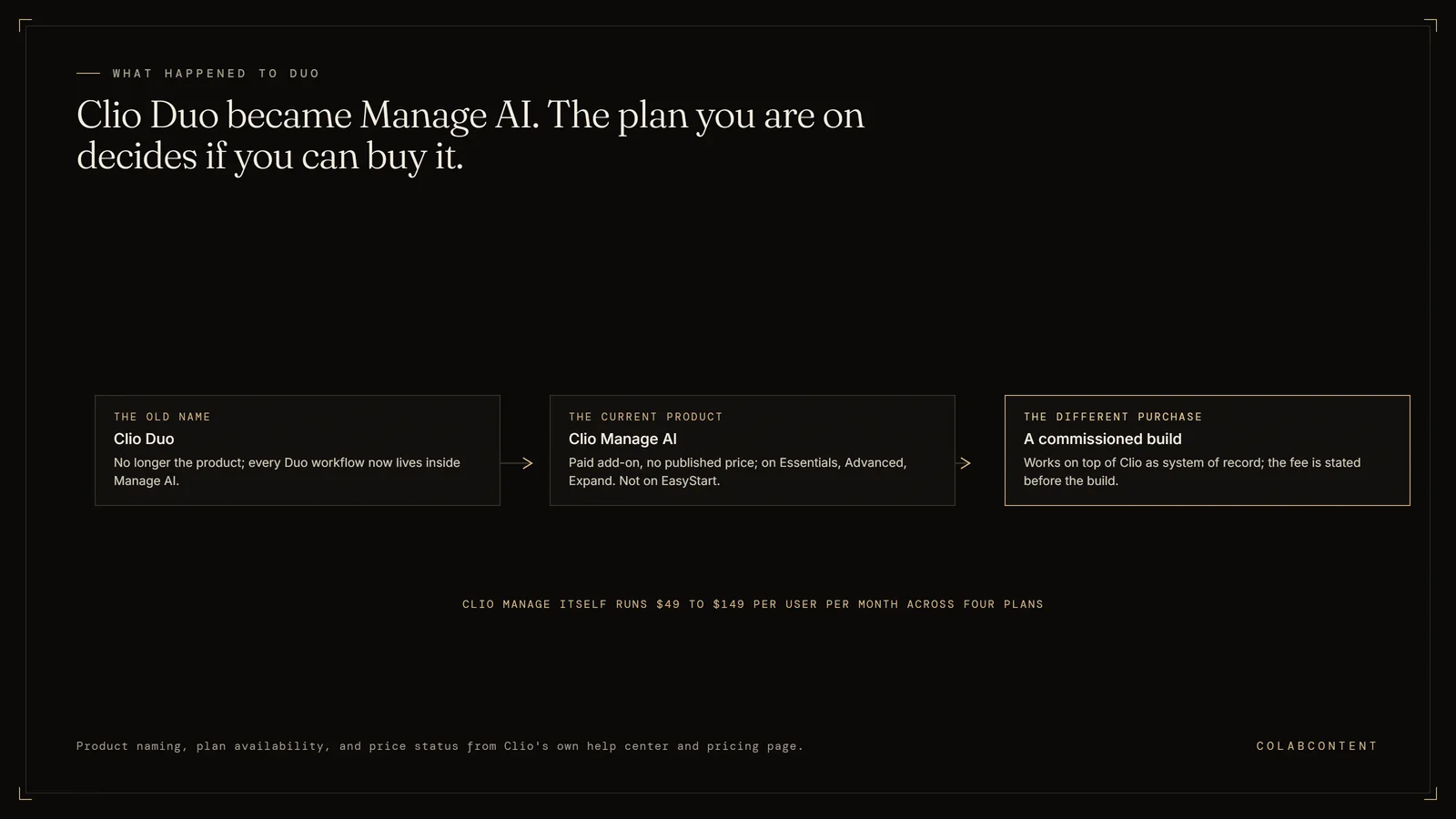
Clio Duo is no longer the product name. Clio's own help center says Duo has evolved into Manage AI and that every Duo workflow still lives inside it. Manage AI is a paid add-on rather than an included feature: Clio's pricing page offers it on Essentials, Advanced and Expand, marks it unavailable on EasyStart, and publishes no price for it. Clio Manage itself runs $49 to $149 per user per month across four plans. A commissioned build is a different purchase from either, not a cheaper one.
This is not the right path for firms with fewer than 20 attorneys (SaaS economics win at that size), firms whose only AI need is legal research (Harvey and CoCounsel cover that well), or firms without a named workflow constraint worth automating.
Most firms asking us this have already made the expensive decision. The practice management system is chosen, the matters live inside it, the billing runs through it, and moving would cost a year of partner patience. So the live question is narrower: what does switching on Clio's AI actually reach, and what still gets done by a person at seven on a Thursday evening.
What each alternative covers and where it falls short.
Clio and a commissioned build are not competing purchases, and treating them as a fork is the most common way this decision goes wrong. Clio is a system of record (the one system that holds the official copy of a record): it holds the matters, contacts, time entries, documents and invoices, and its value comes from being the single place all of that is true. Manage AI, the feature Clio launched as Clio Duo at the end of 2024, is an intelligence layer over that record. It reads what is already in Clio and turns it into completed work, so dates inside a court document become calendar events and time entries become a payment-ready bill.
That is a useful thing to own, and for most small and mid-size firms it is the right next purchase. It is also bounded. An assistant over the record can answer questions about the record and act on it, but it cannot be shaped around a process that exists only in your firm, because Clio ships one product to every firm on the platform. The moment your bottleneck depends on your own taxonomy, history or definition of a good outcome, you have left what a product can represent.
So the honest sequence for a firm on Clio is not to choose. Buy the add-on, run it for a quarter, and find out which of your problems it did not touch. Firms that commission before doing that pay us to discover something Clio would have told them for the cost of a month.
| Option | What it does | Published price | Ownership |
|---|---|---|---|
| Clio Manage, system of record | Holds matters, contacts, time entries, documents and invoices | $49 to $149 per user per month across four plans | Vendor-owned subscription |
| Manage AI (formerly Clio Duo) | Intelligence layer that reads the Clio record and turns it into completed work | Paid add-on on Essentials, Advanced and Expand; no price published | Vendor-owned subscription |
| Custom build (ColabContent) | Shaped around a process, taxonomy or definition of a good outcome that exists only in your firm | Not per seat | $499 AI-Ready Audit first; custom builds from $10,000 as one fixed fee quoted after the audit; working prototype on your own data before payment; code owned at handoff; no per-seat fees |
Key Terms
Data residency: the physical location where client data is stored and processed; a compliance requirement for firms handling matters subject to GDPR or state privacy laws. Billable hour recapture: the revenue recovered when AI captures time entries that attorneys would otherwise forget to log; most firms lose 10 to 30 percent of billable time to incomplete manual entry (our estimate). Practice management integration: connecting AI tools with the firm's existing case management, billing, and document systems so data flows without rekeying. Model hallucination rate: the frequency at which an AI system generates plausible but factually wrong legal citations or case holdings; the metric that separates usable legal AI from a liability.
What is actually on the table.
What moved: access runs through a Launchpad reached from a diamond icon anywhere in Clio Manage, covering scheduling events from documents, automating bills, document analysis (formerly Doc Analyzer) and questions about matters and firm operations (formerly Duo Chat).
Most third-party comparisons still evaluate Clio Duo as a live product name. Check the date on anything you read, this page included.NamingDuo became Manage AI
The AI: Manage AI appears in the add-ons section under a Legal AI heading. It is marked unavailable on EasyStart and available on Essentials, Advanced and Expand. The only pricing language Clio attaches to it is to contact your sales representative for pricing.
Clio Grow is the one add-on Clio prices openly, at $59 per user per month on Essentials or Advanced. Budget the AI as an unknown until a written quote arrives.PricePlatform yes, AI no
Why that shape: each one is a transformation of data Clio already holds, which is the natural reach of an assistant built on a system of record.
Read the list as a boundary as well as a feature set. If your bottleneck is on it, buy the add-on. If it is not, the add-on is unlikely to grow toward it, because Clio ships one product to every firm.ShapeActions on the record
What Clio says Clio Work is: a legal AI built on Clio Library, which Clio describes as over one billion legal documents from more than 100 countries, grounded through Cert, its proprietary citator for confirming whether authorities remain good law. Clio states it works with or without Clio Manage.
Clio publishes no price for Clio Work. The page routes large firms to a custom quote and everyone else to a demo.ScopeManage AI is not Clio Work
Why products do not reach it: not carelessness, but because these workflows are only legible against your data. A product that shipped your intake taxonomy to every firm would be a worse product.
That gap is what a commissioned build closes: a fixed fee from $10,000, built on the firm's real data, owned by the firm at handoff and running in its own cloud tenant (a private cloud account). It sits beside Clio rather than replacing it.GapWhere custom is live
The decision tree.
- Are you on EasyStart? Then Manage AI is not available to you at all, and the first decision is a plan upgrade rather than an AI decision. Price the move to Essentials against what the AI is quoted at, as one number.
- Have you actually switched Manage AI on? If not, do that before anything else. It is the cheapest experiment available to a firm already paying for Clio, and the quarter you spend running it is what makes every later decision cheap and specific.
- Is the bottleneck deadline capture, invoice drafting, client updates, or matter questions? Buy the add-on and stop there. Those are the four things Clio names, and a commissioned build has no advantage over a product that already reads the record natively.
- Is the bottleneck legal research rather than firm operations? That is Clio Work or a competing research platform, not Manage AI and not a custom build. We do not own a research library and will not pretend to compete with one. See the CoCounsel and Harvey comparison and the wider alternatives list.
- Did a quarter with Manage AI leave a named workflow untouched? Write it in one sentence. If that sentence contains your own taxonomy, history or rules, that is the operational middle and a commission becomes live. The law-firm diagnostic dollarizes it in about two minutes.
- Is the firm above roughly 150 attorneys? Different market. Enterprise vendors and the Big Four are shaped for it, and our principal-run model is not built for that scale of rollout.
When we tell firms to commission nothing.
A custom build is the wrong call more often than this page's incentives would suggest, and on Clio specifically the cases are easy to name.
If you have not run Manage AI, do not commission anything. This is the most common mistake we see, and it is expensive in the least interesting way: a firm pays for a build that overlaps something already sitting behind a plan it holds. If the workflow you want is invoice drafting or deadline capture, Clio built that, maintains it, and will keep improving it on a roadmap you do not have to fund. If your matter data is unreliable, with matter types entered inconsistently for years or time missing across whole practice groups, fix that first; a system built on bad data ships confident wrong answers faster than a person would. If nobody in the partnership can state the target workflow in one sentence, the diagnosis is not finished and neither is the scope. If no one will own the system after handoff, ownership is a liability rather than an asset and a vendor-managed product is the better posture.
There is also a case that is not about readiness. Some firms should simply get good at Clio. If the leak is that half the associates never learned the workflow automations already sitting in the Advanced plan, the answer is training and configuration, and a certified Clio consultant will fix it for a fraction of any fee we would quote. We have said that on a call and ended the call there.
Our own boundary, stated plainly: we run every build principal-led, and the firms we take on are the ones where a product genuinely cannot represent the workflow. If your answer is a product, we will say so and you keep the report. That is why we publish comparisons that do not end with us.
Start with the $499 audit.
The AI-Ready Audit is $499. The report arrives the same day, as a private link and a PDF, with a 5-minute video walkthrough and a 20-minute call. If it has no value you get the $499 back, and every quarter your AI answers, rankings and money leak are re-checked free.
No slides, no pitch. We walk your intake, conflicts, and billing workflow and tell you which of the three paths the math actually favors.
Read the law-firm offering → Book directly →Related reading.
- The Clio AI integration playbook, workflow by workflow
- ColabContent vs Harvey AI: the fixed-fee comparison
- CoCounsel vs Harvey, and how mid-market firms choose
- Spellbook vs custom AI for law firms
- Best AI consultants for mid-market law firms in 2026
- All vendor comparisons
- How a commission runs, week by week
- The AI maturity self-assessment
Where the comparison actually matters.
A side-by-side only helps when it compares the things that decide the outcome. The sections below take each alternative on the workflow it was built for, name where it is genuinely the better choice, and show where a custom system the business owns changes the answer, with the trade-offs stated.
What Clio is genuinely good at.
Clio's real achievement is not the AI. It is that a mid-market firm can run intake, matters, documents, time capture, trust accounting and billing inside one system that stays consistent, without an IT department. Clio publishes more than 300 integrations, unlimited storage, a 99.9 percent uptime guarantee and 24/5 support on every plan. It also states that any information put into a Clio account can be retrieved at any time in non-proprietary open formats, which is a real commitment from a platform vendor and one worth demanding from anything else you buy.
That consistency is also what makes the AI layer plausible: Manage AI works because Clio already knows which matter a document belongs to, who the client is, and what has been billed. The corollary is worth holding through the rest of this page. Clio's advantage comes from being the system of record, so anything built around it should protect that position rather than compete with it. A build that duplicates matter data into a second store, or becomes a second place where time is entered, has destroyed the property that made the stack work.
What Manage AI actually does, precisely.
Clio launched Clio Duo at the end of 2024 and rebranded it to Manage AI, framing the change as a move from a task-based assistant toward AI that completes jobs. The capabilities it lists are worth reading literally, because the specificity is the useful part. Court documents become verified calendar events. Prioritized tasks and risk alerts surface on the matter. Client updates get drafted from recent matter activity. Time and expense entries become payment-ready invoices. Document analysis and matter questions carry over from the Duo era.
Two things follow. A firm whose partners lose evenings to deadline entry, invoice assembly or client status emails has a cheap answer, and it is not us. But the list describes transformations inside Clio's own boundary. Nothing there routes work between people by your firm's rules, checks anything against your firm's history, or reconciles Clio against a system outside Clio.
One operational detail deserves attention before a rollout, and it comes from Clio rather than from us. Clio's documentation notes that depending on where a firm is located, Manage AI may process queries on servers outside the firm's home jurisdiction, with resulting data then stored within the region, and it advises consulting internal compliance or counsel before enabling the feature where data residency obligations apply. For a firm with confidentiality commitments written into engagement letters, that is a conversation to have before the switch is flipped.
What Clio publishes about price, and what it does not.
Clio deserves credit here, because it publishes more than most vendors in legal AI do. Its pricing page states that Clio Manage plans range from $49 to $149 USD per user per month and names all four: EasyStart at $49, Essentials at $89, Advanced at $119, Expand at $149. It also publishes a Clio Grow add-on price of $59 per user per month on Essentials or Advanced. Several enterprise legal AI vendors publish no number anywhere, so that posture makes a mid-market budget conversation possible.
What Clio does not publish is the price of the AI. Manage AI sits in the add-ons section with the instruction to contact your sales representative for pricing, and the plan matrix marks it unavailable on EasyStart while showing it available on Essentials, Advanced and Expand. Clio Work publishes no price either. So a firm modelling the all-in cost of an AI-enabled Clio has one known number and one unknown, and the unknown scales with headcount.
Two cautions. Clio's own site carries an older pricing summary in one place while the current plan names and figures sit in another, so confirm any figure against the live pricing page and your written quote, not against a summary, this one included. And the number that matters against a commissioned build is not the monthly rate; it is that rate times seats times the years you expect to run it, set against a fixed fee that ends. Run it against our published commission bands.
The category question underneath the product question.
Most comparisons ask which tool is better. The more useful question is what kind of thing each one is. Clio is a system of record, and a system of record earns its keep by being authoritative, consistent and boring. Manage AI is an assistant over that record, and such an assistant can only answer questions about it and perform transformations on it. Both are doing what they should.
A commissioned build is a third category. It is not a better assistant and not a replacement record. It encodes decisions your firm makes that no vendor can see: which matter type a new intake belongs to given how your firm splits them, whether a prospective client conflicts with a matter closed in 2019 under a former entity name, whether the narrative on a time entry matches the work the file shows. Those are answerable only against your data and your rules, which is why they are not on anyone's roadmap.
So the two purchases almost never trade off. Nearly every firm we work with keeps Clio and commissions around it, and the ones arriving with a plan to replace their practice management system get talked out of it on the first call. The healthy end state is two systems with a clean boundary: Clio holds the truth, and the commissioned system handles firm-specific judgment and writes its conclusions back into Clio.
Where a commissioned build belongs, and where it does not.
The builds that work on top of Clio share a shape. They read from Clio through its documented API (the connection one piece of software offers to another), apply rules that came out of a diagnosis with the firm's own partners, and propose an action a human approves before anything is written back. Clio publishes developer documentation for the Clio Manage API covering authorization, permissions, fields, rate limits, pagination, ETags and a versioning policy, which is the surface that work is scoped against. Read-and-suggest is the deliberate default: a system that writes to a firm's billing records with nobody in the loop is a liability dressed as an efficiency.
The commercial terms are what firms weigh against a per-seat renewal. The fee is fixed from $10,000, scoped against the named constraint and the integration depth, paid in two installments, one at production-build start and one at handoff. A working prototype runs on the firm's real data before any fee is due. Code, prompts, models, datasets and documentation transfer at handoff, and the system runs inside the firm's own cloud tenant under NDA (a signed non-disclosure agreement). No per-seat line and no renewal is the structural difference from every product here.
Where it does not belong is worth repeating, because the incentive to blur it is obvious. Not legal research, where we do not own a library and would lose to the vendors who do. Not the four things Manage AI already does well. Not as a replacement for practice management. Our law-firm offering names those boundaries in the words we use on the call, and the maturity assessment lets a firm test its own readiness before speaking to anyone.
The questions buyers ask after the first one.
These are the questions that come up once the first one, whether to build at all, has been answered. Each answer below is the one we give on the call that ends the $499 AI-Ready Audit, written down here so it can be checked against your own report before anything is commissioned.
Is Clio Duo still a product?
Not under that name. Clio's help center article on the change states that Clio Duo has evolved into Manage AI, and that all the features you relied on in Clio Duo are still available within Manage AI. The Launchpad covers scheduling events from documents, automating bills, analyzing documents (formerly Doc Analyzer), and asking questions about matters and firm operations (formerly Duo Chat). If you are reading a comparison written against Clio Duo as a live product, check its date.
How much does Clio cost, and is Manage AI included in that?
Clio publishes plan pricing on its own pricing page: EasyStart at $49, Essentials at $89, Advanced at $119 and Expand at $149, all in USD per user per month. Manage AI is not included in any of those numbers. It appears in the add-ons section under the Legal AI heading, it is marked unavailable on EasyStart, and the only pricing language Clio attaches to it is to contact your sales representative for pricing. Clio Grow is the one add-on Clio does price publicly, at $59 per user per month on Essentials or Advanced.
Can a commissioned build replace Clio?
It should not try, and we do not scope work that way. Clio is the system of record for matters, contacts, time, documents and billing, and rebuilding a mature practice management platform is a poor use of a fixed fee. The builds that work sit next to Clio, read from it, write back to it, and leave it as the place the firm's data lives. A firm that wants to leave Clio has a migration problem rather than an AI problem.
Does a commissioned build integrate with Clio?
Clio publishes developer documentation for the Clio Manage API covering authorization, permissions, fields, rate limits, pagination, ETags and a versioning policy, which is the surface a build reads from and writes back to. What we scope against that surface is deliberately narrow: the system reads matter and time data, applies the firm's own rules, and proposes changes a person approves before anything is written back. Integration depth is one of the two things that moves the fee inside the band, alongside the constraint itself.
When is a commissioned build the wrong call for a firm already on Clio?
When Manage AI has not been switched on yet. The add-on is the cheapest experiment available to a firm already paying for Clio, it covers the tasks most firms name first, and buying a build before running it means paying to discover something a month with the add-on would have told you. It is also wrong when matter data is unreliable, when nobody can name the target workflow in one sentence, or when no one will own the system after handoff. In those cases we say so on the audit call and nobody signs anything.