Who Can Automate a Manual Back-Office Workflow in Manufacturing?
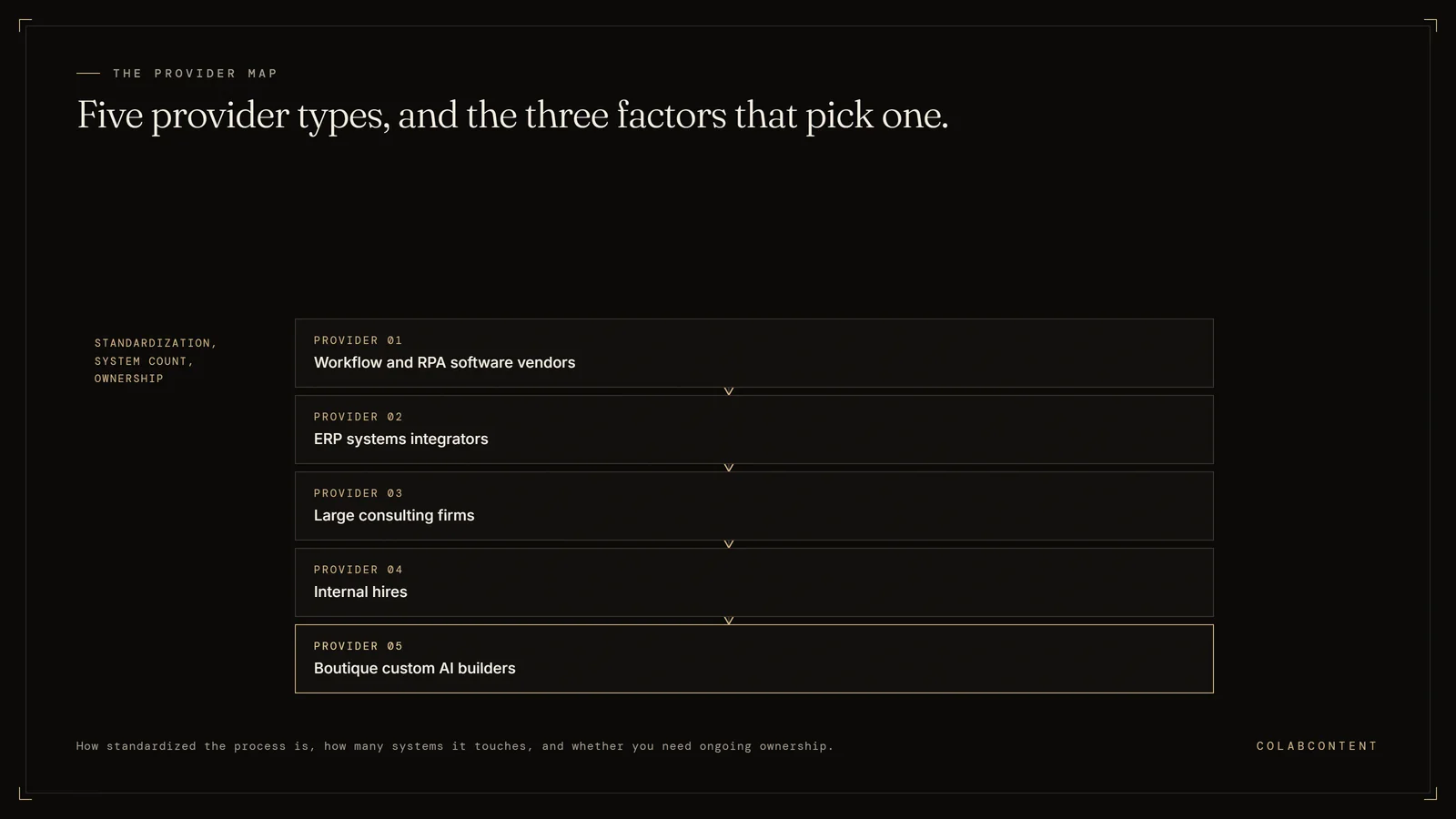
Five types of providers can automate a manual back-office workflow in a manufacturing business: workflow and RPA software vendors, ERP (the system that runs finance, inventory and orders) systems integrators, large consulting firms, internal hires, and boutique custom AI builders. The right choice depends on how standardized the process is, how many systems it touches, and whether you need ongoing ownership of the solution. ColabContent LLC publishes this page: a boutique AI consulting house in Boston that builds custom automation for job shops and contract manufacturers of 20 to 250 employees.
The $499 AI-Ready Audit comes first; after it, the system that matters most is proven as a working prototype on your own data before any build fee. Production builds are one fixed fee from $10,000, one time, with the code owned by the shop at handoff and no per-seat licence. The $499 AI-Ready Audit is ordered at colabcontent.com/ai-ready-audit/.
Key Takeaways
- Manufacturers can source workflow automation from software vendors, ERP integrators, consulting firms, internal hires, or boutique custom AI builders.
- Standardized, high-volume processes such as invoice matching and purchase order approvals fit off-the-shelf workflow tools.
- Workflows that involve unstructured documents, tribal knowledge, or judgment calls usually need a custom build.
- Start the evaluation with the process, not the vendor: document it, understand the manual effort, then match the tool class.
- Decide ownership up front. Renting software, hiring talent, and commissioning a system you own are three very different commitments.
What Counts as a Manual Back-Office Workflow in Manufacturing?
A manual back-office workflow is any administrative process that moves through people, inboxes, and spreadsheets rather than through defined software steps. In a manufacturing business, the usual suspects include order entry from emailed or faxed purchase orders, three-way invoice matching, quoting and estimating, bill-of-materials updates, inventory reconciliation between the shop floor and the ERP, shipping and customs paperwork, quality and compliance documentation, and supplier onboarding.
These workflows share a pattern: information arrives in one format, someone rekeys it into another system, approvals happen over email, and status lives in someone's head. Nobody designed the process; it accumulated. That is exactly why it resists generic software and why the question of who should automate it matters as much as the question of what to automate.
Who Does Workflow Automation? Five Provider Types
Five distinct provider types compete for manufacturing workflow automation work, each suited to a different situation: workflow and RPA software vendors, ERP systems integrators, large consulting firms, internal hires, and boutique custom AI builders. The right fit below depends on how standardized the process already is and where in-house engineering capacity sits.
There is no single profession called "workflow automator." Instead, five distinct provider types compete for this work, and each fits a different situation.
1. Workflow and RPA software vendors
Platforms in this category sell configurable software: form builders, approval routing, and bots that mimic keystrokes across legacy screens. They fit well when your process is already standardized and resembles what thousands of other companies do. The tradeoff is that you adapt your process to the tool, you pay per user or per bot indefinitely, and edge cases that fall outside the configuration still land back on your team.
2. ERP systems integrators
If the workflow lives mostly inside your ERP, the integrator or VAR that implemented the system is a natural candidate. They know the data model and can extend native workflows. They are less suited to processes that start outside the ERP, such as unstructured emails, PDFs, and supplier portals, which is where most manufacturing back-office pain actually begins.
3. Large consulting firms
Big consulting firms bring process redesign methodology and can handle enterprise-scale transformation programs. For a mid-market manufacturer automating a handful of workflows, the engagement model is often heavier than the problem requires. If you are weighing this path, the tradeoffs are covered in Big Four AI consulting vs a boutique AI commission.
4. Internal hires
Some manufacturers hire an operations analyst, developer, or AI lead to build automation in-house. This gives you permanent capability, but it concentrates risk in one person and takes time before anything ships. The comparison in internal AI hire vs a commissioned custom AI build walks through when each path makes sense.
5. Boutique custom AI builders
Boutique firms scope a specific workflow, build a system around your actual process (including the messy inputs like emailed POs and scanned packing slips), and hand over something the business owns. This fits workflows that are unique to your operation, involve unstructured documents, or require judgment steps where an AI model with human review outperforms rigid rules.
Examples of Back-Office Automation in a Manufacturing Business
- Order entry: extracting line items from emailed purchase orders and creating sales orders in the ERP with a human confirmation step.
- Invoice matching: comparing supplier invoices against purchase orders and receiving records, flagging only the exceptions for review.
- Quote follow-up: tracking open quotes and drafting follow-up outreach for the sales team to approve.
- Compliance documentation: assembling certs, test reports, and traceability records into the packet a customer or auditor expects.
- Inventory reconciliation: surfacing mismatches between shop floor counts and system records instead of waiting for month-end.
- Supplier onboarding: collecting W-9s, insurance certificates, and banking details through a defined intake instead of email threads.
How to Automate a Manual Process: A Practical Sequence
- Document the workflow end to end. Capture inputs, decision points, systems touched, handoffs, and outputs. Include the exceptions, because exceptions are where automation projects fail.
- Understand the manual effort. Identify who touches the process, how often, and where errors originate.
- Standardize what varies by person. If two clerks handle the same task differently, resolve that before automating either version.
- Match the process to a tool class. Structured, rule-based steps suit workflow software. Unstructured documents and judgment calls suit AI with human review.
- Pilot on a slice of volume. Run the automated path alongside the manual one and compare error rates before trusting it.
- Keep a human in the loop for exceptions. The goal is to remove routine work, not accountability.
- Expand deliberately. Extend to adjacent workflows only after the first one holds up in production.
Where to Start Your Back-Office Automation Evaluation
Resist the urge to start with a vendor demo. Start with a process inventory: list the workflows your back-office team runs, rank them by volume and error cost, and identify which ones are standardized enough for packaged software and which ones are peculiar to your business. A simple filter for this decision is laid out in the two questions framework.
Then look at the shape of the inputs. If the workflow begins with structured data already inside one system, native ERP workflows or off-the-shelf tools deserve the first look. If it begins with emails, PDFs, phone notes, or supplier portals, you are in territory where custom workflow automation tends to be the honest answer, because no configuration screen anticipates your specific mess.
Build, Buy, or Commission the Work?
Once you know which workflow to automate, the remaining question is the sourcing model. Buying software is fastest for standardized processes but leaves you renting capability and absorbing every edge case the tool cannot handle. Building in-house gives you control but requires hiring and retaining the right person. Commissioning a custom build gives you a system fitted to your process that the business owns, delivered by people who do this repeatedly.
The decision logic is covered in depth in build, buy, or commission, and the practical differences between packaged tools and commissioned systems are compared in off-the-shelf AI vs a custom AI commission. There is no universally correct answer; there is a correct answer for a given workflow.
A Final Word
The honest answer to "who can automate this" is that several parties can, and the wrong match wastes more money than the manual process ever did. Standardized processes belong with software vendors or your ERP integrator. Workflows that are specific to how your plant actually runs, especially ones fed by unstructured documents, belong with a builder who starts from your process rather than a product roadmap. ColabContent, a Boston-based AI consulting and implementation firm, commissions custom automation systems for mid-market businesses, including manufacturers evaluating exactly this question.
Frequently Asked Questions
Short answers first, detail underneath. Every answer here matches the FAQ schema on this page word for word, and each one is the answer we give on the audit call. Where a question depends on your own numbers, the $499 AI-Ready Audit report replaces the general answer with your figures.
How to automate a manual process?
Start by documenting the process end to end: inputs, decision points, systems touched, and outputs. Standardize any steps that vary by person. Then match the process to the right tool class, which might be workflow software, RPA, or an AI system for judgment-heavy steps. Pilot on a subset of volume, compare results against the manual baseline, and expand only once the automated version proves reliable.
Who does workflow automation?
Workflow automation is delivered by several kinds of providers: workflow and RPA software vendors, ERP systems integrators, large consulting firms, internal operations or IT staff, and boutique firms that build custom AI systems. Software vendors fit standardized processes. Integrators fit ERP-centric work. Custom builders fit workflows that are specific to one business and involve unstructured documents or judgment calls.
Should a manufacturer buy software or commission a custom build?
Buy when the workflow is standardized, high volume, and well served by existing products. Commission a custom build when the workflow is specific to your operation, starts with unstructured inputs like emailed purchase orders or scanned documents, or requires judgment steps that rigid rules cannot handle. Many manufacturers end up doing both, using packaged tools for commodity processes and custom systems for the workflows that differentiate them.
Can automation handle back-office steps that require human judgment?
Partially. Modern AI systems can draft the judgment call, such as flagging a probable invoice mismatch or proposing an order entry, but well-designed automation keeps a human review step for anything consequential. The productive framing is not replacing judgment but removing the routine gathering, rekeying, and routing work that surrounds it, so people spend their time on the decisions that actually need them.
Start with the $499 audit.
A $499 audit, then a 20-minute call. No slides. We walk one real workflow end to end, name the step eating the most staff hours, and tell you plainly whether a custom build is the right lever for it. If an off-the-shelf tool would serve you better, we say so on the call.
Read the manufacturing offering → Or book directly →Where to look next.
Three pages carry the specifics this one summarizes. The commission process runs the five phases between the first call and code handoff, including the working prototype built on your own data before any fee is owed. The pricing page publishes the fee bands rather than making you ask. And the AI maturity assessment walks the five stages, which is worth reading before you spend a dollar with anyone.
Every published side-by-side lives on the comparisons hub, the industry practice pages cover the workflows most often commissioned in each vertical, and contact is the direct route if you already know what you want scoped.