A word on the roster before the roster. Two of the most detailed Aloha comparison guides an operator will find are written by companies selling the reader an alternative subscription: loman.ai publishes a thorough Aloha pricing breakdown and promotes its own restaurant product inside it, and katalystos.com publishes an Aloha versus Toast guide that estimates monthly ranges for both and then positions its own cloud point of sale as cheaper than either. Neither of those is dishonest, and both contain useful work. But a buyer should know that the most detailed cost analysis of their current vendor was written by someone who gets paid if they leave. Meanwhile the neutral review aggregators tend to have the opposite problem: one large hospitality review site rates Aloha's cost as Above Average and carries no dollar figure at all, and its own price estimator tool returned no matching results when we tried it on August 30, 2026.
What follows is the field an actual multi unit operator would evaluate, ordered the way we would evaluate it. Every price is labelled, every source is named, and where a vendor's own numbers are not obtainable we say that instead of substituting somebody else's.
1. Toast POS
What it is. The cloud native restaurant platform that has taken more share from the legacy incumbents than anything else in the last decade. Android hardware, a very large restaurant specific integration ecosystem, and a product line that now reaches well past the terminal into payroll, online ordering, marketing, gift cards, capital lending and delivery.
Published price. VERIFIED at pos.toasttab.com/pricing, read August 30, 2026: pricing starts at $0 per month, with flexible plans covering hardware kits, flat rate processing and payroll bundles, and a direction to request a custom quote. That is genuinely all the page itself commits to in a form a reader can check. The Point of Sale plan is published at a starting rate of $69 per month, and the Build Your Own tier is the one that goes to a quote. Those plan figures are drawn by script rather than delivered in the served file, so an automated fetch sees only the $0 Starter Kit; read in a browser they are Toast's own published numbers. POS USA, REPORTED, puts Toast in the $0 to $69 per month band in its competitor comparison table.
Best for. Operators who want the deepest restaurant specific integration ecosystem in the category and are comfortable assembling their cost from a base plus per module add ons.
Where it falls short. The same add on structure that makes the entry price look low is what makes the exit price hard to predict, and neither Toast nor NCR publishes the tier figures you would need to settle that comparison. We found no source we would stand behind for what a fully built out Toast stack costs against a comparable Aloha configuration, so we are not going to tell you which one lands higher. And the $0 starting point is a real number attached to a plan most multi unit groups will not stay on for long. You are also swapping one processing relationship for another rather than opening it up.
Verdict. The most credible like for like replacement for Aloha, and a genuine architectural upgrade. It is not a cost escape, because it is still rent, and the rent still scales with your growth.
Aloha Cloud vs Toast: the comparison most operators are actually running
This is the head to head that comes up more than any other, so here it is properly, with the honest admission that it cannot be settled on price.
On transparency, Toast wins narrowly and neither wins cleanly. Toast publishes a $0 per month Starter Kit and a $69 per month Point of Sale plan on its own site, and pushes only its Build Your Own tier to a quote. NCR publishes nothing at all, on any page, including the one document in its library with the word pricing in the filename. So Toast gives you two checkable anchors and Aloha gives you none, and both leave you negotiating without a benchmark. Anyone who shows you a precise monthly figure for either one is showing you an estimate, and you deserve to be told which.
On architecture, Toast wins, and it is not close. Aloha Cloud is NCR's newer Android product and Aloha Essentials is a Windows based hybrid that predates the cloud era. Toast was built after the cloud and it shows in update cadence, remote management and the pace at which new modules land. If your frustration is that your system feels like it belongs to an earlier decade, that frustration is well founded and Toast is the direct answer to it.
On enterprise depth, Aloha Essentials still wins for the largest and most complex operations. Multi revenue centre venues, deep modifier logic, granular permission control, offline behaviour during a service, and enterprise menu governance across dozens of sites are exactly what Aloha Essentials was built for, and the reason large chains have not all moved. Note that this advantage belongs to Essentials, not to Aloha Cloud. If you are on Aloha Cloud, you do not currently have it.
On processing, this is the material difference and it deserves the emphasis. POS USA reports that NCR requires you to use its integrated payment processing and that third party processors are not supported. Toast likewise steers you to its own flat rate processing. So in practice both are closed, and switching between them is switching which company sets the largest variable cost in your stack, not regaining the ability to shop it. If the ability to shop processing is what you are after, look at the vendors below who publish an actual rate card, because a published rate is the only kind you can negotiate against.
On cost, nobody can answer it for you, including us. The only figures that exist for a real multi location comparison are third party estimates, and the most cited of them for this specific matchup comes from a company selling a third product. Get quotes from both, on your real terminal count, with every module you actually use itemised, and put them into the calculator above. That is the only version of this comparison that is true for your group.
2. Square for Restaurants
What it is. The lowest friction entry in the category. A free tier, month to month terms, no long contract, hardware you can buy off a website, and an ecosystem that reaches into payroll, banking, marketing and lending.
Published price. VERIFIED at squareup.com's restaurant pricing page, read August 30, 2026. A free tier exists. On the middle plan, the Square kitchen display app is $30 per month per device and the kiosk app is $50 per month per device. On the higher plan, those drop to $20 and $30 per month per device. The Pro tier is custom priced and the page states the eligibility threshold in its own words: process over $250,000 per year. Base subscriptions are published as Free at $0, Plus at $49 per location per month and Premium at $149 per location per month.
Best for. Single location and small multi location independents who want to be able to leave. Month to month with no term is a real feature, and it is the single thing Aloha most conspicuously does not offer.
Where it falls short. Two ways, and both bite at exactly the scale this page is written for. The per device add on fees compound: fifteen kitchen display screens at $30 is $450 a month before anything else, which is the same per unit trap you are trying to leave. And enterprise multi site reporting, franchise level controls and menu governance across many locations are where Square is thinnest against Aloha Essentials.
Verdict. The right answer for a two or three location independent and the wrong answer for a fifteen location group. Include it in the shortlist honestly and rule it out on capability rather than on price.
3. SpotOn Restaurant
What it is. A full service focused restaurant platform covering point of sale, online ordering, loyalty, marketing, labour and reporting, and the most transparent vendor in this entire comparison by a wide margin.
Published price. VERIFIED at spoton.com/pricing, read August 30, 2026, with every figure below present in the page itself. Three plans. All-In at $0 per station per month with hardware included, processing at 2.79 percent plus $0.20 card present and 3.79 percent plus $0.20 keyed, on a two year minimum term. POS Essentials at $55 per station per month, processing at 2.45 percent plus $0.15 card present with American Express at 3.19 percent plus $0.15, and 3.45 percent plus $0.15 keyed. Build Your Own for multi unit and high volume, custom priced. Hardware is listed openly: Station 15 at $995 with a promotional $750 each, Station 10 at $550 promotional $415, handheld $495 promotional $297, guest facing display $200, wireless router $300, with implementation costs additional. There is also an optional software Core Bundle at $50 per month per location plus 20 basis points of gross payment volume, capped at $200 per location.
Best for. Multi location full service groups that want to be able to model their own cost before a sales call, and operators who want a real published processing rate they can hold a vendor to.
Where it falls short. The Core Bundle's twenty basis points of gross payment volume means part of your software cost scales with revenue rather than with terminal count, which is a worse shape than a flat per terminal fee for a high volume location, even with the $200 cap. The All-In plan's headline of $0 per station is real and it is paid for in the processing rate, which at 2.79 percent plus $0.20 is the most expensive card present rate on this page. And as shown further up, the POS Essentials rate only beats NCR's reported rate above a $33.33 average check.
Verdict. The strongest comparison point on this page precisely because it is checkable. If you do nothing else with this page, get a SpotOn quote, because it is the only one you can validate against a public rate card before you take the call.
4. Lightspeed Restaurant
What it is. A hospitality platform with genuine depth in full service, strong inventory and menu tooling, and a published tier structure that makes it unusually easy to evaluate at the low end.
Published price. VERIFIED at lightspeedhq.com's restaurant pricing page, read August 30, 2026: Starter at 69 USD per month, Essential at 189 USD per month, Premium at 399 USD per month, with the kitchen display system listed at $30 per screen per month across all three. The Enterprise tier is not priced and carries a Get a quote button. Processing rates are not published on that page.
Best for. Independents and small groups that want to compare real numbers without a discovery call, and operators who want strong inventory and recipe costing without buying a separate product for it.
Where it falls short. The transparency runs out at exactly the point where you need it. A fifteen terminal multi location group is an Enterprise conversation, and the Enterprise tier reverts to the same custom quote opacity you are trying to escape at Aloha. So the published tiers tell you what Lightspeed charges a restaurant that is not you. Processing is also unpriced on the page, which means the largest variable cost is invisible at the shortlist stage.
Verdict. Genuinely transparent below the enterprise line and no more transparent than NCR above it. Worth a quote; do not mistake the published tiers for the price you would pay.
5. TouchBistro
What it is. An iPad based full service restaurant system with a long standing reputation for floor plan and table management, plus a guest engagement layer of reservations, loyalty, gift cards and marketing sold around it.
Published price. VERIFIED at touchbistro.com/pricing, read August 30, 2026: Point of Sale starting at $69 per month and an Essentials Bundle, hardware included, starting at $119 per month, with a Custom Setup priced on request. Credit where it is due, the page footnotes its own limits in plain sight: hardware, payment processing and additional fees apply on the $69 tier, and payment processing and additional fees apply on the $119 tier.
Best for. Single location and small chain full service floors where table management and coursing are the daily bottleneck, and operators who want hardware bundled into a predictable monthly.
Where it falls short. The vendor's own footnotes tell you the sticker is not the bill, which is honest and is also the same pattern as everywhere else in this category. And like Square, it thins out against Aloha Essentials once you are governing menus and reporting across a dozen or more sites.
Verdict. A credible small and mid sized swap with unusually candid disclosure. Not built for the top end of the range this page addresses.
6. Clover
What it is. A very widely deployed small business platform with a broad hardware family, sold overwhelmingly through banks, independent sales organisations and payment processors rather than direct.
Published price. This one has to be handled carefully. We make no absence claim about clover.com. Its pricing page returned a shell to us on August 30, 2026 with no readable pricing content in it, and a page that delivers nothing readable is a failure to observe, not an observation that nothing is published. So we use a third party: REPORTED by tech.co, an independent technology publication, Quick Service plans at $135, $185 and $245 per month and Full Service plans at $179, $239 and $354 per month, all on 36 month terms, with card present processing between 2.3 and 2.6 percent plus $0.10 and keyed at 3.5 percent plus $0.10. Other aggregators report materially different numbers for the same named plans, which is not a contradiction to resolve; it is the finding. Clover is resold on negotiated terms and the price genuinely varies by who sells it to you.
Best for. Operators who want the hardware family and are comfortable that the deal is brokered by whoever handles their merchant account.
Where it falls short. No canonical price exists anywhere, not even a stable third party consensus one, which makes Clover arguably less benchmarkable than Aloha's single custom quote model. Thirty six month terms are long. And the enterprise restaurant tooling is not where Aloha Essentials is.
Verdict. Include it for completeness and because your bank will probably suggest it. Price it as reseller variable and get two quotes from two different resellers, because you will get two different numbers.
7. A commissioned build you own
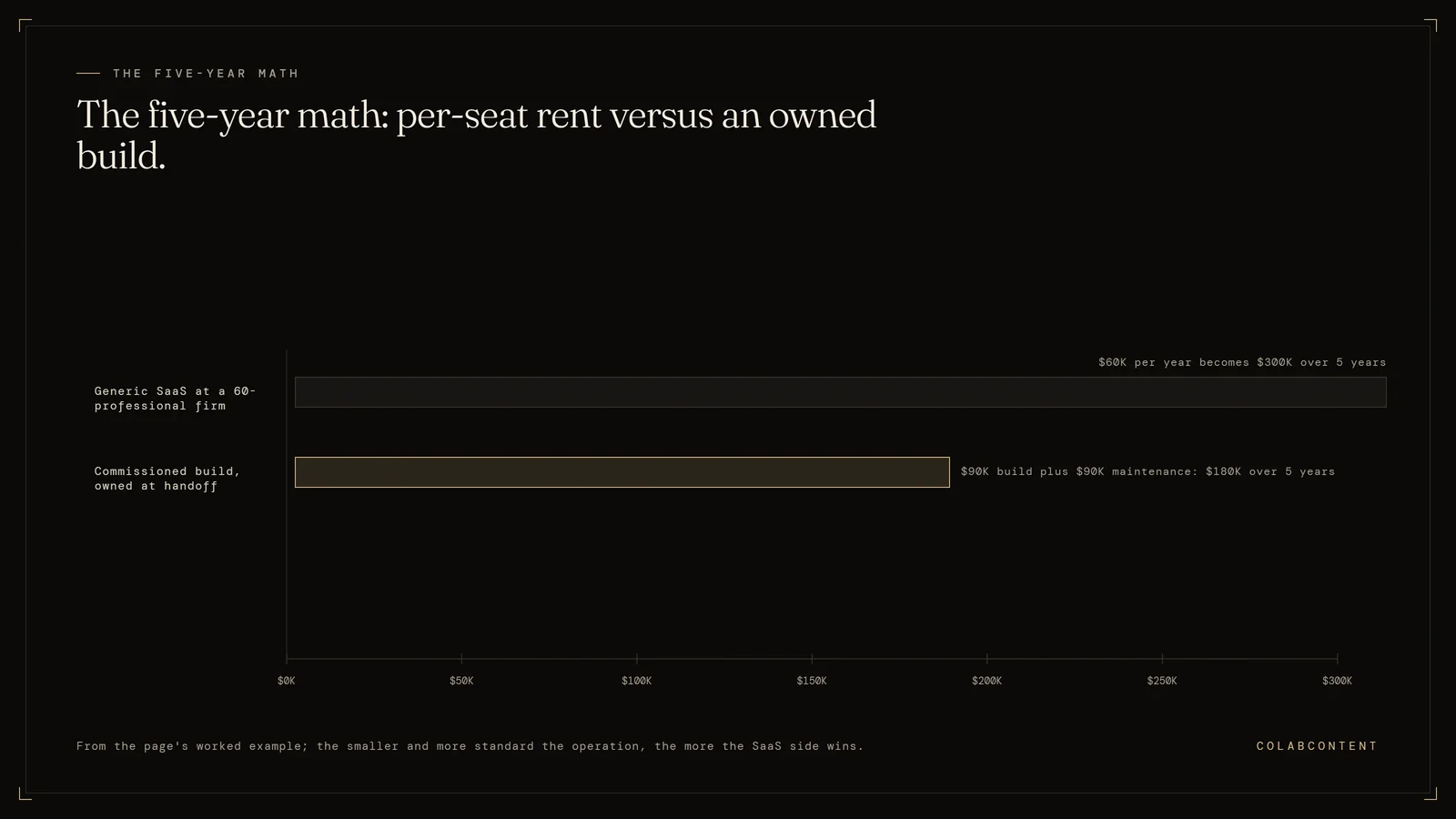
What it is. This is the option that does not appear on any comparison page in this category, for the straightforward reason that everyone who writes those pages sells a subscription. You pay a one time fixed fee inside from $10,000, you get a system built around your group's actual workflow, and you own it: the code, the data model, the integrations, the documentation. There is no per terminal licence, no per location fee, no seat count, no renewal, and no escalator.
What it is not, and this is the part other pages would leave out. It is not a replacement for your card present terminal. We do not build EMV certified payment hardware, we do not run a card processing business, and a restaurant cannot take a chip card on a custom web application. A commissioned build sits alongside a point of sale. What it replaces is the layer above the terminal, which is where a surprising share of your monthly actually lives: online ordering and its commissions, inventory and recipe costing, labour forecasting and scheduling, multi location reporting and menu governance, guest data and loyalty, and increasingly the AI layer that answers the phone, takes the reservation and reads the P and L.
Published price. from $10,000, one time, scoped after an audit call. Maintenance modelled at eighteen percent a year on this page is a stated ASSUMPTION for modelling, not a contract term.
Best for. Groups above roughly ten terminals whose add on module spend is a meaningful share of the bill, who have one or two workflows that leak money every month, and who intend to be operating in five years.
Where it falls short. Below about six terminals the arithmetic on this page does not work and we will tell you so. It carries an internal ownership obligation: somebody at your company has to own the system after handoff or it decays. It is slower to stand up than buying a subscription. And we have no hospitality case study, which is a real gap and is addressed honestly in the worksheet at the bottom of this page.
Verdict. The only structurally different option on the list. Every other row changes who you rent from.