Home/ Comparisons/ NetDocuments Alternatives

NetDocuments Alternatives for Law Firms: 8 Options, Priced

There are five credible alternatives to NetDocuments for a 10 to 75 attorney firm, two categories that belong on a disqualification list rather than a shortlist, and one option nearly every comparison page omits. The five are iManage Work, LexWorkplace, SuiteFiles, SharePoint with Microsoft 365 plus a matter-centricity layer, and the practice management platforms that carry a document layer. The two to rule out are Worldox, which has been a NetDocuments company since October 2022 and whose on premise product is reported to reach end of life on December 31, 2026, and the general purpose content platforms that clutter most roundups: Box, DocuWare, Laserfiche, Alfresco, PandaDoc, Square 9. None of those do matter numbers, ethical walls or conflict workflows, and a law firm cannot use a shortlist that contains them. The eighth option is the one no document management vendor can sell you: commissioning the system your firm actually needs and owning it outright, one fixed fee, no per seat licence, no renewal escalator. NetDocuments publishes no price at all. Its own pricing URL returned HTTP 404 when we checked it on August 26, 2026, so every NetDocuments figure on this page is labelled reported rather than verified. Run the reported numbers through a 45 seat firm and you get $175,944 over three years and $281,667 over five, against a one time $45,000 to $180,000 for a commissioned build. At the midpoint of that build range the two lines cross at about 2.6 years, and the calculator further down this page will do the same arithmetic on your own numbers instead of ours.

A note on names, because the searches split. NetDocuments is the cloud document and email management platform. ndMail, ndOffice and ndThread are the modules sold on and around it. ndMAX and PatternBuilder MAX are the generative AI layer. Worldox is the on premise product NetDocuments acquired in 2022. People search NetDocuments alternatives, NetDocuments competitors, NetDocuments pricing, NetDocuments too expensive and leaving NetDocuments, and they all mean the same decision. This page is the comparison for all of them.

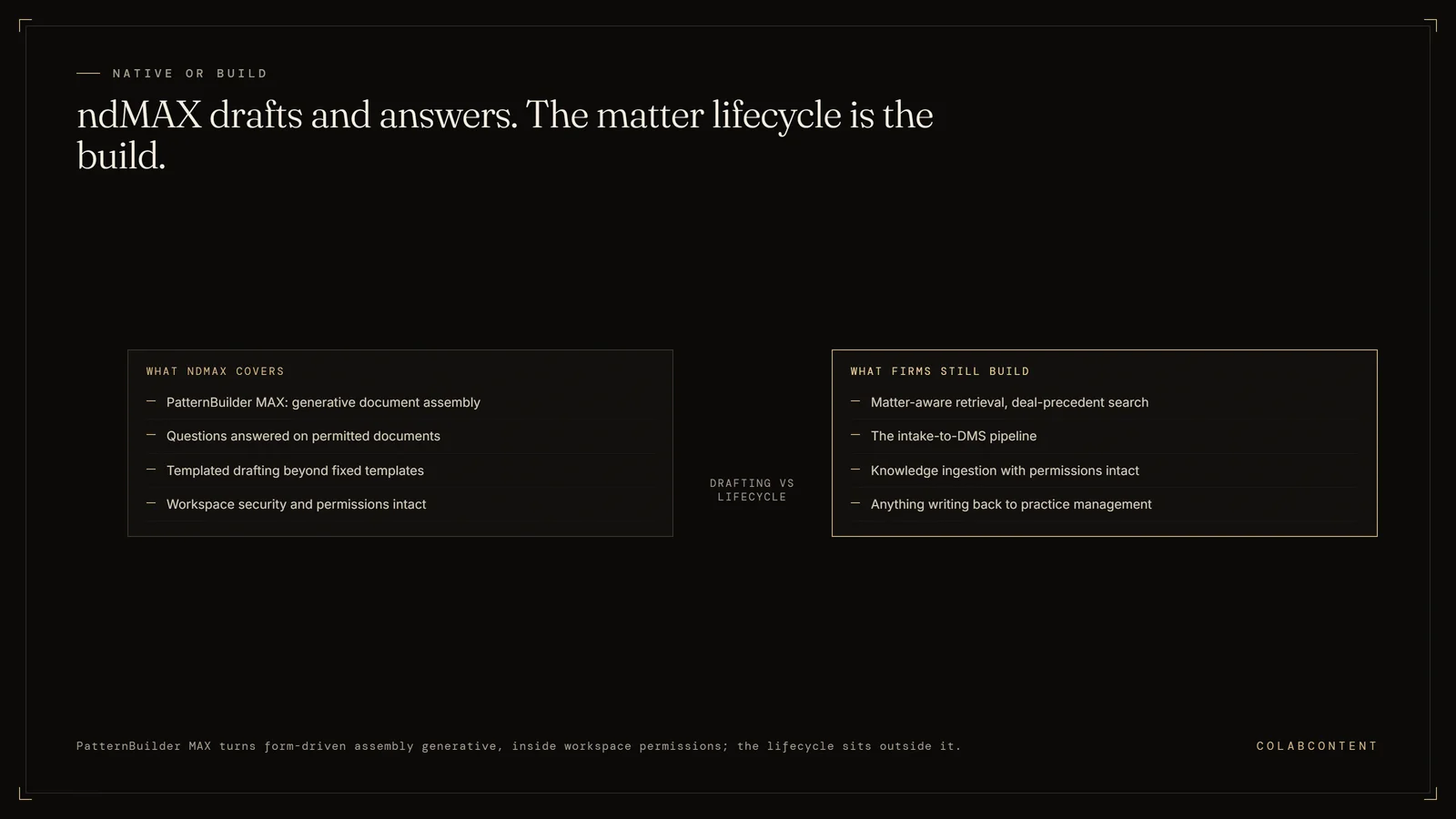
The boundary of NetDocuments AI: ndMAX and PatternBuilder MAX cover generative document assembly and questions on permitted documents, while matter-aware retrieval, the intake-to-DMS pipeline, and anything writing back to practice management remain custom builds
Where the document system stops and the firm's own logic begins.

Written for the firm that already pays for NetDocuments. We do not sell a document management system, we take no referral fee from anyone in the table below, and we will say plainly which firms should stay where they are.

For10 to 75 attorney firms on NetDocuments
StanceNeutral. We sell no DMS.
Bottom lineCrossover at 2.6 years at a $112,500 build
CostFree 45-minute diagnosis
Prices readAugust 26, 2026

The short answer.

If you are on NetDocuments and the reason you are reading this is money, the first thing to know is that the per user rate on your invoice is not the number that is hurting you. The reported base subscription of $50 to $65 a seat is broadly in line with every enterprise peer in the category. What moves the total is the stack on top of it: ndMail, ndOffice and OCR are reported to add $25 to $60 a seat before you have changed anything about how your firm works, and implementation and migration are separate engagements priced in five and six figures. A page that tells you a cheaper document management system will fix this is not being straight with you, because at 45 seats the cheapest credible legal document system with a published price, LexWorkplace Core, is $29,940 a year, which is more than a NetDocuments base licence at the low end of its reported range.

So the honest verdict splits three ways. Firms under roughly 20 attorneys should look hard at LexWorkplace and SuiteFiles, both of which publish real prices you can check in ten seconds, or at consolidating onto a practice management platform that includes a document layer. Firms in the 20 to 75 attorney band with a working document system and a named workflow that leaks partner hours are the ones for whom the arithmetic on this page actually flips, because at that size the subscription curve overtakes a mid range one time build inside three years while the per seat model keeps taxing every new hire. And firms that genuinely live inside NetDocuments, with ethical walls that took a year to configure, deep practice management integrations, and a decade of workspace structure nobody wants to touch, should stay. There is a whole section below arguing that case as strongly as we know how, and it includes the single strongest counter argument to everything else on this page: at 100 seats and above, NetDocuments is reported to sell at $15 to $20 a user per month, which is a price no build we quote can beat.

What NetDocuments actually does well.

A comparison page that treats the incumbent as a punching bag is useless to the person actually holding the contract, so it is worth being precise about what you would be giving up.

Matter-centricity as a first class concept. This is the thing that separates a legal document management system from a file store, and it is the reason most of the tools on generic alternatives lists are unusable for a law firm. Documents live under matters, matters carry the client and matter numbers your billing system already knows, and the structure is enforced rather than suggested. Box, Alfresco, DocuWare and Square 9 do not do this, and no amount of folder discipline substitutes for it.

Permissions and ethical walls enforced at the platform. Access control is enforced by the document platform itself rather than by whichever application is asking, which is why a wall configured once holds no matter what queries it. Any AI layer built on top queries with the requesting user's actual permissions rather than a service account. Firms with real conflict exposure do not experiment casually here, and they are right not to.

Email filing that survives. Filing an email into a matter with its metadata intact, its attachments linked and its thread reconstructable years later is unglamorous, and it is exactly where cheaper substitutes quietly fail. Native SharePoint does not do this, which is why the SharePoint route needs a paid layer on top before it is a real option for a law firm.

A cloud posture the category eventually copied. NetDocuments was cloud native before the rest of the category moved, which is why its architecture does not carry a decade of on premise compromise. If your firm's objection to the cloud has already been settled, this is a mature platform and it shows.

ndMAX and PatternBuilder MAX, within their lane. The generative layer does document assembly and answers questions against documents the asking user already has permission to open. It is genuinely useful. It does not know your billing rules, your trust accounting or your intake path, and NetDocuments does not claim it does. Our NetDocuments AI workflow playbook maps that boundary in detail from a build perspective.

Why firms start looking for a way out.

Five patterns. The first four are reported across our sources rather than measured by us, and we say so because there is no survey behind them.

The bill is not the rate card, because there is no rate card. netdocuments.com/pricing returned HTTP 404 on August 26, 2026. That is not an oversight in a category this mature; it is a pricing strategy, and it means every number quoted to you is quoted against you rather than against a published rate. Firms discover the shape of their own deal only by comparing notes with other firms, which is a bad way to buy anything.

The add-on stack. The reported $50 to $65 base is not the product most firms run. ndMail at a reported $5 to $15 a seat, ndOffice at $10 to $20, OCR at $10 to $25. Turn on the modules a firm assumes are included and the reported all in figure is $80 to $120 or more per user per month. That is the single number most competing comparison pages omit entirely, and it is the number your budget actually feels.

The renewal came in higher than the budget. The per seat model means every hire raises the bill, so the firm that added six associates last year finds the number moved without anyone deciding it should. With no published rate to argue against, the renewal conversation starts from whatever the account team opens with.

Mac. This appears repeatedly across the legal technology writeups we read as an actual switching trigger, with Mac users described as needing Parallels or a Windows virtual machine for full desktop functionality. We are labelling that reported, not verified, because it comes from competitor marketing and consultancy blogs rather than from a vendor statement we could read. If it matters to your firm, test it on a real MacBook rather than trusting anyone's comparison page, ours included.

The thing the firm needs is not a document problem. Matter lifecycle, intake routing, billable hour reconstruction, trust reconciliation. None of these are search problems. A document assistant does not solve any of them, and no amount of licence spend will change that. This is the reason we hear most often on diagnosis calls and the one that never shows up in a switching survey, because it is not a complaint about the software.

What you are actually paying

Every number on this page, with its source.

Three of the vendors below publish a real, checkable price on their own website. Two do not publish one at all, and one of those two, NetDocuments itself, returns HTTP 404 on its own pricing URL. We label each figure VERIFIED when it was read off the vendor's own page on August 26, 2026, and REPORTED when it came from a third party the vendor has not confirmed. Where a figure could not be pinned to a source we would stand behind, we leave the cell empty and say why rather than filling it with a plausible number. There is one such cell below and one such row, and both are marked.

VendorSold byPublished or reported priceImplementation, one timeSource
NetDocuments, base subscriptionPer user / month$50 to $65 at small and mid sized firms. $15 to $20 on enterprise contracts above roughly 100 seats.$3,700 to $15,000 (10 to 25 users); $18,000 to $61,000 (25 to 100); $70,000 to $175,000+ (100+)REPORTED checkthat.ai/brands/netdocuments/pricing and suitefiles.com/suitefiles-vs-netdocuments, converging. netdocuments.com/pricing returns HTTP 404, VERIFIED by direct fetch.
NetDocuments, all in with essential modulesPer user / month$80 to $120+As aboveREPORTED suitefiles.com/suitefiles-vs-netdocuments
NetDocuments, ndMailPer user / month, add-on$5 to $15Not separately priced by any sourceREPORTED checkthat.ai and suitefiles.com
NetDocuments, ndOfficePer user / month, add-on$10 to $20Not separately priced by any sourceREPORTED checkthat.ai
NetDocuments, OCRPer user / month, add-on$10 to $25Not separately priced by any sourceREPORTED checkthat.ai and suitefiles.com
NetDocuments, data migrationOne time, separate line at every firm sizeNot a subscription line$5,000 to $15,000, with documented overruns of two to three timesREPORTED synthesis across Optiable, Irvine Software Solutions and other implementation partners
iManage Work (cloud)Per user / month, ~10 seat minimum$50 to $75$10,000 to $15,000 (10 to 25 users); $15,000 to $25,000 (25 to 50); $25,000+ (51+)REPORTED lexworkplace.com/imanage-pricing. iManage publishes no pricing page in any source we found. Training reported separately at $100 to $300 per user.
LexWorkplace StarterPer firm / monthFree, 500 GB storage, user count matching the paid plan seat countSee onboarding rowVERIFIED lexworkplace.com/pricing/
LexWorkplace CorePer firm / month, 3 users included$395, plus $50 per additional user. 1,000 GB storage included, then $40 per 100 GB.Free self-managed; $1,495 managed to 250 GB; $3,995+ managed to 1,000 GB with trainingVERIFIED lexworkplace.com/pricing/
LexWorkplace AdvancedPer firm / month, 3 users included$595, plus $60 per additional user. 2,000 GB storage. Adds OCR and Litera Compare.Same as CoreVERIFIED lexworkplace.com/pricing/
SuiteFiles Semi-SuitePer firm / month, up to 10 usersFrom $250 month to month, or $230 billed annuallyNo setup fee listed on the pricing pageVERIFIED suitefiles.com/pricing-us/
SuiteFiles Super SuitePer firm / month, up to 5 usersFrom $225 month to month, or $210 billed annually. Adds e-signing, client portal, advanced PDF tools.No setup fee listed on the pricing pageVERIFIED suitefiles.com/pricing-us/
Microsoft 365, the SharePoint layerPer user / month, billed annuallyBusiness Basic $7.00. Apps for business $10.00. Business Standard with Copilot $23.50, or $20.30 without Teams. Business Premium with Copilot $32.00, or $28.80 without Teams.Not published by Microsoft; every source says outside help is required to configure it for legalVERIFIED microsoft.com official business plan comparison page
Matter-centricity layer for SharePointPer user / monthRequired, and we could not pin a current published figure to a single verifiable source, so we are not printing one.No source published a dollar figureNo usable source. Claim withheld.
WorldoxNot a destination; see the roundupPer user figures circulate in the $115 to $300 range across deployment models. We could not corroborate any of them in the same band from a second independent source, so we are not printing them as a price.Not applicableVERIFIED ownership: netdocuments.com/company-news/netdocuments-acquires-worldox/ and worldox.com, October 18, 2022. REPORTED on premise end of life December 31, 2026 across lexworkplace.com, docsvault.com, optiable.com and plummerslade.com.
ColabContent commissioned buildOne time fixed fee$45,000 to $180,000, set after a free 45-minute diagnosisIncluded in the fixed feeVERIFIED our own published pricing

The market context nobody puts on a pricing page

Two acquisitions matter to anyone evaluating this category right now, and neither shows up in the comparison guides a firm is most likely to be handed. NetDocuments acquired Worldox on October 18, 2022, which is VERIFIED from both companies' own announcements. And on October 2, 2025, NetDocuments announced its acquisition of eDOCS from OpenText, with terms undisclosed and the deal expected to close in early 2026; that is VERIFIED from the PR Newswire release. Read together, those two facts say the legal document management market is consolidating around NetDocuments, not away from it. If part of your reason for looking at alternatives is diversifying vendor risk, the pool of genuinely independent enterprise options is smaller this year than it was three years ago, and that is a real argument in favour of a system nobody can acquire out from under you.

Normalise it: what a 45 seat firm pays for a year

Per seat and per firm pricing are not comparable until you fix the headcount. Hold one firm at 45 seats, take each vendor's published or reported rate at face value with nothing negotiated, and ask what a single year of licence costs.

Vendor and planOne year, 45 seats, licence onlyHow it is calculated
Microsoft 365 Business Basic, no legal layer$3,780$7.00 x 45 x 12. Not a document management system on its own.
NetDocuments enterprise rate, reported at 100+ seats$8,100 to $10,800$15 to $20 x 45 x 12, shown for scale. This rate is reported only above roughly 100 seats and a 45 seat firm will not be offered it.
Microsoft 365 Business Standard with Copilot$12,690$23.50 x 45 x 12, before any matter-centricity layer
Microsoft 365 Business Premium with Copilot$17,280$32.00 x 45 x 12, before any matter-centricity layer
NetDocuments base, low end of reported range$27,000$50 x 45 x 12, base subscription only
iManage, low end of reported range$27,000$50 x 45 x 12
LexWorkplace Core$29,940($395 + 42 x $50) x 12, storage overages excluded
NetDocuments base, midpoint of reported range$31,050$57.50 x 45 x 12, base subscription only
NetDocuments base, high end of reported range$35,100$65 x 45 x 12, base subscription only
LexWorkplace Advanced$37,380($595 + 42 x $60) x 12, storage overages excluded
iManage, high end of reported range$40,500$75 x 45 x 12
NetDocuments all in, midpoint of reported band$44,550$82.50 x 45 x 12, base plus ndMail and OCR
NetDocuments all in, high end of reported band$56,700$105 x 45 x 12, base plus the full module stack
SuiteFilesNot published at this sizePublished tiers cap at 10 users; above that it is a custom quote

Read that table honestly and the first thing it says is that the cheap alternatives are not as cheap as the internet suggests. At 45 seats LexWorkplace Core is $29,940 a year, which is more than a NetDocuments base licence at the low end of its reported range and roughly level with it at the midpoint. If your firm is paying near $50 a seat for base subscription only, switching document management systems to save money is a fight you may not win. That is not the conclusion a page selling you something would print, and it is the reason the rest of this page is about the module stack, the one time costs and the slope rather than the licence line.

The three year and five year model

The model below uses the all in rate rather than the base rate, because the all in rate is what most firms actually run, and it adds the one time implementation and migration lines. It then escalates the subscription 5 percent a year from year two. The escalation rate is our modelling assumption, not a NetDocuments figure; no vendor in this category publishes an escalation schedule, and we set 5 percent because the reported complaint pattern is renewal quotes that climb rather than hold. Change it in the calculator below and the answer changes.

Three things this model deliberately leaves out, all of which would push the NetDocuments side higher: internal administration time, storage overages, and the two to three times migration overruns that multiple implementation partners report. It is a floor on real spend, not a ceiling. The mid scenario's $82.50 all in rate also sits at the very bottom edge of the reported $80 to $120 or more all in band, which is a deliberate choice: a model built to survive a NetDocuments reseller reading it has to be set where the reseller cannot call it inflated.

Scenario, 45 seats3 year total5 year totalComponents
NetDocuments, low ($65 all in, $23,000 one time)$133,653$216,950$50 base plus $15 modules, implementation at the low end of the 25 to 100 band plus a $5,000 migration
NetDocuments, mid ($82.50 all in, $35,500 one time)$175,944$281,667$57.50 base plus $25 modules, $28,000 implementation plus $7,500 migration
NetDocuments, high ($105 all in, $76,000 one time)$254,747$389,303$65 base plus $40 modules, implementation at the high end of the band plus a $15,000 migration
Commissioned build at $45,000 + 15% a year maintenance$65,250$78,750One time fee, then maintenance
Commissioned build at $112,500 + 15% a year maintenance$163,125$196,875One time fee, then maintenance
Commissioned build at $180,000 + 15% a year maintenance$261,000$315,000One time fee, then maintenance

The rows we are obliged to point at are the last one and the first one. A build at the top of our range, $180,000, costs $261,000 over three years and $315,000 over five. Against the mid scenario it loses on both horizons. Against the low scenario it loses badly. And in the mid scenario the three year gap in the build's favour is only $12,819, which is 7 percent of the total and well inside the range that a single renegotiated line item on either side could erase. A build only beats the mid scenario on three year total if it is priced below about $121,341, and on five year total if it is priced below about $160,953. Those figures are back solved from the same formula. If someone tells you a custom build is always cheaper, they have not done this arithmetic.

What actually separates the two is not the three year total. It is the slope. The subscription line compounds forever and the build line does not, which is why the five year gap in the mid scenario is $84,792, or 30 percent, when the three year gap was 7 percent. The chart below is that sentence drawn out.

The crossover

Where the two lines meet.

Cumulative spend for the same 45 seat firm, five years out. NetDocuments at the all in midpoint of $82.50 a seat, with $28,000 implementation and $7,500 migration paid at year zero and a 5 percent annual escalator from year two. Against it, a commissioned build at $112,500, the midpoint of our fixed fee range, paid once at year zero, with 15 percent a year maintenance after that. Every figure in the chart comes from the table above.

Cumulative five year cost: NetDocuments subscription versus a one time commissioned build A line chart of cumulative spend for a 45 seat law firm over five years. The NetDocuments line starts at $35,500 at year zero for implementation and migration, then rises steeply to $80,050 at year one, $126,828 at year two, $175,944 at year three, $227,516 at year four and $281,667 at year five. The commissioned build line starts at $112,500 at year zero and rises gently by $16,875 of maintenance each year to $129,375, $146,250, $163,125, $180,000 and $196,875. The two lines cross at about 2.6 years, at roughly $156,400 of cumulative spend on each path, after which the subscription line is permanently above the build line. By year five the gap is $84,792. $0 $50K $100K $150K $200K $250K $300K Year 0 Year 1 Year 2 Year 3 Year 4 Year 5 Crossover, 2.6 years NetDocuments $281,667 Owned build $196,875 NetDocuments, 45 seats at $82.50 all in, 5% escalator Commissioned build, $112,500 once, 15% maintenance

The crossover lands at about 2.6 years, roughly $156,400 of cumulative spend on each path. Before that point the subscription is cheaper and the build is the worse financial decision, which is exactly what you would expect and exactly what most vendor comparison charts hide by starting the axis in a flattering place. After that point the gap widens every year, because one line has a slope and the other is nearly flat. At year five the difference is $84,792, and nothing in the model makes the subscription line bend back down.

Change the build price and the crossover moves. At $45,000 it happens inside year one. At $180,000 it does not happen within five years at all against the mid scenario, and you should not commission a build at that price on cost grounds alone. Change the NetDocuments rate and it moves further. On the low scenario, $65 a seat all in with a $23,000 one time cost, a $112,500 build does not break even until deep into year five. That is a real outcome, it is one we see, and the calculator below will tell you if it is yours.

Your firm, your numbers

The NetDocuments total cost calculator.

Every default below is the figure from the table above, and every one of them is editable, because the defaults are a market estimate and your order form is a fact. Nothing is submitted anywhere. There is no email gate, no external request, and no stored value. The arithmetic runs in your browser and stops there. If your inputs make the build lose, the tool will say so in plain words rather than quietly hiding the result.

Attorneys plus paralegals and staff who need document access.
Reported $50 to $65 under 100 seats, $15 to $20 above. NetDocuments publishes nothing. Use your quote.
Reported ndMail $5 to $15, ndOffice $10 to $20, OCR $10 to $25. Default is ndMail plus OCR only.
Reported $3,700 to $15,000 at 10 to 25 seats, $18,000 to $61,000 at 25 to 100, $70,000+ above 100. Enter 0 if already paid.
Reported $5,000 to $15,000, with overruns of two to three times documented by implementation partners.
Modelling assumption, not a NetDocuments published figure. Set to 0 to remove it.
Both totals are calculated over this horizon.
ColabContent fixed fee range, $45,000 to $180,000, set after the diagnosis call.
Software industry heuristic, not a ColabContent contract term. Replace it with a real quote before deciding.
The roundup

Eight options, in the order we would look at them.

One note on the roster before the list. Most of the NetDocuments alternatives lists in circulation are published by general purpose software directories, and they include Box, PandaDoc, Alfresco, Mayan EDMS, Egnyte, Square 9 and DocuWare. Those are content management products. They do not have matter numbers, they do not have ethical walls, they do not have conflict workflows, and they do not have legal hold or records management built for a law firm's retention obligations. A managing partner working from one of those lists gets a shortlist no law firm can use. The list below covers the systems NetDocuments actually competes against in law firms, and it puts them in the order a firm holding a NetDocuments contract would sensibly evaluate them.

1. iManage Work

What it is. The other enterprise peer, and the only other vendor in this category with a comparable footprint in law firms. Matter centric, full email management, server enforced permissions and ethical walls, its own generative layer branded Ask iManage.

Price. REPORTED at $50 to $75 per user per month with a minimum around ten seats, implementation at $10,000 to $15,000 for 10 to 25 users, $15,000 to $25,000 for 25 to 50, and $25,000 or more above 51, with training reported separately at $100 to $300 per user. iManage publishes no pricing page in any source we could find, so the vendor confirms none of it.

Best for. Firms that want to change vendors without changing category, and firms whose practice management or e-discovery stack integrates more deeply with iManage than with NetDocuments. That integration question is the only one that reliably separates the two.

Where it falls short. It is the same shape of purchase, at the same order of magnitude, with the AI layer quoted as an unpriced uplift on both sides. If the reason you are leaving NetDocuments is the per seat model itself, or the module stack, this move does not address either. At 45 seats the reported ranges overlap so heavily that switching for price alone is a coin flip.

Verdict. A lateral move, not an escape. Our iManage alternatives page runs this same analysis from the other side of the fence, and the conclusions rhyme.

2. LexWorkplace

What it is. Cloud document management built specifically for small to midsize law firms, with matter centric organisation, email management, full text search and version control. Owned by Uptime Legal.

Price. VERIFIED from lexworkplace.com/pricing/ on August 26, 2026. Core is $395 a month including three users, plus $50 a month per additional user, with 1,000 GB storage and $40 a month per additional 100 GB. Advanced is $595 a month including three users, plus $60 per additional user, with 2,000 GB and OCR plus Litera Compare added. There is a free Starter tier with 500 GB. Onboarding is free if self managed, $1,495 managed up to 250 GB, or $3,995 and up managed to 1,000 GB with training.

Best for. Firms in the 5 to 30 user range where the base price covering three users does real work, and firms that want a published number they can budget against without a sales cycle. This is the best documented genuine alternative in the set and the only one that answers the pricing question in public.

Where it falls short. The economics stop being remarkable as you scale. At 45 seats Core is $29,940 a year and Advanced is $37,380, which is inside NetDocuments' own reported base band rather than below it. Also worth knowing before you read their comparison content: LexWorkplace publishes its own NetDocuments alternatives guide and a pair of NetDocuments versus iManage write ups, all authored by a vendor you would be switching to. It is a useful set of articles. It is not a neutral one, and neither is ours.

Verdict. A genuine cost saving under about 25 seats. Roughly a wash at 45.

3. SuiteFiles

What it is. Cloud document management for professional services firms, built tightly around Microsoft 365, with client portals, digital signing and PDF tooling on the upper tier.

Price. VERIFIED from suitefiles.com/pricing-us/ on August 26, 2026. Semi-Suite is from $250 a month month to month or $230 billed annually for up to ten users. Super Suite is from $225 a month or $210 billed annually for up to five users and adds e-signing, the client portal and advanced PDF tools. Enterprise is price on application. Note the structure, which is unusual: the cheaper headline tier covers more users, and the more expensive one covers fewer but does more.

Best for. Small firms and satellite offices, and firms already standardised on Microsoft 365 that want document management layered on rather than bolted beside.

Where it falls short. The published tiers stop at ten users. A 45 attorney firm is in custom quote territory, where the published price advantage evaporates and you are negotiating like everyone else. SuiteFiles also publishes its own NetDocuments comparison, which is where two of the reported figures on this page come from, so read it with the same scepticism you would apply to us.

Verdict. The cheapest real option at small scale. Not evaluable at mid market scale from public information.

4. SharePoint with Microsoft 365, plus a matter-centricity layer

What it is. The general purpose substitute, and the one every managing partner asks about because the firm is already paying for it.

Price. The Microsoft half is VERIFIED from Microsoft's own business plan comparison page on August 26, 2026: Business Basic $7.00 per user per month billed annually, Apps for business $10.00, Business Standard with Copilot $23.50 or $20.30 without Teams, Business Premium with Copilot $32.00 or $28.80 without Teams. The other half is the problem. Raw SharePoint has no ethical walls, no matter templates and no conflict workflow, so it needs a legal accelerator layer on top, and we could not pin a current published per user figure for that layer to a source we would stand behind. So we are printing none. Every source we read says firms need outside help to configure SharePoint as a legal document management system, and none of them published a dollar figure for it either.

Best for. Firms with real internal IT capability, a tolerance for configuration work, and document practices simple enough that matter centricity is not load bearing.

Where it falls short. Native SharePoint does not file email with metadata intact, which is the single most important daily function of a legal document management system, and it has no concept of a matter. That is why the accelerator exists and why it is not optional. Any SharePoint total you see quoted is a floor, not an estimate, until the layer and the consulting are priced.

Verdict. Cheapest licence line in the set and the hardest total to price honestly. Do not commit to it on a headline per seat number.

5. Worldox, and why it is on this list as a warning

What it is. The legacy on premise document management system that several comparison guides still recommend as a NetDocuments alternative today.

Status. NetDocuments acquired Worldox on October 18, 2022. That is VERIFIED from both companies' own announcements, and it means recommending Worldox as an escape from NetDocuments is recommending NetDocuments. On top of that, the on premise product is REPORTED to reach end of life on December 31, 2026, corroborated by four independent legal technology sources with no official notice we could locate to read directly. If that date holds, a firm adopting Worldox today is signing up for a second forced migration in under five months.

Price. Per user figures circulate in the $115 to $300 range across deployment models. We could not corroborate any of them in the same band from a second independent source, so we are not printing them as a price. A number we cannot stand behind is worse than no number.

Verdict. Not a destination. Worldox belongs on this page as the clearest available illustration of vendor risk in this category: a product bought by a competitor and wound down on the acquirer's calendar, while comparison pages that have not been updated keep sending buyers toward it.

6. The general purpose ECM platforms, disqualified by name

What they are. Box, DocuWare, Laserfiche, Alfresco, Mayan EDMS, PandaDoc, Egnyte, Square 9, FileHold, DynaFile and PairSoft. Every one of these appears on at least one widely circulated NetDocuments alternatives list.

Why they are here. Not as options, but because you will meet them on the other lists and deserve a reason to skip them. A legal document management system has to do four things a general content platform does not: organise by client and matter number in a way your billing system recognises, enforce ethical walls, support conflict checking, and handle legal hold and retention against a law firm's obligations. These products do document storage, workflow and retention for a general business. Adapting one to a law firm is a build project in itself, and if you are going to run a build project you should compare it against option eight rather than against a licence.

Verdict. Skip them. If a comparison page recommends Box or PandaDoc as a NetDocuments alternative, that page was not written for a law firm.

7. Practice management platforms with a document layer

What they are. Clio, Filevine, Smokeball, MyCase, LEAP and ProLaw. Practice management first, with document handling attached, rather than document management with practice features attached. A different centre of gravity from everything above.

Price. None of these were priced in our research pass for this page and we are not going to estimate them. Get a quote directly, and take the total cost model on this page with you when you do.

Best for. Firms that would rather run one system than two, and firms whose matter management currently lives across a document system, a spreadsheet and someone's memory. Filevine has genuine depth on the plaintiff and personal injury side; our Filevine alternatives page covers that comparison in detail.

Where they fall short. This is a consolidation play, not a document management upgrade. Firms with heavy email filing, complex ethical walls or a decade of NetDocuments workspace structure will feel the difference within a quarter. The document layer in a practice management platform is good for a practice management platform and thinner than a dedicated document system.

Verdict. Right answer for firms under about 20 attorneys consolidating their stack. Wrong answer for a firm whose document practice is the sophisticated part of the operation.

8. A commissioned build you own

What it is. Not a replacement for NetDocuments as a document store. A custom system built for the workflow no document management vendor covers, sitting on top of whichever document system you keep, owned by the firm at handoff. In practice that means matter aware retrieval that understands your taxonomy, an intake to document system pipeline, billable hour reconstruction from document and communication activity, or trust and invoice operations.

Price. A fixed fee of $45,000 to $180,000, set after a free 45-minute diagnosis call and after the integration depth is named, paid in two installments at build start and handoff. A working prototype runs on your real data in seven to ten days before any payment. Production build is five to seven weeks. The firm owns the code, prompts, models and pipeline at handoff and runs it in its own cloud tenant.

Best for. Firms in the 20 to 75 attorney band with a document system that basically works and a named workflow that leaks partner hours every week.

Where it falls short. It is a bigger single cheque, it needs a tighter scope than buying software does, and above about $121,000 it loses the three year cost argument outright against the mid scenario, as the table above shows. It also does not replace your document management system, so if what you want is to stop paying NetDocuments entirely, this is not that.

Verdict. The option nobody in the table above will show you, and the only one where the bill stops going up.

The head to head everyone asks about

NetDocuments vs iManage, answered here.

This is the head to head most firms weigh before they weigh anything else, and the most visible write ups of it are published by a vendor sitting inside the comparison, so rather than send you somewhere else, here it is. Four things are actually checkable and the rest is marketing.

Neither publishes a price. netdocuments.com/pricing returned HTTP 404 on August 26, 2026, and no public iManage pricing page exists in any source we found. The reported ranges overlap almost entirely, $50 to $65 for NetDocuments against $50 to $75 for iManage. At 45 seats that is $27,000 to $35,100 a year against $27,000 to $40,500, which is inside the noise band of a negotiated enterprise contract. Neither one is the cheap option and neither one will tell you which is cheaper for you.

The one time costs diverge more than the licence. NetDocuments implementation is reported at $18,000 to $61,000 for 25 to 100 users, against $15,000 to $25,000 for iManage at 25 to 50, plus a $5,000 to $15,000 NetDocuments migration line with documented overruns. If two quotes come in level on the per seat rate, the one time engagement is where the difference actually is, and it is the number that gets skimmed in the board meeting.

NetDocuments is the consolidator. It acquired Worldox in October 2022 and announced the acquisition of eDOCS from OpenText on October 2, 2025, with the deal expected to close in early 2026. Both are verified from primary sources. That cuts two ways for a buyer. It means NetDocuments is not going anywhere, which is reassuring. It also means the pool of independent enterprise options in this category is shrinking, which is exactly the risk a firm diversifying away from vendor concentration is trying to avoid.

Both sell AI as an unpriced uplift. ndMAX and PatternBuilder MAX on one side, Ask iManage on the other. Neither publishes AI pricing. Both quote it per firm as an addition to the existing licence, scaling with seat count and enabled modules. So the AI capability arrives as a second per seat charge layered on the first, on both platforms, at a number you cannot benchmark.

How to actually decide. Since price and function are close, decide on integration depth. Ask your practice management, time and billing, and e-discovery vendors which of the two they integrate with more deeply today, and ask them for a customer running the same combination you would be running. That answer moves the needle more than any feature grid. Our NetDocuments AI workflow playbook and iManage AI integration playbook document the API surface of each from a build perspective, which is the view neither sales team leads with.

The ownership case

Nine arguments for owning it instead.

Each of these is either arithmetic you can check on this page or a structural fact about the two models. Where an argument does not honestly apply to your firm, the section after this one says so.

One. The math, restated. A subscription never ends. At the mid scenario a 45 seat firm pays $175,944 over three years and $281,667 over five, and year six starts at zero progress. A $112,500 build costs $163,125 over the same three years and $196,875 over five, and the lines cross at about 2.6 years. After the crossover the gap widens every year because one curve has a slope and the other is nearly flat: 7 percent at three years, 30 percent at five. That is the whole argument, and it is the reason the chart is on this page rather than in a sales deck.

Two. Per seat pricing taxes growth. Every associate you hire raises the bill by the same rate whether or not that associate generates proportional revenue in year one. Ten new seats at $82.50 all in is $9,900 a year, added automatically, forever, with no decision made. An owned system has no marginal seat cost at all, so the hiring decision stops carrying a software decision inside it.

Three. Asset versus expense. A subscription is rent and it leaves nothing behind. A commissioned build is a piece of the firm: transferable, valuable in a merger or succession conversation, and on the balance sheet rather than only on the expense line. For firms where the partners are thinking about a five to ten year horizon, that difference is not cosmetic.

Four. Built around your workflow, not the median firm's. Every product in the roundup above is calibrated against the average customer in its category, which means you pay for the full bundle and adapt your process to the fraction of it your firm actually uses. A commissioned system starts from your matter taxonomy, your review hierarchy, your intake path. Nobody has to be retrained into someone else's assumptions.

Five. No per seat AI tax, and no module stack. This one is concrete on this page rather than hand waved. NetDocuments does not publish AI pricing for ndMAX or PatternBuilder MAX; it is quoted per firm as an uplift on the existing licence and it scales with seat count and enabled modules. iManage does the same with Ask iManage. And underneath the AI layer sits the module stack that this page has spent a table documenting: ndMail, ndOffice and OCR reported at $25 to $60 a seat on top of the base subscription. In a commissioned build the AI is the system, there is no separate AI licence, there is no module list, and adding a user costs nothing.

Six. Unlimited seats. Attorneys, paralegals, seasonal staff, contract reviewers, and where appropriate clients themselves. Zero marginal cost per person means the question changes from who needs a licence to who needs access, which is a better question and a cheaper one.

Seven. Data ownership and no exit ransom. Your documents, your metadata, your export path, in your own cloud tenant, under an agreement you wrote. Compare that with the migration section below, where the hard part of leaving a document management system is not the documents but the metadata and the permissions, both of which live in a structure the vendor designed. Owning the structure removes the negotiation from leaving. It is also worth noting that NetDocuments prices migration as its own line item at a reported $5,000 to $15,000 with documented overruns of two to three times, which tells you how the vendor itself views the difficulty of moving data in and, by implication, out.

Eight. Vendor risk you stop carrying. This category supplies its own evidence and it supplies more of it than any other vertical we write about. Worldox was acquired by NetDocuments in October 2022 and its on premise product is reported to reach end of life on December 31, 2026, so firms that chose it are migrating on someone else's calendar. eDOCS was acquired from OpenText in an announcement dated October 2, 2025. Two of the enterprise names a buyer would have shortlisted five years ago are now inside the incumbent. Acquisitions, sunsets and forced migrations are normal here. A system you own does not get sunset by anybody.

Nine. Change speed. A change request to your own system is a scoping conversation and a deployment. A change request to a vendor is a feature request in a queue behind every other customer's, with no committed date and no obligation. When the thing you need changed is the thing that makes your firm different, the queue is not an acceptable answer.

What we can actually prove

The list of arguments above is worth exactly as much as the evidence behind the firm making it, so here is ours, with nothing rounded up. Jim Glaser Law is our nameable reference and the principal takes reference calls; five channel specific voice agents route and handle intake there, and the call volume across our practice is more than 6,000 AI handled calls. The LELF platform is the fullest example of what commissioning looks like in a law firm: a 47-attorney litigation firm runs its matter, invoice and IOLTA trust operation on it, holding 13,296 matters, 4,396 clients and 5,684 invoices, with trust reconciled byte identical against the system it replaced. That firm is under confidentiality and stays anonymised, which is why we name the platform and not the firm. Across the practice we have delivered more than forty commissions.

What that evidence supports is a specific claim: we can build and run a system that carries real operational volume in a law firm and reconciles to the penny under audit. What it does not support is a claim that we have decommissioned a NetDocuments tenant for anyone, because we have not, and the migration section below says so in plain language rather than around it.

The honesty section

Who should stay on NetDocuments.

Seven situations where every argument in the previous section fails, and where we would tell you to stay put on a call.

Firms at 100 seats and above on an enterprise contract. This is the strongest counter argument on the page and it is worth stating first. NetDocuments is REPORTED to sell at $15 to $20 per user per month on enterprise contracts above roughly 100 seats. At that rate the subscription is so cheap per head that no build we quote competes on cost, and the per seat objection that drives most of this page simply evaporates. If your order form says $18 a seat, the answer is that you have a good contract and you should defend it at renewal rather than shop it.

Firms under about 20 attorneys. The arithmetic does not work in the direction you would want. At the mid all in rate the cheapest build we scope only starts to win on three year total somewhere around 17 seats, and even where it wins on paper, LexWorkplace Core at 20 seats is $14,940 a year, which undercuts both a NetDocuments contract and a build. Below that threshold the right move is a cheaper document management system or a practice management consolidation, and LexWorkplace and SuiteFiles both publish numbers you can check today.

Firms whose all in rate is genuinely low. If you run base subscription only, at the low end of the reported range, with no module stack, your three year total is $133,653 in our low scenario. The cheapest build we would scope, $45,000 with maintenance, is $65,250 over three years, so a build can still win there on cost. But a $112,500 build does not break even against that scenario until deep into year five, and if what you want is a $150,000 system, the cost argument is not yours. Run it in the calculator and see.

Firms that need a working system next quarter. A commissioned build ships a prototype in seven to ten days and production in five to seven weeks, and a document management migration on top of that runs three to six months. If the deadline is real and near, buying is faster than building and it is not close.

Firms living inside one capability. If your practice depends on an ethical wall configuration that took a year to get right, or on one integration that only NetDocuments supports in your stack today, the switching cost is not the licence, it is the risk. That risk is often larger than the savings, and pretending otherwise would be dishonest.

Firms where nobody owns the system internally. An owned build needs a named person who cares about it, even at a light touch. Firms without that person are better off renting, because the alternative is an orphaned system that decays quietly and then has to be replaced anyway.

Firms whose constraint is not a workflow at all. If the leaking hours are in something a document system was never involved in, changing document systems is motion rather than progress. A regular share of the diagnosis calls we run end with us recommending the firm keep what it has, and this is the most common reason.

Decision tree

Six questions, in order, with stop points.

1. Is your firm at 100 seats or more on an enterprise contract? If yes, stop here. At the reported enterprise rate of $15 to $20 a seat your subscription is cheaper per head than anything on this page can beat, and the right work is renewal defence, not replacement. If no, continue.

2. Is your firm under 20 attorneys? If yes, stop here too. Price LexWorkplace Core and SuiteFiles against your current contract and consider consolidating onto practice management. A commissioned build will not return its cost at your volume. If no, continue.

3. Do you know your actual all in rate per seat, including every module? Not the base subscription. The invoice total divided by seats. If no, stop and go find the order form and the last renewal quote. Every decision after this one depends on it, and the reported ranges on this page are a substitute for that document, not a replacement for it. If yes, continue.

4. Run your numbers in the calculator above. Is your three year NetDocuments total below about $65,000? If yes, stop. The cheapest build we would scope is $45,000, which costs $65,250 over three years with maintenance, so no build we quote can beat your contract on cost. Renegotiate at renewal and spend the energy elsewhere. If no, continue.

5. Is the thing that actually costs you money a document problem? If yes, meaning search, filing, versions, permissions, then a different document management system may genuinely help and iManage or LexWorkplace is where to look. Stop here and go price them. If no, continue.

6. Can you name the workflow in one sentence, with a rough dollar or hour figure attached? If no, stop, and spend two weeks measuring before anyone spends money. Every failed build we have seen started with an unnamed constraint. If yes, that call is the next step, and it regularly ends with us telling you to stay where you are.

Next step

Book the 45-minute diagnosis.

Bring your order form, your last renewal quote and one sentence describing the workflow that leaks. You leave with the constraint written down either way, and these calls regularly end with us telling a firm to stay where it is.

Free · 45 minutes
Under NDA
Partner to partner
No follow-up unless asked
Migration reality

What leaving NetDocuments actually involves.

Almost none of the comparison guides in this category answer this question with specifics, which is strange, because it is the question that decides whether a firm ever acts on any of the rest. Here is the honest shape of it. The timelines below are our own scoping ranges for an engagement of this type, stated as estimates rather than dressed up as research, and no vendor publishes a comparable figure. The one hard number we can point at is the reported $5,000 to $15,000 migration line with documented overruns of two to three times, which is the vendor ecosystem's own assessment of how hard this is.

You are not moving documents. You are moving five things. The documents themselves are the easy part and they are also the part every vendor's migration page talks about. The other four are where projects overrun. Metadata, meaning the profile fields your firm has been populating for a decade. Version history, which some target systems flatten. Workspace and matter structure, which encodes years of how your firm organises work. Filed email, with its threading and attachments. And permissions, including ethical walls, which are enforced at the platform and have to be reconstructed rather than copied.

Phase one: export and inventory. Before anything moves, someone has to answer what is actually in there and what of it matters. Our planning range is four to eight weeks at mid market volumes for a full extraction and reconciliation, longer for firms with more than a decade of history or heavy email filing. The deliverable that matters at the end of this phase is a reconciliation count: documents out equals documents in, matter by matter, with the exceptions listed rather than rounded away.

Phase two: parallel run. Both systems live. New work goes into the new system, the old one goes read only, and nothing is switched off. Run this for at least one full billing cycle, because the gaps in a document migration do not surface when you look for them, they surface when someone needs a 2019 engagement letter on a Thursday afternoon. A firm that skips the parallel run to save six weeks usually spends the saving twice.

Phase three: decommission. Only after the parallel run has produced no unresolved exceptions. Read the notice provisions in your order form before you schedule this, because a document management contract that auto renews will renew during a migration if nobody sends the letter. NetDocuments publishes no standard contract term we could read, so your order form is the only document that answers this.

A realistic total is three to six months from decision to switching off the old system. The largest driver of that number is not firm size. It is how much of the metadata your firm actually relies on day to day, which is something you can measure this week by asking three partners how they find a document they have not touched in two years.

What we do and do not do here. We have not run a NetDocuments decommissioning, and we are not going to imply otherwise. What we build is the workflow layer that sits on top of whichever document system you land on, which is a different job and one we have evidence for. If your project needs a migration partner, that is a specialist engagement, and the document management vendor you are moving to will usually name two or three. Ask that vendor for a migration reference from a firm your size before you sign anything, because implementation partners are where the reported overruns come from.

The option most firms do not consider. You do not have to leave to fix the problem. In a large share of the cases we see, the document system is fine, the licence is defensible, and the leak is in a workflow that sits beside it. That path keeps NetDocuments, keeps the ethical walls, keeps the years of structure, and builds the missing piece against the platform's API. No migration, no parallel run, no decommissioning letter, and no $5,000 to $15,000 migration line with a two to three times overrun attached to it.

Deep dive

The dimensions the price table cannot show.

Six dimensions, side by side.

Price transparency. LexWorkplace, SuiteFiles and Microsoft publish real rate cards. NetDocuments and iManage publish nothing, and NetDocuments' own pricing URL returns 404. Transparency is not the same as cheapness, but an undisclosed price lets the seller quote against the buyer rather than against the work, and it is the reason a page like this one has to exist at all.

Unbundling. NetDocuments is the most modular product in the set, which cuts both ways. A firm that needs only the core platform pays less than a firm that needs the whole stack, which is fair. But it also means the headline rate is not the product, and the gap between the reported $50 to $65 base and the reported $80 to $120 all in is larger than the gap between any two vendors on this page.

Cost slope. Every subscription on this list rises with headcount and with renewal. A commissioned build is a one time fee plus a flat maintenance line. The slope, not the starting point, is what decides a five year comparison, and it is why the mid scenario gap goes from 7 percent at three years to 30 percent at five.

Ownership at exit. Every vendor here retains the code, the structure and the pipeline. A commission transfers all three at handoff, running in the firm's own cloud tenant. That is the difference between an export and a handover.

AI economics. NetDocuments and iManage both sell AI as an unpriced per firm uplift on the existing licence, scaling with seat count. A commissioned build has no separate AI licence because the AI is the system.

Vendor risk and consolidation. Worldox in 2022 and eDOCS from OpenText announced in 2025, both into NetDocuments. Two enterprise names a buyer would have shortlisted five years ago are now inside one company. If your reason for looking is diversification, the category has moved in the opposite direction while you were not watching.

When to pick which, in one paragraph each.

Stay on NetDocuments if you are above 100 seats on an enterprise rate, if your ethical wall configuration is load bearing, or if you need certainty next quarter. Take the total cost figure from this page into the renewal conversation as leverage rather than as a reason to leave, and ask specifically what happens to the module pricing at renewal rather than only the base rate.

Move to iManage only if your practice management, time and billing or e-discovery vendors integrate with it more deeply than with NetDocuments. On price and function it is a lateral move and the reported ranges overlap.

Move to LexWorkplace or SuiteFiles if you are under about 25 seats and want a published price you can budget against without a sales cycle. LexWorkplace is the better documented of the two for a law firm specifically.

Move to SharePoint only with real internal IT, a priced matter-centricity layer and a configuration budget, and only after someone has tested email filing with metadata on your actual mail flow. Not on the $7 headline.

Consolidate onto a practice management platform if the document system is not the sophisticated part of your operation and running one system beats running two.

Do not move to Worldox under any circumstance that involves escaping NetDocuments, because it is a NetDocuments product with a reported end of life date inside the next five months.

Commission a build if the document system is fine, the constraint is a named workflow, and the three year subscription total on this page is comfortably above what a scoped build would cost. Most of the firms in that position keep NetDocuments and build beside it.

Why this page is written by someone who does not sell a document system.

Worth saying plainly, because it changes how you should read everything above. The NetDocuments alternatives guides you are most likely to be handed come from one of two kinds of author: a general purpose software directory whose list includes products no law firm can use, or a document management vendor that is itself one of the alternatives. That vendor, LexWorkplace, is the most aggressive publisher in this space and runs a multi article set covering alternatives, pricing and head to head comparisons. Its content is genuinely useful and it is written by a company that wins if you switch to it. Two of the reported figures on this page come from SuiteFiles, which is also in the comparison.

ColabContent sells commissioned AI builds. We do not sell a document management system, we take no referral fee from anyone in the roundup, and we have no reason to steer you toward or away from any of them. That does not make us neutral about the conclusion, obviously, and the whole point of publishing the arithmetic and the assumptions is that you can check where our interest starts affecting the numbers. It does mean that when this page says LexWorkplace at 45 seats costs more than a low end NetDocuments base licence, or that a $180,000 build loses the cost argument outright, or that a firm above 100 seats should stay put, nothing commercial is pulling in the other direction.

What a build on top of NetDocuments actually looks like.

Three workflows come up repeatedly, and they share a property: none of them is a search problem, which is why the document assistant does not touch them.

Matter aware retrieval and precedent search. Not full text search over documents, which NetDocuments already does well, but retrieval that understands your matter taxonomy, your matter types and your review hierarchy, and that surfaces the closest prior precedent with the reasoning attached.

The intake to document system pipeline. A new matter arrives by phone, form or referral and has to become a client record, a matter number, a conflict check, a workspace with the right structure and the right permissions, and a first set of documents. Every firm does this and almost none of them have it automated end to end, because it crosses three systems that were never designed to talk.

Billable hour reconstruction. Rebuilding a defensible time record from document activity plus Outlook and Teams history, drafted for the attorney to approve rather than posted automatically. This is the workflow with the clearest dollar figure attached and the one partners feel on Friday afternoons.

The integration posture is read and suggest by default, human in the loop, relaxing to spot check only after 60 to 90 days of held output quality. Integration happens at the API layer as the primary route; the API surface and its limits are documented in our NetDocuments AI workflow playbook rather than asserted here. A database layer is a last resort requiring explicit approval. We do not replace the document platform, we do not bypass ethical walls, and for document review and redlining at scale we will point you at the specialists rather than build a worse version of them.

Questions

The eight questions NetDocuments buyers actually search.

What does NetDocuments actually cost?

NetDocuments does not publish pricing. We checked directly: netdocuments.com/pricing returned HTTP 404 on August 26, 2026, and there is no public rate card anywhere on the vendor's site. Third party aggregators converge on $50 to $65 per user per month for the base subscription at small and mid sized firms, dropping to a reported $15 to $20 per user per month for enterprise contracts above roughly 100 seats. The number that matters more is the all in figure, because the base subscription is not the product most firms actually run: ndMail is reported at $5 to $15 per user per month, ndOffice at $10 to $20, and OCR at $10 to $25, which is how a $50 to $65 headline becomes a reported $80 to $120 or more per user per month once a firm turns on the things it assumed were included. Implementation is reported separately at $3,700 to $15,000 for 10 to 25 users, $18,000 to $61,000 for 25 to 100 users, and $70,000 to $175,000 or more above 100 users, with data migration a further $5,000 to $15,000 and documented overruns of two to three times that. Every one of those figures is reported rather than verified, because the vendor has confirmed none of them.

What are the best NetDocuments alternatives for a law firm?

Five real ones, two categories to rule out, and one option nearly every comparison page omits. iManage Work is the other enterprise peer, reported at $50 to $75 per user per month, which makes it a lateral move rather than an escape. LexWorkplace publishes a real price at $395 a month for Core including three users plus $50 per additional user, and it is built for exactly the small to midsize firm trying to leave. SuiteFiles publishes a real price from $230 a month billed annually for up to ten users and suits firms already standardised on Microsoft 365. SharePoint with Microsoft 365 has the cheapest licence in the set at $7 to $32 per user per month and needs a matter-centricity layer before it is a legal document management system at all. The two categories to rule out are Worldox, which has been a NetDocuments company since October 2022, and the general purpose content platforms that clutter most roundups, meaning Box, DocuWare, Laserfiche, Alfresco, PandaDoc and Square 9, none of which do matter numbers, ethical walls or conflict workflows. Practice management platforms such as Clio, Filevine, Smokeball, MyCase, LEAP and ProLaw are a consolidation play rather than a document management swap. The eighth option is a commissioned build the firm owns outright, which is the one no document management vendor will put on its own comparison page.

Did NetDocuments acquire Worldox, and what is Worldox's end of life date?

Yes. NetDocuments acquired Worldox on October 18, 2022, and both companies published the announcement on their own sites, so that date is verified from primary sources rather than reported. This matters more than it looks, because Worldox still appears as a recommended NetDocuments alternative in several comparison guides today. Switching from NetDocuments to Worldox to escape NetDocuments means buying a product NetDocuments owns. On top of that, the on premise Worldox product is reported to reach end of life on December 31, 2026. That date is corroborated by four independent legal technology sources, LexWorkplace, Docsvault, Optiable and Plummer Slade, and we could not locate an official NetDocuments or Worldox end of life notice to read directly, so we label it reported rather than asserting it. If it is right, a firm that adopts Worldox now is signing up for a second forced migration in under five months. That is the clearest illustration of vendor risk anywhere in this category: a product bought by a competitor and wound down on the acquirer's calendar.

Does NetDocuments work on Mac?

This comes up often enough to be a genuine switching trigger, and the honest answer is that we could not verify it from the vendor. Mac compatibility appears repeatedly across the legal technology writeups in our research as a reason firms leave, with Mac users described as needing Parallels or a Windows virtual machine to get full functionality from the desktop integrations. We are labelling that reported, because it comes from competitor marketing and consultancy blogs rather than from a NetDocuments statement we could read, and because a vendor's platform support changes without the secondary sources being updated. If your firm is Mac heavy, do not take our word for it or anyone else's. Put a partner's actual MacBook on a trial tenant, file an email into a matter from Outlook for Mac, check the metadata survived, and open a document from a link. That test takes an afternoon and it settles a question that no amount of published comparison content will settle for you.

Is NetDocuments cloud only, or does it support on premise?

Every source we read describes NetDocuments as a cloud service, and the company has marketed itself as cloud native since long before the category moved that way. We did not find a primary vendor page stating that no on premise deployment option exists, so we are not going to assert it as a fact; treat it as reported and confirm it with your own account team if an on premise mandate is what is driving your search. What we can say with more confidence is the shape of the situation. The on premise product in the NetDocuments family was Worldox, acquired in October 2022 and reported to reach end of life on December 31, 2026. If your requirement is genuinely on premise, whether for a client mandate, a regulator, or an insurance condition, the cloud document management category is largely not the answer, and a system your firm owns and runs inside its own tenant or its own data centre is worth pricing against the alternatives on this page rather than after them.

Why do law firms leave NetDocuments?

Four patterns, in the order they appear across the sources we read, all of them reported rather than measured by us. First, cost and pricing complexity: no published rate card, a base subscription that is not the product most firms actually run, and add-on modules that stack on top of it. Second, renewal increases: quotes that climb at renewal with no rate card to argue against, which is a negotiating problem as much as a pricing one. Third, Mac compatibility, described as needing Parallels or a Windows virtual machine for full desktop functionality. Fourth, migration handed off to third party consultants rather than handled by the vendor directly, with implementation and migration priced as separate engagements. To that we would add a fifth reason that never shows up in a switching survey, because it is not a complaint about the product: the thing the firm actually needs fixed is not a document problem. Matter lifecycle, intake routing, billable hour reconstruction and trust reconciliation are not search problems, and no document management system on the market solves them no matter how much you spend on it.

NetDocuments vs iManage: which is better?

On price, neither will tell you. Both vendor pricing URLs return HTTP 404, and the reported ranges overlap almost entirely: $50 to $65 per user per month for NetDocuments against $50 to $75 for iManage, with iManage carrying a reported minimum of about ten seats. At 45 seats the reported base licence for either lands somewhere between $27,000 and $40,500 a year, which is inside the noise band of a negotiated enterprise contract. On implementation the reported bands also overlap, though NetDocuments' reported range runs wider at the top, $18,000 to $61,000 for 25 to 100 users against $15,000 to $25,000 for iManage at 25 to 50. On product, both are mature enterprise document and email management systems, both are matter centric, both enforce permissions and ethical walls at the server, and both sell an AI layer as an unpriced uplift on the existing licence, ndMAX and PatternBuilder MAX on one side, Ask iManage on the other. Firms that switch between them do it over price, cloud posture or one specific integration rather than a feature gap. If you are genuinely choosing between the two, the deciding question is which one your practice management, time and billing, and e-discovery vendors integrate with more deeply today, and that answer is worth more than any feature grid.

What is the real total cost of ownership for a 45 seat firm on NetDocuments?

Using the reported figures and our stated assumptions, a 45 seat firm pays $175,944 over three years and $281,667 over five. That is built from an all in rate of $82.50 per user per month, which is the midpoint of the reported $50 to $65 base plus $25 for ndMail and OCR, a one time $28,000 implementation at the 25 to 100 user band plus a $7,500 data migration line, and a 5 percent annual renewal escalation applied from year two. The escalation rate is our assumption and not a NetDocuments published figure; no vendor in this category discloses an escalation schedule. The $82.50 all in rate sits at the very bottom edge of the reported $80 to $120 or more all in band, so this model is a floor rather than a ceiling, and it deliberately excludes internal administration time, storage overages, ad hoc training and the two to three times migration overruns that multiple implementation partners report. Against that, a commissioned build at the midpoint of our $45,000 to $180,000 range, $112,500, with maintenance modelled at 15 percent a year, totals $163,125 over three years and $196,875 over five. The two lines cross at about 2.6 years. A build only wins on three year total if it is priced below about $121,341, and on five year total if it is priced below about $160,953. Above those numbers the subscription is the cheaper decision and we will say so.

Buyer worksheet

What to have in front of you before any call.

Five documents to pull before you talk to anyone.

One. Your current order form. Not the invoice. The order form is where the term, the renewal mechanics, the escalator if there is one, and the notice period live. NetDocuments publishes no standard contract term we could read, so this document is the only thing that answers those questions for your firm. Every reported figure on this page is a substitute for it and a worse one.

Two. Your module list. Which of ndMail, ndOffice, OCR and anything else you are being billed for, and what each one costs on your invoice. Then divide the invoice total by your seat count. That number, not the base rate, is what you compare against everything on this page, and most firms have never calculated it.

Three. Your actual seat count, split. Attorneys, paralegals, administrative staff, and anyone holding a licence who has not logged in this quarter. That last group is usually the fastest money a firm finds.

Four. Your storage consumption. Overages are a common surprise in this category and they are the line item nobody models. LexWorkplace charges $40 a month per additional 100 GB, which is a useful order of magnitude even if you are not going there.

Five. One sentence naming the workflow that leaks. With a rough dollar or hour figure attached. If you cannot write that sentence, no vendor on this page can help you, and neither can we.

Five questions to ask every vendor, including us.

What is the all in rate, with every module I will actually use? Ask for it per seat and in total, in writing. A base rate quoted without the modules is not a quote, and this is the specific place a NetDocuments comparison goes wrong.

What is the term, and what happens at renewal? Ask for the escalator in writing. A vendor that will not commit one to paper has told you something.

What is the total in year three, not year one? Make them do the arithmetic on your seat count with their own escalation assumption. Compare that number to the one the calculator on this page produced.

What exactly do we own at the end, and in what format? For a subscription the answer is an export. For a commission it should be code, prompts, models, datasets, runbook and integration documentation, in writing.

Can we speak to a firm you did this for? Then ask that firm three things: what the constraint was, what the system does now, and whether they would do it again. Our answer to this question is Jim Glaser Law, and the principal takes reference calls.

When not to buy from us.

Do not commission a build if your firm is above 100 seats on the reported enterprise rate of $15 to $20 a seat. At that price your subscription is cheaper per head than anything we can quote, and we will tell you so on the call.

Do not commission a build if your firm is under about 20 attorneys. The volume through any single workflow will not return a five figure build, and we will tell you that rather than take the engagement.

Do not commission a build if what you actually want is to stop paying NetDocuments. We do not replace a document management system, and a commission sits on top of one rather than instead of it. If leaving the category entirely is the goal, price iManage, LexWorkplace and SuiteFiles and use this page's cost model as the yardstick.

Do not commission a build if nobody at the firm will own the system after handoff. An owned system with no internal owner decays, and that outcome is worse than renting.

Do not commission a build if you cannot name the constraint in a sentence. Book the diagnosis call anyway, because naming it is the work of the call, but do not sign anything until the sentence exists.

Sources, with dates and labels.

All fetched on August 26, 2026 unless noted. VERIFIED means read directly off the source's own page. REPORTED means a third party published it and the vendor has not confirmed it.

VERIFIED lexworkplace.com/pricing/ (LexWorkplace tiers, storage, onboarding). suitefiles.com/pricing-us/ (SuiteFiles tiers). microsoft.com business plan comparison page (Microsoft 365 per user rates). netdocuments.com/company-news/netdocuments-acquires-worldox/ and worldox.com (Worldox acquisition, October 18, 2022, both primary). prnewswire.com official release dated October 2, 2025 (NetDocuments acquisition of eDOCS from OpenText, terms undisclosed, expected to close early 2026). netdocuments.com/pricing returned HTTP 404, which is how we know NetDocuments publishes no rate card.

REPORTED checkthat.ai/brands/netdocuments/pricing and suitefiles.com/suitefiles-vs-netdocuments (NetDocuments base range, module pricing, all in band, implementation bands). Implementation partner synthesis across optiable.com and other partner sites (data migration $5,000 to $15,000 with two to three times overruns). lexworkplace.com/imanage-pricing (iManage per seat range and implementation tiers; training $100 to $300 per user from aggregator synthesis). Worldox on premise end of life December 31, 2026, corroborated across lexworkplace.com, docsvault.com, optiable.com and plummerslade.com with no official notice found to read directly. Mac compatibility and the reasons firms leave, from legal technology consultancy and competitor writeups only.

Claims we withheld. Worldox per user pricing: figures circulating in the $115 to $300 range across deployment models could not be corroborated in the same band by a second independent source, so no price is printed. Per user pricing for the SharePoint matter-centricity layer could not be pinned to a source we could stand behind, so no figure is printed. Single firm case study dollar figures attributed to unnamed 23, 25 and 75 user firms appeared only inside an AI aggregator page with no named firm, named consultant or linked source document, so none of them appear anywhere on this page. NetDocuments' cloud only status is stated as reported rather than asserted, because we found no primary vendor page confirming it.

Our own figures. The $45,000 to $180,000 fixed fee range, the seven to ten day prototype and five to seven week production timeline, and the three to six month migration planning range are ours and are stated as our terms and estimates, not as research. The 5 percent escalation and 15 percent maintenance rates are labelled assumptions throughout and are adjustable in the calculator.

Bring your order form.

Free 45-minute diagnosis, under NDA. We will run your real numbers against the model on this page and tell you honestly whether the answer is renegotiate, switch, or build. These calls regularly end with us telling a firm to stay where it is.