Home/ Playbooks/ NetDocuments AI Workflow

NetDocuments AI: ndMAX, PatternBuilder, and what firms build themselves.

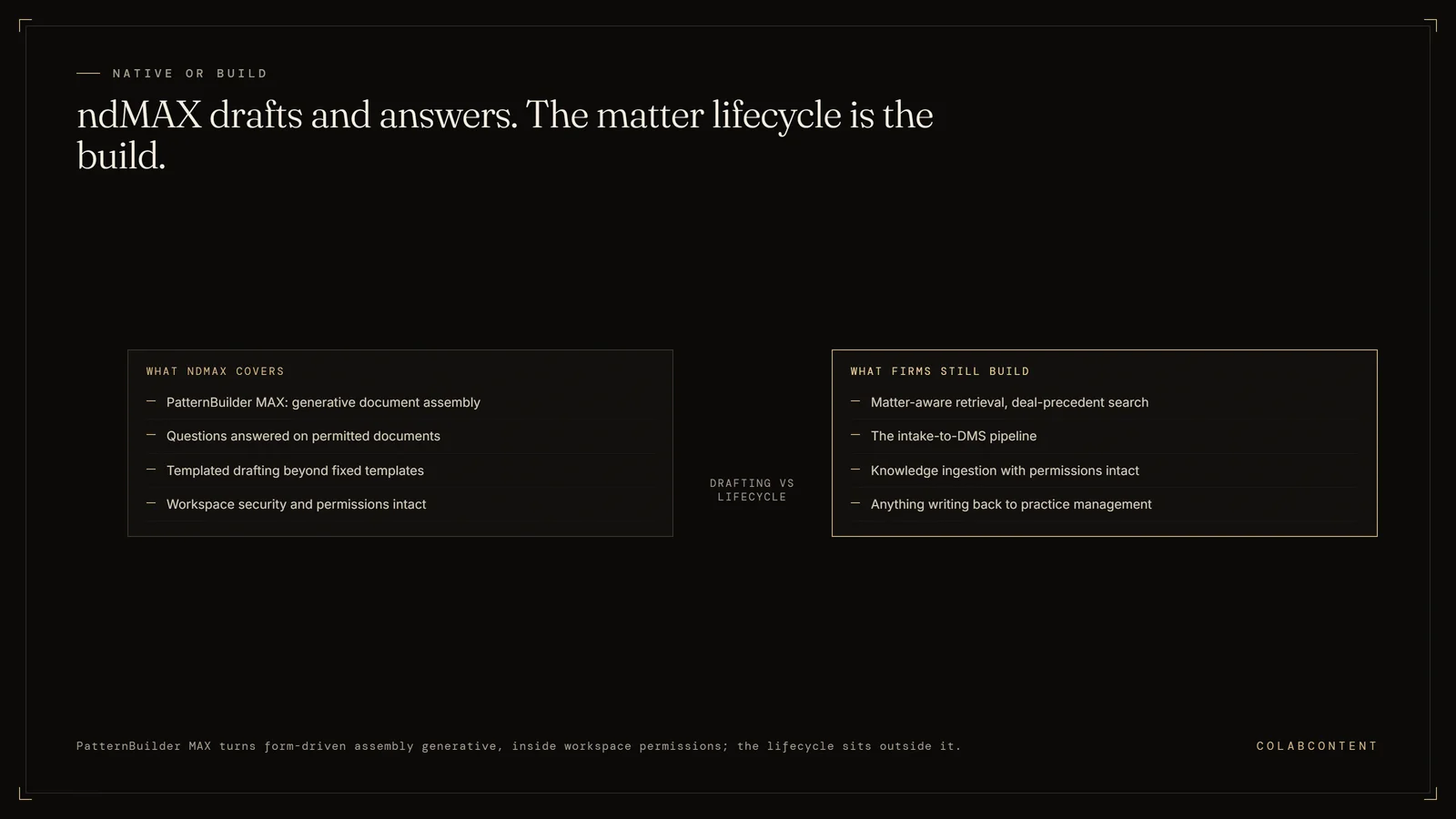
NetDocuments AI is delivered through ndMAX, the AI layer over the NetDocuments repository, with PatternBuilder MAX as the piece most firms actually touch: it takes the form-driven document assembly tool firms already use and adds generative AI, so output is drafted rather than only assembled from fixed templates, while staying inside NetDocuments workspace and security permissions. It is strong for templated drafting and for asking questions of documents a user can already open. It does not know your matter lifecycle, so intake, triage, billing, trust, and anything that has to write back to a practice management system is a build.

The boundary of NetDocuments AI: ndMAX and PatternBuilder MAX cover generative document assembly and questions on permitted documents, while matter-aware retrieval, the intake-to-DMS pipeline, and anything writing back to practice management remain custom builds
Native drafting inside permissions; the matter lifecycle is the build.

Custom AI on top of NetDocuments for 20-150 attorney mid-market firms. Matter-aware retrieval, deal-precedent search, intake-to-DMS pipelines. Permissions intact, ethical walls preserved, audit trail unbroken.

ForManaging Partner / Innovation Partner
StackNetDocuments + custom AI layer
Build cycle5-7 weeks

Why this memo.

NetDocuments has shipped a credible AI roadmap (PatternBuilder, ndMAX) targeting AmLaw firms with internal innovation teams. Mid-market firms with 20 to 150 attorneys are usually not the right ICP for it. A firm that size that wants its workflow leakage closed needs custom AI built on top of NetDocuments, not the AmLaw-segment product.

This memo is what we'd commission for that firm. Below: the NetDocuments surface area we touch, the workflows we ship in 5-7 weeks, and how the permissions and ethical-wall architecture stays intact.

The NetDocuments surface area we touch.

NetDocuments exposes the ndMAX REST API for documents, folders, matters, workspaces, profiles, and metadata. Auth is OAuth2 with the firm's identity provider. Permissions and ethical walls are enforced at the NetDocuments server level; the AI layer queries with the user's actual permissions, not a service-account super-user.

This matters more in legal than any other vertical. A retrieval system that bypasses ethical walls is a malpractice incident waiting to happen. Our query architecture preserves them.

Workflow I: Matter-aware retrieval and deal-precedent search.

Year-one associate starts a research task; spends three hours combing the matter archive for prior memos on the same issue, the same judge, the same opposing counsel. Often misses the most relevant precedent because the metadata is inconsistent.

The custom-AI version: associate types the research question in plain English. The retrieval layer queries NetDocuments with the associate's actual permissions, reads matter metadata + document content, returns the top 8-12 most relevant prior matters with the partner who handled each, the outcome, and the specific paragraphs that match.

Workflow II: Intake-to-DMS pipeline.

New-matter intake usually involves a paper or PDF intake form, a partner triage email, and someone manually creating the matter workspace in NetDocuments with the right metadata. The custom AI receives the intake (form, email, or call summary), runs conflict-clearance against the firm's matter history, drafts the engagement letter from the firm's template, creates the NetDocuments matter workspace with correct profile values, kicks off the document collection from the client.

Workflow III: Knowledge ingestion with permissions intact.

The retiring-partner workflow. Twenty years of memos, briefs, deal precedents in the partner's NetDocuments workspaces. We bulk-ingest into a permissions-preserving retrieval index, with the original ACLs maintained. The next lateral hire has access to the firm's intellectual capital, gated by the same ethical-wall logic that gated the original documents.

What we don't build.

We do not replace NetDocuments. We do not bypass ethical walls. We do not build a competitor to ndMAX or PatternBuilder. We do not build "Harvey for your firm" because Harvey already exists and serves a slightly different segment well. The leverage is in firm-specific workflow integration, not generic legal AI.

Risk & governance.

Three things every legal AI commission must do, by default: (1) preserve client confidentiality through actual permissions enforcement, not policy memos; (2) provide an audit trail that survives subpoena; (3) avoid hallucination on dispositive citations through retrieval-grounded generation. Architecture follows from these constraints.

Run your firm's number

Billable-Hour Recovery Diagnostic.

12 questions. Your firm's annual unbilled-time leakage in dollars, on screen.

Start the diagnostic
Free · 2 minutes
Personalized $ figure
3-page peer-ranked report
Email gates the PDF
Integration playbook

How a custom AI layer integrates with Netdocuments.

Why this integration matters.

Netdocuments sits at the center of the operational stack for many law firms. The workflows that route through it are the workflows where AI investment shows up first on the P&L: intake to matter routing, conflict checks, document automation, matter-to-template matching, timesheet reconciliation. A commissioned AI layer that integrates cleanly with Netdocuments addresses those workflows without forcing the operator to migrate off the system of record.

Architecture: where the AI layer sits relative to Netdocuments.

The most common integration pattern is a read-and-suggest pattern. The AI layer reads structured records out of Netdocuments, runs the workflow it was commissioned to run, and writes back a suggested action that a human reviewer approves inside Netdocuments's native UI. The system of record stays Netdocuments. The AI layer never bypasses the human-in-the-loop step for production-data writes.

For lighter-touch workflows we have shipped read-only layers that extract structured data out of Netdocuments, hand it to a reasoning step, and emit a report. No writes back. The operator uses the report as input to their existing decision process. Time to ship is faster, integration risk is lower.

For heavier workflows where the audit trail is structured and the failure cost is bounded we have shipped fully bidirectional integrations that close the loop end-to-end with structured logging. These engagements take longer (six to seven weeks rather than four to five), require more diligence on the read/write permissions inside Netdocuments, and ship with a runbook for human review of edge cases.

The integration mechanics, in plain language.

Integration with Netdocuments happens at one of three levels: the API layer, the webhook layer, or the database layer. The right level depends on what permissions the operator's Netdocuments instance grants, what data the workflow needs to see, and what data the workflow needs to write.

API layer. Read and write through Netdocuments's documented REST or SOAP endpoints. Cleanest, most maintainable, vendor-supported. Works when the data the workflow needs is exposed through the API.

Webhook layer. Subscribe to Netdocuments events, react to them in real time, write back through the API. Good for workflows that need to fire when a specific record changes.

Database layer. Direct read against the underlying database, where the API does not expose what is needed. Brittle, requires direct hosting access, used only as a last resort and always with the operator's explicit approval.

Common pitfalls when integrating AI with Netdocuments.

Treating the integration as an afterthought. The AI work is the easy part. The integration is the hard part. Operators that under-invest in the integration boundary spend the entire build cycle fighting authentication, rate limits, and edge-case schema. The commission scopes the integration boundary in the first week.

Skipping the human-in-the-loop step too early. Closing the loop end-to-end on day one is a recipe for hidden errors. Every engagement starts with human review of every AI output. Only after the operator has seen the output quality hold for sixty to ninety days does the human-in-the-loop step relax to spot-check.

Underestimating the data-cleanup work. Netdocuments contains data the operator has entered over years. Some of it is clean. Some of it is not. The AI layer's quality is bounded by the data it reads. Cleaning happens as part of the build, not as a prerequisite for it. If the data is unworkable we flag it in the diagnosis call.

Building bespoke when a product would suffice. If Netdocuments already has a productized AI feature that covers the workflow, the operator should evaluate it before commissioning a custom build. We will tell the operator honestly when that is the right answer.

Reference: prior commissions involving Netdocuments.

Specific numbers are bound by NDA but the pattern is consistent across the engagement set: the operator runs the workflow faster, with fewer hands, and with a structured record of every AI-generated suggestion alongside the human approval.

What a Netdocuments engagement scope looks like.

A typical Netdocuments commission scope: one or two specific workflows, read-and-suggest pattern, four-to-seven-week build cycle, fixed fee in the $45K to $180K band depending on integration depth and workflow complexity. The diagnosis call identifies the workflow. The prototype demonstrates feasibility against the operator's real data inside seven to ten days. The production build ships inside the operator's own cloud tenant under NDA.

The operator owns the Netdocuments integration code, the AI prompts, the model selection, and the data pipeline at handoff. We do not retain a license, a recurring fee, or a vendor relationship that the operator depends on.

Extended questions

The questions buyers ask after the first one.

What is ndMAX?

ndMAX is the NetDocuments AI layer sitting over the document repository, with an assistant for asking questions of documents and a studio for building AI-assisted tooling. Because it runs inside NetDocuments it inherits the workspace and security model rather than asking the firm to copy documents somewhere else.

What is PatternBuilder MAX?

PatternBuilder is the NetDocuments pattern builder, the automation tool that turns a form into a finished document. PatternBuilder MAX adds generative AI to that flow, so the output is drafted rather than only assembled from fixed templates. It is the piece most firms actually touch, because it maps onto work a knowledge management lead already understands.

Does NetDocuments have an AI assistant?

Yes, through ndMAX, and it answers against documents the asking user already has permission to open. Ask for the audit trail during the pilot: which documents a given answer drew on, for which user. A legal AI assistant without a readable audit trail cannot be evaluated by a general counsel or a malpractice carrier.

Does NetDocuments AI respect ethical walls?

Inheriting workspace permissions is the design intent, and it is the reason to prefer a repository-native assistant over a general chatbot pointed at exports. Test it directly rather than accepting it: put a walled matter into the pilot, confirm a lawyer outside the wall cannot surface it, and keep that test in the quarterly review.

How much does ndMAX cost?

NetDocuments does not publish AI pricing. It is quoted per firm, usually as an uplift on the existing license and often with usage components. Ask for the number at your current attorney count and at your five-year plan. The gap between those two figures is the honest comparison against a one-time build.

What do firms build beyond PatternBuilder?

The work that needs the firm's own logic rather than the document: intake, matter lifecycle, billing, and trust. One anonymized 47-attorney litigation firm runs matters, invoices, and IOLTA trust on a commissioned platform holding 13,296 matters, 4,396 clients, and 5,684 invoices, with trust reconciled byte-identical. NetDocuments stays the system of record for documents; the build handles the operation around them.

Should a firm wait for NetDocuments to ship it instead of building?

For document search, drafting, and question answering, yes. That is the vendor's road, and building a competing layer wastes money. For matter lifecycle, intake, billing, and trust, no. Those run on the firm's own rules, and a document platform is not going to ship them.

Does a custom AI layer require moving documents out of NetDocuments?

No, and no build should. The correct pattern is read and suggest against the API, with NetDocuments staying the system of record and permissions enforced at the source. Any proposal that starts by exporting the repository into a separate index should be declined on security grounds alone.

How long does a NetDocuments build take?

A working prototype on the firm's real data in 7 to 10 days, then a production build in 5 to 7 weeks for a scoped workflow. The fee is fixed and stated before the build begins, in the $45,000 to $180,000 band depending on integration depth, with the code owned by the firm at handoff.

Can AI handle intake and calls, not just documents?

Yes, and for many firms it is the larger number. Jim Glaser Law runs 3,787 AI-handled calls and 5,514 minutes across five channel-specific agents covering PPC, organic, TV, Meta, and LSA, giving the firm per-channel attribution on answered calls. That is an intake and marketing problem sitting entirely outside the document repository.

What does a NetDocuments build cost to run after handoff?

The recurring cost is model usage and hosting inside the firm's own cloud tenant, not a license fee. It appears on the firm's own bill and it is renegotiated with nobody. There is no ongoing fee after handoff, which is the point of transferring the code, the prompts, and the data pipeline.

Ready when you are

Book the 45-minute diagnosis.

Custom AI on your NetDocuments instance. Permissions and ethical walls intact.