AI Tools for CPA Firms: A Practical Evaluation Guide
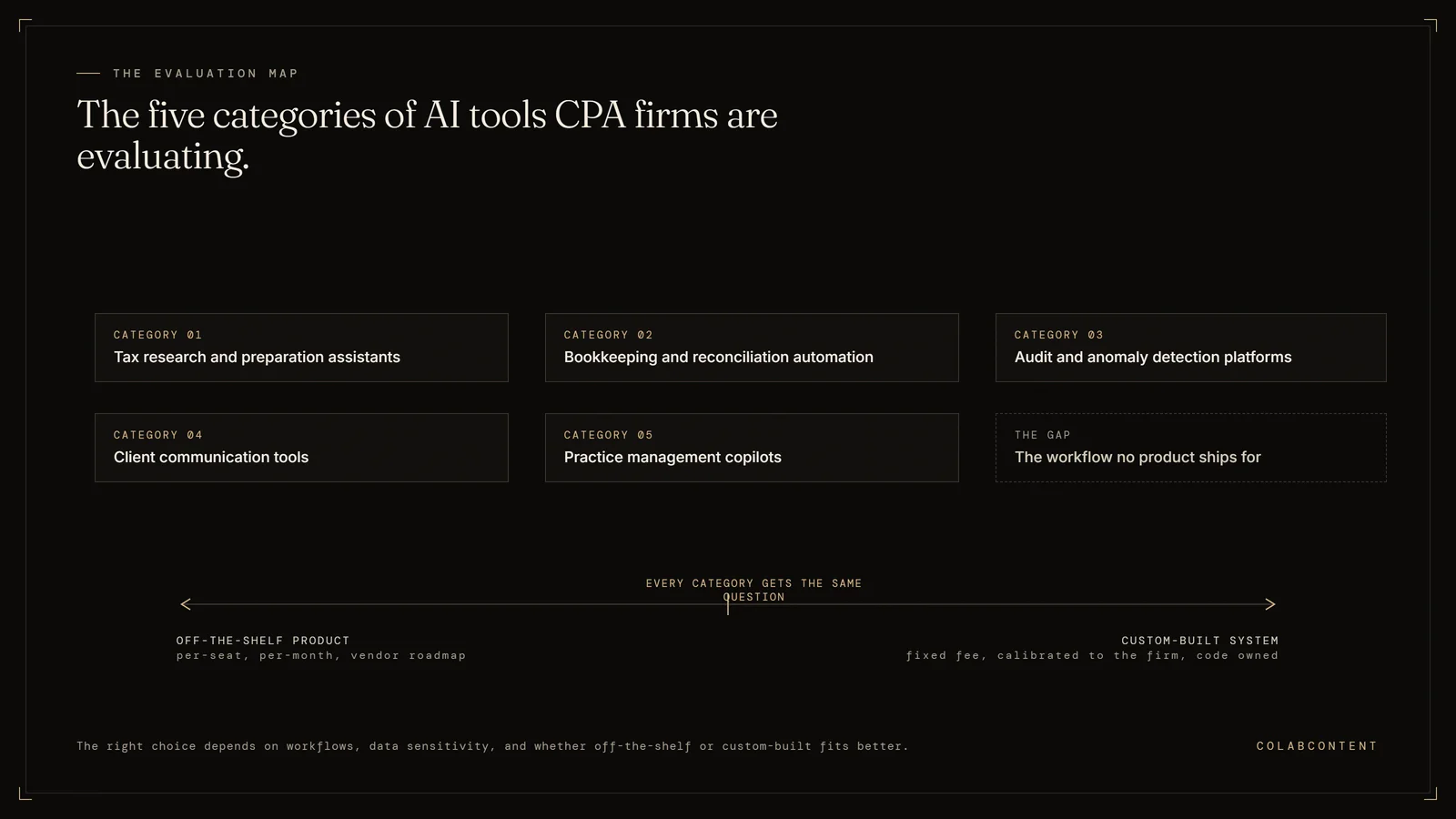
The most useful AI tools for CPA firms fall into a few categories: tax research and preparation assistants, bookkeeping and reconciliation automation, audit and anomaly detection platforms, client communication tools, and practice management copilots. The right choice depends on your firm's workflows, data sensitivity, and whether an off-the-shelf product or a custom-built system fits better. ColabContent LLC publishes this page: a boutique AI consulting house in Boston that builds custom systems for CPA and accounting firms of 10 to 150 people.
The $499 AI-Ready Audit comes first; after it, the system that matters most is proven as a working prototype on your own data before any build fee. Production builds are one fixed fee from $10,000, one time, with the code owned by the firm at handoff and no per-seat licence. The $499 AI-Ready Audit is ordered at colabcontent.com/ai-ready-audit/.
This guide is not written for every firm. A solo practitioner, a firm whose workflow already matches an off-the-shelf tax or bookkeeping product exactly, or a firm without a named workflow constraint worth automating is better served by a rented subscription than by a custom build. ColabContent's commissioned systems start at $10,000, one time, and that fee only makes sense once the firm-specific workflow is the actual bottleneck.
A quick way to sort the five categories: tax research and client communication tools are usually the easiest to buy off the shelf, since they sit on top of a vendor's own data and update on their own. Bookkeeping and reconciliation automation and audit and anomaly detection sit closer to firm-specific workflow, which is where a custom build starts to make more sense than another subscription. Practice management copilots depend entirely on which system the firm already runs, so that fit gets evaluated before any AI feature on top of it.
Key Takeaways
- Rather than chasing individual product names, which change quarterly, evaluate by category.
- Most mid-market firms end up running tools from several categories at once.
- Off-the-shelf tools make sense when your workflow matches what the vendor built for the median firm.
- Neither path is universally right.
Most tool roundups rank products. This one is built to help you decide which category you are actually shopping in, because the wrong category is a more expensive mistake than the wrong product inside the right one.
What is AI for accounting?
AI for accounting is software that uses machine learning or large language models to handle work that previously required manual judgment: categorizing transactions, drafting client emails, summarizing tax guidance, flagging anomalies in ledgers, or extracting terms from contracts and leases. It is not one product. It is a layer of capability that shows up inside tax software, audit platforms, practice management tools, and standalone assistants.
For a CPA firm, the practical question is not "should we use AI" but "where in our workflow does AI reduce hours or errors without introducing risk we cannot review." The best implementations produce output a human can inspect and approve. The worst ones act as a black box between your staff and your client's numbers. That distinction matters more than any feature list, and it should anchor every evaluation your firm runs.
Categories of AI tools CPA firms are evaluating
Rather than chasing individual product names, which change quarterly, evaluate by category. Most tools a CPA firm will encounter fit one of these buckets:
- Tax research and preparation assistants. Tools that summarize guidance, answer research questions with citations, and help draft workpapers (the working files behind a tax return or audit). Verify that citations are real before relying on them.
- Bookkeeping and reconciliation automation. Software that categorizes transactions from bank feeds, matches entries, and surfaces exceptions for human review instead of processing everything by hand.
- Audit and anomaly detection platforms. Systems that scan full populations of transactions rather than samples and flag outliers for the engagement team to investigate.
- Client communication and CAS tools. Drafting assistants for client emails, meeting summaries, and advisory deliverables in client accounting services engagements.
- Practice management copilots. AI features embedded in workflow platforms that summarize client history, draft task notes, and triage inboxes. See how these compare in ColabContent vs Karbon AI.
- Document and data extraction. Tools that pull structured data from source documents like leases, invoices, K-1s, and engagement letters.
- Custom internal systems. Commissioned builds that connect your firm's own templates, prior-year files, and review standards into a private workflow, an option covered in the off-the-shelf AI vs custom commission comparison.
Most mid-market firms end up running tools from several categories at once. That is normal. The problem arises when categories overlap and staff cannot tell which tool is the system of record (the one system that holds the official copy of a record).
What separates a great accounting AI tool from a forgettable one
Demos all look impressive. The tools that survive past month three at a real firm share a few traits:
- It connects to your existing stack. A tool that requires exporting CSVs and re-importing them will be abandoned by staff during busy season, regardless of how good the output is.
- Output is reviewable. Every AI-generated categorization, draft, or flag should be traceable to a source. If a partner cannot see why the tool made a decision, the firm cannot sign off on the work product.
- It fits your actual workflow. A tool designed for a solo bookkeeper behaves differently than one designed for a multi-partner firm with review layers. Buy for the workflow you have.
- Data handling is documented. You should know where client data is stored, whether it trains vendor models, and how deletion requests are handled before any client file touches the system.
- Someone at the firm owns it. Tools without an internal owner decay. Assign accountability at purchase, not after adoption stalls.
Build vs buy: the decision framework for CPA firms
Off-the-shelf tools make sense when your workflow matches what the vendor built for the median firm. Custom-built AI makes sense when your firm's advantage lives in workflows the vendors did not anticipate: a niche client base, a proprietary review methodology, or a service line the practice management platforms do not model well.
A useful test: if you find yourself paying for a platform and then building spreadsheets and manual workarounds on top of it, the vendor's model of your firm does not match reality. That gap is the signal to consider a commissioned build. The build, buy, or commission framework walks through this decision in detail, including the hidden costs on both sides.
Neither path is universally right. Buying is faster and cheaper to start. Building or commissioning takes longer but produces a system shaped around how your firm actually works. Firms comparing practice management options specifically can start with Karbon alternatives for mid-market CPA firms to see how the major platforms differ before deciding whether any of them fit.
Due diligence questions before you sign an AI contract
Before committing to any AI tool, get written answers to these questions:
- Where is client data stored, and is it used to train the vendor's models?
- Can output be exported if the firm leaves the platform, and in what format?
- What happens to accuracy when the tool encounters an entity type, industry, or transaction pattern it was not trained on?
- Who at the vendor is responsible when the tool produces an incorrect result that reaches a client deliverable?
- How are model updates communicated, and can the firm test them before they go live?
- Does the contract lock the firm into per-seat pricing that penalizes seasonal staffing?
A vendor that answers these directly is worth a pilot. A vendor that redirects to marketing language is telling you something. Firms weighing whether to run this evaluation internally or bring in outside help can compare approaches in Boomer Consulting vs commissioned AI for CPA firms.
The $499 AI-Ready Audit is the way to get this analysis run against your own business rather than the general case described here.
How mid-market CPA firms actually roll out AI
The rollouts that stick tend to follow a similar sequence. First, pick one workflow with a clear before-and-after: transaction categorization, engagement letter drafting, or client email triage. Second, run the AI output in parallel with the existing process so reviewers can compare quality without risk. Third, only expand once the pilot workflow has a defined owner, a review step, and staff who prefer the new process over the old one.
What kills rollouts is the opposite pattern: buying a platform-wide license, announcing it at a firm meeting, and expecting adoption to happen organically during busy season. It will not. AI adoption is a workflow change, not a software installation, and it needs the same change management any workflow change requires. Firms that treat tool selection as the finish line stall; firms that treat it as the starting line compound gains from one workflow to the next.
How to pilot an AI tool without burning a season
The riskiest way to adopt accounting AI is to switch it on for the whole firm in February. The firms that get real answers run constrained pilots in the off-season, and they design the pilot before they pick the tool. Choose one workflow, not a category: not tax generally, but first-pass review of 1040s with Schedule C activity, or reconciliation of three specific high-volume clients. Narrow scope is what makes the results readable.
Structure the pilot as a comparison you can defend. Split the same class of work between the current process and the tool-assisted process, with the same reviewers on both sides. Measure the things that actually cost money in a firm: preparer hours to first draft, review notes per engagement, rework after review, and days in work-in-progress. A tool that shortens preparer time but doubles review notes has not saved anything; the pilot design above is what catches that trade before it hits a live season.
Two guardrails keep the pilot honest. First, data handling gets settled before any client file touches the tool: where files are processed, whether they inform model training, retention at termination, and whether your engagement letters and state privacy obligations permit the transfer at all. Second, name a skeptic as the pilot's co-owner. Every firm has a partner or senior manager who distrusts the whole category; putting them inside the evaluation converts the loudest objection into the most credible verdict, whichever way it lands. If the pilot succeeds, the same structure becomes the rollout plan, one workflow at a time, with the busy season untouched until the tool has earned its place in it.
Sequencing is the last piece. Firms rarely have the attention to pilot more than one category at a time, and the right first category follows the firm's profile. A firm drowning in write-up work starts with bookkeeping and reconciliation automation because the volume makes results measurable fastest. A tax-heavy firm starts with research and first-pass preparation, where preparer hours concentrate. An audit practice starts with anomaly detection on a single engagement type. Pick the category where your hours actually pool, run the pilot structure above, and let the second category wait for the first one's verdict. The guide to choosing an AI consultant for a CPA firm covers what to look for once a pilot points toward a commission.
Frequently asked questions
Short answers first, detail underneath. Every answer here matches the FAQ schema on this page word for word, and each one is the answer we give on the audit call. Where a question depends on your own numbers, the $499 AI-Ready Audit report replaces the general answer with your figures.
Which AI is best for CPAs?
There is no single best AI for CPAs because the right tool depends on the workflow. Tax research assistants, bookkeeping automation, audit analytics, and practice management copilots solve different problems. Start by identifying the workflow that consumes the most staff hours or produces the most errors, then evaluate tools built for that specific job. A tool that fits your existing stack and produces reviewable output beats a more famous tool that does not.
How are CPA firms using AI?
CPA firms are using AI to categorize and reconcile transactions, draft client communications, summarize tax research, extract data from source documents like leases and invoices, flag anomalies across full transaction populations in audits, and automate practice management tasks like meeting notes and inbox triage. The common thread is that AI handles the repetitive first draft while staff review and approve the final output before it reaches a client.
Will AI take over CPA firms?
AI is automating tasks within CPA firms, not replacing the firms themselves. Transaction categorization, first-draft documents, and data extraction are increasingly automated, but judgment, client relationships, professional liability, and sign-off authority remain human. The more likely outcome is that firms using AI well will outcompete firms that do not, because they can serve more clients at higher margins. The risk is competitive, not existential. The cost of AI consulting for CPA firms page sets out what a commission runs once a pilot names the workflow.
Start with the $499 audit.
A $499 audit, then a 20-minute call. No slides. We walk your engagement pipeline from the first client document request through review sign-off, name the step costing the most reviewable hours, and tell you whether a build is the right lever for it. If packaged software would serve the firm better, we say so on the call.
Read the CPA offering → Or book directly →Where to look next.
Three pages carry the specifics this one summarizes. The commission process runs the five phases between the first call and code handoff, including the working prototype built on the firm's own data before any fee is owed. The pricing page publishes the fee bands rather than making you ask for them. And the AI maturity assessment walks the five stages and the mistakes mid-market teams make.
For accounting-specific depth: the CPA practice page covers the workflows most often commissioned in accounting firms, AI consulting cost for CPA firms breaks the bands down by scope, best AI consultants for CPA firms is the vertical buyer guide, and what actually works in CPA firms is the honest version, including where these projects fail.
If a specific platform is already on the shortlist, read Karbon AI against a custom build and the Karbon alternatives comparison before signing anything. Firms on CCH Axcess should start with the CCH Axcess AI workflow playbook, and firms on Lacerte with the Lacerte integration playbook.