Lacerte AI Automation: What Works, What Does Not, and Why
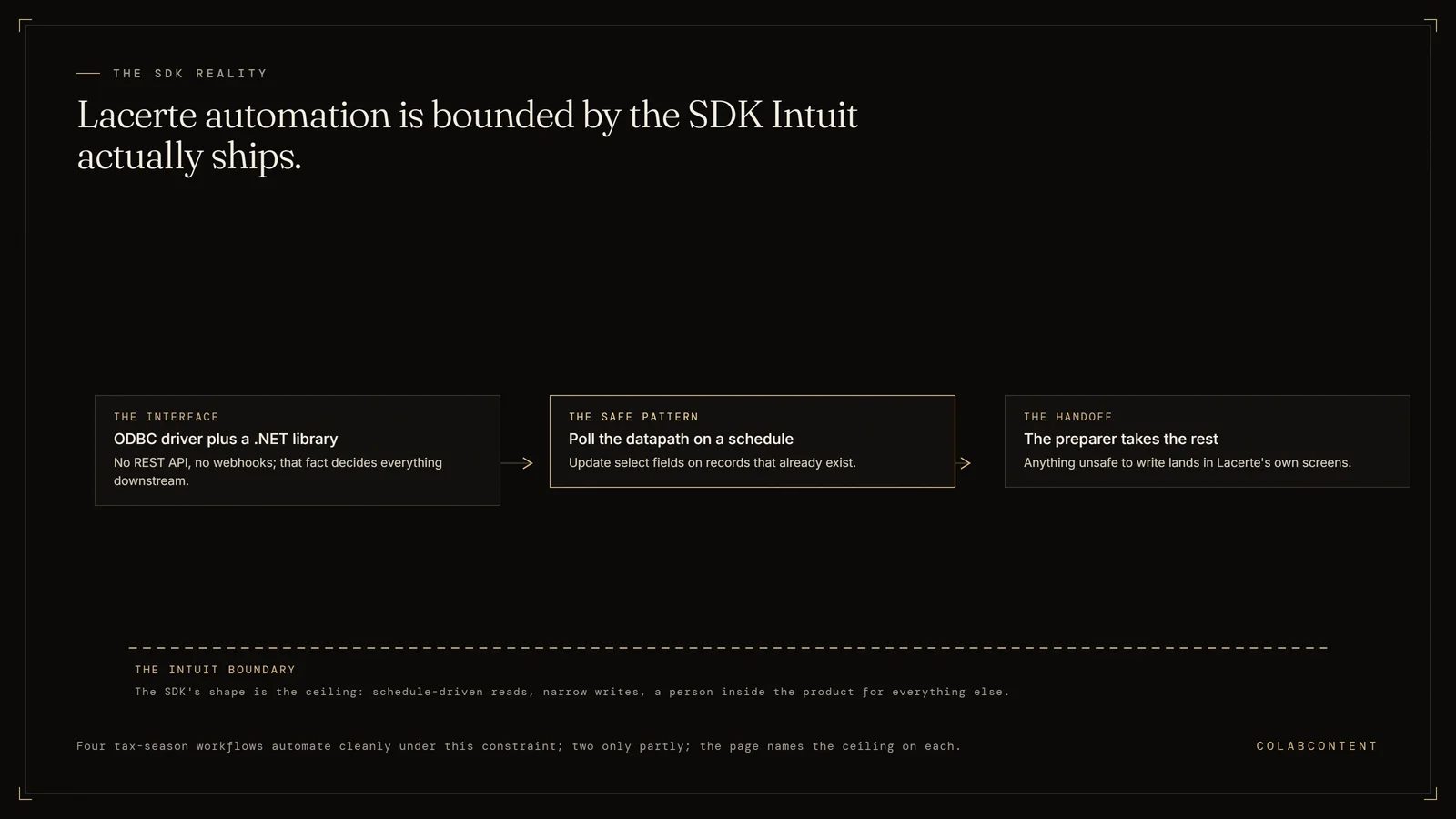
Lacerte AI automation is real but bounded by what Intuit actually exposes: a Software Developer's Kit with an ODBC driver and a .NET library, not a REST (a standard way for software to exchange data over the web) API (the connection one piece of software offers to another) and not webhooks.
For managing partners and tax practice leads at Lacerte firms in the 30-to-150-professional band who have already bought a scan-and-populate product and want to know what is left on the table. Written against Intuit's published SDK documentation and against what the integration costs to keep running after April.
Key Terms
Engagement letter compliance: ensuring every client engagement has a signed, current letter that matches the scope of work actually performed; a risk management requirement that manual tracking routinely misses. Staff leverage ratio: the number of staff and senior associates a partner can supervise productively; AI tools that handle routine preparation work increase this ratio without adding headcount. Tax provision automation: calculating ASC 740 or other tax provisions from trial balance data, including deferred tax assets and liabilities; a technical workflow where manual spreadsheets introduce material error risk. Client portal integration: connecting document exchange, e-signatures, and status updates with the firm's practice management system so clients and staff share one source of truth.
What the numbers say and where each path fits.
Most pages about Lacerte and AI are written by people who have never opened the SDK documentation. They describe a REST layer with webhooks and bidirectional writes, because that is what the other pages on their site said about NetSuite, and Lacerte got the same paragraph. It is wrong, and if you scope a build on that assumption you will spend your first three weeks discovering it.
Here is the actual shape. Lacerte is desktop software with a file-based datapath. Intuit publishes a Software Developer's Kit for third-party vendors and for Lacerte customers who write their own code, and you request a developer license through Intuit's developer portal. The SDK ships an ODBC driver, so any database-aware client can query the tables and detail files in a datapath, and a .NET library for the operations ODBC cannot perform. Every third-party application registers its integration, and the Lacerte user sees a consent dialog before that application reads anything. Intuit states plainly that SDK support does not come through normal Lacerte support channels.
Reads are easy. Writes are asymmetric. Through ODBC you can SELECT freely and UPDATE existing rows, but you cannot create records: Intuit's own moderator response in its SDK forum is that you cannot create a client using the ODBC driver, only using the SDK API, and a user report in that same thread has the driver crashing outright on an INSERT against a client detail table. Nothing in Lacerte pushes events, either. There is no subscription to listen to. An automation layer polls, or it watches the systems that sit around Lacerte and reconciles on a schedule.
That is not a small platform, and it is not a closed one. It is a specific one. Once you accept the shape, the question stops being "can AI work with Lacerte" and becomes "which of my April problems fit inside a polling read layer with narrow writes." That is a much better question, and it has a clear answer. It is the rest of this page.
If you want the broader positioning question first, whether a custom layer is the right buying motion at all against a product or an internal hire, that is the build, buy or commission decision, and it is worth settling before you read a word about ODBC drivers.
What Lacerte actually exposes to an automation layer.
The consequential detail is in Intuit's own wording. Support for the Lacerte SDK is not provided through normal support channels. If your integration breaks the week before the deadline, you are not opening a ticket. You are reading the developer instructions PDF and the SDK community forum. Budget for that, or commission someone who will own it.SDKLicense by request
It is also the surface a commissioned layer sits on. A read connection against the datapath gives you the client list, the in-progress returns, the field-level detail, and the prior year. That is enough raw material for classification, checklist comparison, status monitoring and chase logic, without touching a single write.ReadDatapath level
Practically: if your build only reads and suggests, you may never leave ODBC. If it has to create a client or add detail rows, you are writing .NET against the SDK API, and your testing burden goes up meaningfully because you are now mutating live client tax data.WriteBusiness logic
This is a good design and it has an operational consequence worth planning for. Consent is a human action inside your firm, on a machine, by a person with rights. It is not a service account you configure once in a console. Onboarding a new workstation, or a new season, means someone clicks. Your runbook (the written operating instructions) should say who.ConsentPer firm, per install
The pattern that works is a scheduled reconciler. Poll the datapath on an interval, diff against the last known state, and act on the delta. Everything real-time in your workflow (a client uploading a document, an acknowledgment arriving, an email landing) is watched at its own source, in the portal or the DMS or the mailbox, and reconciled back against Lacerte on the next pass.PollingNot event driven
Scope accordingly. A design that assumes it can conjure records through ODBC will fail late, on the one workflow you cared about most.AsymmetricRead easy, write narrow
Six workflows, and exactly how far each one automates.
| Workflow | What Lacerte already does | What a commissioned layer adds | The ceiling |
|---|---|---|---|
| 1. Document intake | Link portal, e-Organizer, Tax Scan and Import, Financial Institution Download | A per-client expected-document set and a classifier that reports what is genuinely missing (buy extraction, do not build it) | Misfiles go to a human queue with a two-click override |
| 2. Inbound K-1s | K-1 export for K-1s the firm itself prepares | Extracts the boxed numbers and surfaces what the attached statements and footnotes say | Basis, at-risk, passive grouping and 199A usability stay with the preparer |
| 3. Prep review | Diagnostics against the form instructions | Runs the firm's own review checklist on every return and attaches a cited flag list | Assistive only: it signs nothing and clears no flag |
| 4. Client chase | Missing Data Utility and Link handle the first request | Owns the follow-up sequence across portal, email and call, and stops when the document lands | Our shipped proof is from law and home services, not a CPA firm |
| 5. E-file status | Full acknowledgement status, on a pull basis | A scheduled poll that diffs acknowledgements and pages the preparer on a rejection | Polling, not push: fifteen minutes is comfortable, real-time is not on offer |
| 6. Extensions | Handled manually at most firms | Selects the population by firm rules, drafts the payment estimate and client note, tracks who has paid | Every payment estimate is a preparer sign-off, with no batch approve |
1. Document intake and classification.
What Lacerte already does. More than most firms use. The Link client portal handles requesting and exchanging client documentation. e-Organizer collects information. Tax Scan and Import performs automated data extraction from scanned source documents. Financial Institution Download pulls data directly from financial institutions and payroll providers. SmartVault or the Document Management System holds the result. If your firm is doing manual data entry off a paper 1099 in 2026, the problem is adoption, not software, and no AI layer fixes that.
What the mature third-party market already does. Scan-and-populate is a solved, competitive category with Lacerte support. SurePrep's 1040SCAN extracts from source documents and exports into Lacerte, UltraTax, CCH Axcess and GoSystem. GruntWorx pushes extracted data straight into the return without an intermediate spreadsheet. Newer entrants such as Juno claim to cover 100-plus document types and to write into Lacerte's input screens across desktop, Rightworks, Verito and AWS-hosted installs. You should buy in this category, not build in it.
What is genuinely left. Extraction is a commodity. Expectation is not. No product knows that this particular client has had a rental in Vermont since 2019, sold half of it in the year in question, and always sends the closing statement late and buried inside a scan of eleven unrelated pages. The unsolved layer is a per-client expected-document set, derived from the prior-year return and last year's actual intake rather than from a generic organizer template, plus a classifier that files an inbound scan against that set and reports what is genuinely missing rather than what is merely not yet ticked.
The ceiling. A classifier is never right every time, and whatever it gets wrong needs somewhere to go, which is a human queue with a two-click override. Build the queue on day one. Firms that skip it end up with a silent misfile problem they discover in June.
2. Inbound K-1 handling.
What Lacerte already does. Lacerte handles K-1s the firm itself produces, well. The K-1 export moves Schedule K-1 data between returns, and the program reads Partner Information Type of Entity to decide which module a given partner's K-1 transfers to: Individual, Partnership, Corporate, S-Corporation or Fiduciary. If you prepare the 1065 and the partner 1040s, that is a solved path and you should be using it.
Where April actually hurts. Inbound K-1s from entities you do not prepare. A single 1040 with eleven of them, arriving between March 20 and September, as PDFs with no layout consistency, each carrying a stack of attached statements: the line 20 codes on a partnership K-1, the line 17 codes on an S-corp K-1, state apportionment schedules, section 199A information, and a footnote page written in prose that changes the answer. Lacerte's own export path cannot help you here, because the data never originated in your Lacerte.
What AI is genuinely good at here. Two things. First, extraction of the boxed numbers, which is now reliable enough that specialist K-1 extraction is its own product category. Second, and more valuable, reading the attached statements and surfacing the sentences that a preparer would otherwise find on page seven at eleven at night. A model that returns "this K-1's footnote reports foreign taxes paid to two jurisdictions and a section 743(b) adjustment, neither of which appears in the boxed figures" earns its keep, because it is doing retrieval and summarisation, which is the thing it is actually good at.
The ceiling, and it is a hard one. Basis. At-risk. Passive activity grouping. Whether the 199A information is usable as presented. None of that is extraction, all of it is judgment against facts that often are not on the document at all, and none of it should be automated. The honest design puts the model on the reading and the flagging, and puts the preparer on the decision, with the model's output attached to the workpaper as evidence rather than as an answer.
3. Prep review.
What Lacerte already does. Diagnostics, and a lot of them. Lacerte's diagnostics catch the things that are wrong against the form instructions. They do not catch the things that are wrong against your firm.
The gap, stated precisely. Every firm has a senior reviewer whose value is a checklist that exists mostly in their head. A state that should have been added because the client mentioned a move in a phone call last August. An account balance that swung past whatever threshold your firm treats as material, with no note in the file. A carryforward that did not proforma, which is a known enough phenomenon that Intuit publishes a help article on why some client data does not proforma. A deduction that is defensible but that this firm, for its own risk reasons, does not take without a partner conversation. Lacerte will never flag any of those, because none of them are diagnostics. They are firm policy.
What a commissioned layer does. Reads the in-progress return through ODBC, reads the prior year, reads the workpapers (the working files behind a tax return or audit) out of the DMS, and runs your checklist. Not a generic checklist. The one your reviewer would run, written down for the first time, versioned, and applied to every return rather than to the ones that reach the reviewer before the deadline. The output is a flag list attached to the return with a citation for each flag, so the reviewer starts from a shortlist instead of from page one.
The ceiling. This is an assistive layer and it stays one. It does not sign anything, it does not clear a flag, and it does not reduce reviewer headcount in year one. What it does is move review earlier in the cycle and make it consistent across the whole population instead of the top third. Firms that pitch this internally as a headcount story get resistance and deserve it. Pitched as "your reviewer sees every return instead of some of them," it lands.
4. Client chase.
What Lacerte already does. The Missing Data Utility borders the fields that are missing information and will send the request out to the client, either to their Intuit Link portal or by email. Link tracks the document exchange. Between them, the first request is well handled.
Why it still fails. The first request is not the problem. The fourth is. A firm sends the organizer, sends the reminder, and then the chase collapses into an admin's spreadsheet and a set of phone calls that nobody has time to make in the last three weeks of March. The work is not intellectually hard and that is exactly why it does not get done: it is the lowest-status task in the building during the highest-pressure fortnight of the year.
The pattern that works. A persistent, multi-channel follow-up layer that owns the sequence rather than the first touch. It reads the outstanding-item list, escalates channel over time (portal notification, then email, then a call), stops the moment the document lands, and keeps a per-client record of what was asked and when. The reason this is worth automating and not staffing is that the value is entirely in the persistence, and persistence is the thing humans stop doing under load.
The proof we have, stated honestly. This is the one workflow on this page where we can point at shipped volume, and it is not from a CPA firm. Jim Glaser Law runs five channel-specific voice agents we built, across PPC, Organic, TV, Meta and LSA, which have handled 3,787 calls and 5,514 minutes and give the firm per-channel attribution on answered calls. A multi-location home services operator runs the same pattern at 1,486 calls and 2,203 minutes. Across all clients the total is past 6,000 live calls. The mechanics of an outbound sequence that keeps calling until it gets the thing are identical whether the missing item is a signed retainer or a brokerage statement. The vertical is not. Read it as evidence that the machinery works, not as a CPA reference, because it is not one.
5. E-file status tracking.
What Lacerte already does. All of it, on a pull basis. Status lives in the Clients list, in the Federal and State e-file status columns; F4 on a highlighted client opens the client status window with an e-File Status tab. You retrieve statuses from the E-file menu under Step 3, e-File Acknowledgement Statuses, then either Receive Acknowledgement Statuses for everything or Update Acknowledgement Status for Selected Return(s). Received at Lacerte means the return has reached Intuit and is being processed for onward transmission to the agency. Accepted means the agency took it. Federal acknowledgements are usually available in one to three days, state acknowledgements in two to five business days. Rejections are visible through the e-file Activity Report, reached from the E-file menu under e-file Reports/Messages, which you can filter down to IRS Rejected and State Rejected.
The gap is not capability, it is attention. Every one of those steps requires a human to open Lacerte, navigate to a view, and choose to look. On April 14 at nine in the evening, nobody is looking. A federal rejection sitting unread for 36 hours in the wrong week is a genuinely expensive event, and the firm usually finds out because the client calls.
The build, and an honest label on it. A scheduled job holds an ODBC read against the datapath, diffs acknowledgment state since the last pass, and pushes: pages the assigned preparer on a rejection with the reject code and the client, posts an accepted notice to the client without anyone drafting it, and keeps a running board of everything still in Received at Lacerte past its normal window. This is the highest-return item on the page relative to build cost, and it is barely AI. It is a poller, a diff and a notifier, with a language model doing nothing more than writing the client-facing sentence. We say so because a vendor who calls this AI is telling you something about the vendor.
Before committing to a build on this workflow, the $499 AI-Ready Audit is the cheaper way to confirm the fit against your own systems and data first.
The ceiling. Polling interval. You are reading a datapath, not receiving a push, so your floor on latency is however often you are willing to run the job and whatever load that puts on the file share during the busiest fortnight of the year. Fifteen minutes is comfortable. Real-time is not on offer, and any vendor promising it on Lacerte should be asked how.
6. Extension workflow.
Why this one is underrated. Extensions are the most automatable thing a tax practice does, because almost none of it is judgment. The population is knowable in February. The criteria are mechanical: who has not delivered, who always extends, who has a K-1 that is not coming before September regardless. The output is a form and a payment estimate. Firms handle it manually anyway, in the exact week they have the least capacity, which is how a client ends up extended without a payment and with a penalty conversation in October.
What the layer does. Selects the population off the datapath against the firm's own rules rather than a gut call. Drafts the payment estimate from prior-year liability plus current-year known items, presented as a worked calculation the preparer approves or overrides, never as a filed number. Generates the client-facing note explaining what is being filed and what they owe by the deadline, in the firm's voice, one per client. Tracks who has been told, who has paid, and who is still silent, and hands the silent list back to the chase sequence from workflow four.
The ceiling, and it is not negotiable. The payment estimate is a preparer sign-off, every time, with no batch approve. The tempting version of this build is one that files the whole population unattended. Do not build that one. The failure mode is silent, it is financial, it belongs to the firm and not to the software, and the time saved does not come close to covering it. The commercial terms for scoping one or more of these six are set out in the pricing page.
What we will tell you before you spend anything.
Before any commitment, the sections below cover what Intuit's own AI actually ships and where it does not, the deployment realities of workstations, bitness and session limits, the security rules that apply to client tax data, what has been proved in practice versus not, and where a commissioned layer earns its cost.
Intuit's own AI is shipping, but not where people think.
Intuit publishes a set of generative AI tax features, Intelligent Data Import for source-document extraction, Smart Navigation, and an AI assistant that reviews returns against its diagnostics library. Those are published on the ProConnect Tax Online product page. They are not claimed for Lacerte or ProSeries. That is the single most useful thing a Lacerte firm can know about Intuit's AI roadmap, because it tells you where the investment is going: into the cloud product.
On the Lacerte side, the integrations page names Intuit Tax Advisor as the AI-driven advisory planning piece, alongside Link, SmartVault, the Document Management System, Tax Scan and Import, Financial Institution Download, Quick Employer Forms, Intuit Sign, the Tax Planner and Analyzer, and QuickBooks Desktop Accountant trial balance transfer. That is a real feature set and a firm should exhaust it before commissioning anything.
The strategic read: if Intuit's generative AI investment lands in ProConnect first, a Lacerte firm has a choice between waiting for a migration it did not ask for and building the specific pieces it needs on the SDK now. Neither answer is automatically right. It depends on how firm-specific your workflow is, which is the question in what actually works for CPA firms.
Deployment reality: workstations, bitness, and a 24-hour session.
The best public documentation of what a Lacerte SDK integration actually costs to deploy is not Intuit's. It is SurePrep's install guide, written for their own customers, and it is worth reading before you scope anything, because your build inherits every line of it.
Install goes on workstations and local machines, not the server. You need both the 32-bit and 64-bit builds. You need the Visual C++ 2015 redistributable in place first. You need administrator rights. Any previous SDK version has to be uninstalled. And the line that matters most operationally: Lacerte sign-in credentials have to be entered again when the session expires after 24 hours.
Read that last one carefully against an unattended overnight job. A poller that needs a human-authenticated session that lapses daily is not unattended. There are architectural answers, and they all involve a decision about where the integration process runs and who owns the credential, which is a security conversation with your IT lead, not a footnote. If your Lacerte is on Rightworks, Verito or a private cloud image, that conversation includes your host.
None of this is a reason not to build. It is a reason to scope it with the host and the IT owner in the room in week one, which is why data readiness is the first thing we assess and not the last.
Security: this is client tax data, and the rules are not decorative.
An ODBC read against a Lacerte datapath returns social security numbers, income detail, bank information for direct deposit, and dependants' identifying information for the whole client base. That is a materially different security posture from a marketing automation, and any scoping conversation that does not open there is the wrong conversation.
Three positions we hold and will not move on. The data stays inside the firm's own environment; the processing runs in the firm's tenant (a private cloud account), not in ours. Anything sent to a model provider is scoped to the specific task and logged, and the firm sees the log. And the firm gets a written data-flow diagram before the build starts, not after, because a data-flow diagram you cannot draw is a design you do not have.
The questions a firm should be asking any vendor here, including us, are listed in the security questions to ask before an AI build. A vendor who cannot answer them in writing is not ready for your client list.
What we have proved, and what we have not.
We have not shipped a Lacerte commission we can point you at. There is no CPA reference call at the end of this page, and if a competitor's Lacerte page offers you one, ask for the firm's name and the partner's number before you believe it.
What we have shipped, and what you can check: Jim Glaser Law, nameable, five channel-specific voice agents across PPC, Organic, TV, Meta and LSA, 3,787 AI-handled calls and 5,514 minutes, giving the firm per-channel attribution on answered calls. Jimmy takes reference calls. Beyond that, and anonymised by agreement: a multi-location home services operator at 1,486 calls and 2,203 minutes, a regional 3PL and warehousing operator at 211 calls, a realty firm at 148 calls, and past 6,000 live calls in total across the client base.
The engagement most relevant to a tax practice is a law firm whose matter, invoice and IOLTA (the client trust account a law firm must keep separate) trust accounting all run on a platform we commissioned: 13,296 matters, 4,396 clients, 5,684 invoices, and trust reconciled byte-identical. That is reconciliation-grade financial software on a regulated professional-services stack, under rules that punish a rounding error the way yours do. It is the closest honest analogue we have to a tax practice. It is not a tax practice, and we are not going to describe it as one.
Two marketing agencies also outsource their AI fulfilment to us, which is worth knowing mainly because it tells you what we are: a build shop, not a reseller. ColabContent LLC has been operating since 2020 on the content side, with the AI practice running since 2024, out of Boston. The full boundary of what we decline to build is published.
Where a commissioned layer earns its cost, and where it does not.
It does not earn it if your problem is extraction. Scan-and-populate is mature, it supports Lacerte, and the vendors have spent years on document coverage you are not going to replicate. Buy it. It also does not earn it if you are a fifteen-person shop where one workflow touches four hundred returns; the fixed fee will not amortise, and packaged tools plus better process discipline is the honest recommendation. We turn that engagement down rather than take it.
It earns it when the thing you need automated is specific to your firm and therefore cannot be bought: your expected-document logic, your review checklist, your chase sequence, your escalation rules, your extension criteria. Those are the parts of the practice that make you different from the firm across town, which is exactly why no product ships them. Volume is the other half of the test. One workflow, several hundred returns or more, repeated every season, is where the arithmetic works.
The commercial shape. Fixed fee from $10,000, set after the $499 AI-Ready Audit and after the integration depth is named, not before. Five to seven weeks for a read-and-suggest build, longer if it writes back through the SDK API. The firm owns the integration code, the prompts, the model selection and the pipeline at handoff, with no retained licence and no dependency on us. Full pricing detail is on the pricing page, and the cost question specific to accounting practices is worked through in what AI consulting costs a CPA firm.
Frequently Asked Questions
Short answers first, detail underneath. Every answer here matches the FAQ schema on this page word for word, and each one is the answer we give on the audit call. Where a question depends on your own numbers, the $499 AI-Ready Audit report replaces the general answer with your figures.
Does Lacerte have AI built in?
Not in the way ProConnect Tax Online does. Intuit publishes its generative AI tax features, Intelligent Data Import, Smart Navigation and AI-assisted diagnostics, on the ProConnect Tax Online product page, and does not extend those claims to Lacerte or ProSeries. Lacerte's own integrations page names Intuit Tax Advisor as its AI-driven advisory planning piece. Almost everything else marketed as Lacerte AI today is a third-party tool sitting on the SDK.
Does Lacerte have an API?
There is no public REST API and no webhooks. Intuit publishes a Lacerte Software Developer's Kit for third-party vendors and for customers who write their own code against the Lacerte database. It includes an ODBC driver and a .NET library. You request a developer license through Intuit's developer portal, and Intuit states plainly that SDK support is not provided through normal Lacerte support channels.
Can AI enter data into a Lacerte return automatically?
Partly. Through the SDK's ODBC driver you can update fields on records that already exist. Creating a new client or a new detail row is a different operation: Intuit's own answer in its SDK forum is that you cannot create a client using the ODBC driver, only using the SDK API. Commercial tools that populate Lacerte either go through the SDK API or drive Lacerte's input screens directly.
What tax season workflows can a mid-market CPA firm actually automate around Lacerte without changing tax software?
Four automate cleanly: document intake and classification, client chase on missing items, e-file acknowledgment monitoring, and extension batching. Two automate only partially: prep review, where a model can flag against the firm's own checklist but cannot sign off, and inbound K-1 handling, where extraction is reliable but basis and at-risk treatment stay with the preparer. None of the four require leaving Lacerte.
Does a Lacerte automation layer work on hosted Lacerte?
Yes, with the host involved. SurePrep's published install guide for the Lacerte SDK ODBC driver is the honest reference for what any integration inherits: install on workstations rather than the server, both 32-bit and 64-bit builds, the Visual C++ 2015 redistributable, administrator rights, and Lacerte sign-in credentials re-entered when the session expires after 24 hours. On Rightworks, Verito or a private cloud image, your host has to be in the room during setup.
How is this different from a scan-and-populate tool like SurePrep or GruntWorx?
Scan-and-populate solves extraction: read the source document, push the numbers into the return. That market is mature, and a firm should buy it rather than build it. A commissioned layer solves the part no product knows, which is your firm's expectations: which documents this specific client owes, which review checks this specific reviewer runs, and which of your people gets paged when something breaks at nine on a Sunday in April.
How much does a custom AI layer on Lacerte cost?
ColabContent commissions at a fixed fee from $10,000, set after the $499 AI-Ready Audit and after the integration depth is named. A narrow build, one workflow, read and suggest only, sits at the bottom of that band and ships in five to seven weeks. Anything writing back through the SDK API sits higher, because the testing burden against live client data is real. The firm owns the code at handoff.
How long does a Lacerte automation build take, and what happens if it does not work?
Five to seven weeks for a read-and-suggest build, longer for anything writing back through the SDK API, after a working prototype against the firm's own Lacerte data proves the pattern first. Every engagement starts with human review of every AI output routed through a two-click override queue, so a misclassification gets caught by the preparer rather than reaching a filed return.
What is expected of the firm during the build, and does this replace preparer or reviewer staff?
A named point of contact who can approve scope on the audit call, a workstation with the SDK's ODBC driver and .NET library installed for development, and time from one or two preparers to review the prototype's output against real returns. It does not replace staff: this stays an assistive layer that moves review earlier and makes it consistent, it does not sign anything, clear a flag, or reduce reviewer headcount.
Has ColabContent built this for a CPA firm before?
Not one we can name, and we will not pretend otherwise. Our shipped work sits in law, home services, logistics and realty, including a law firm running its matter, invoice and trust accounting on a commissioned platform: 13,296 matters, 4,396 clients, 5,684 invoices, trust reconciled byte-identical. That is reconciliation-grade work on a regulated professional-services stack, which is the closest honest analogue we have. It is not a Lacerte reference.
Start with the $499 audit.
Bring one workflow, your Lacerte deployment shape (local, Rightworks, Verito or private cloud), and last season's worst week. We will tell you in the call whether it fits inside a polling read layer or not.
Where to look next.
If you came here for the wider positioning question rather than the integration mechanics, the companion piece is the Lacerte AI integration memo, which covers where a custom layer sits relative to Intuit's own roadmap and what a Lacerte engagement scope looks like. This page is the technical one; that one is the decision one.
Firms running more than one tax stack, which is the normal outcome of growing by acquisition, will want the equivalent write-ups for the others: CCH Axcess, which has a genuinely different and more open integration surface, UltraTax, and ProSystem fx. If the ledger side is where your pain actually is rather than the tax side, start with Sage Intacct instead.
On the practice-management layer that sits above all of this, the comparison work is in our assessment of Karbon AI and in the alternatives for mid-market firms. Firms weighing tools rather than builds should start with the AI tools inventory for CPA firms, because the right answer is frequently a purchase.
For the buying process itself: how to choose an AI consultant for an accounting firm covers the diligence questions, what AI consulting for accounting firms actually involves covers the engagement shape, and the 2026 CPA AI benchmark gives you peer context before you take a number to the partner group. If you are not yet sure a build is the right motion at all, read the two questions framework first; it takes ten minutes and it has talked more firms out of engagements than into them.