CPA automation consultant: what one actually does, in what order, and what it costs.
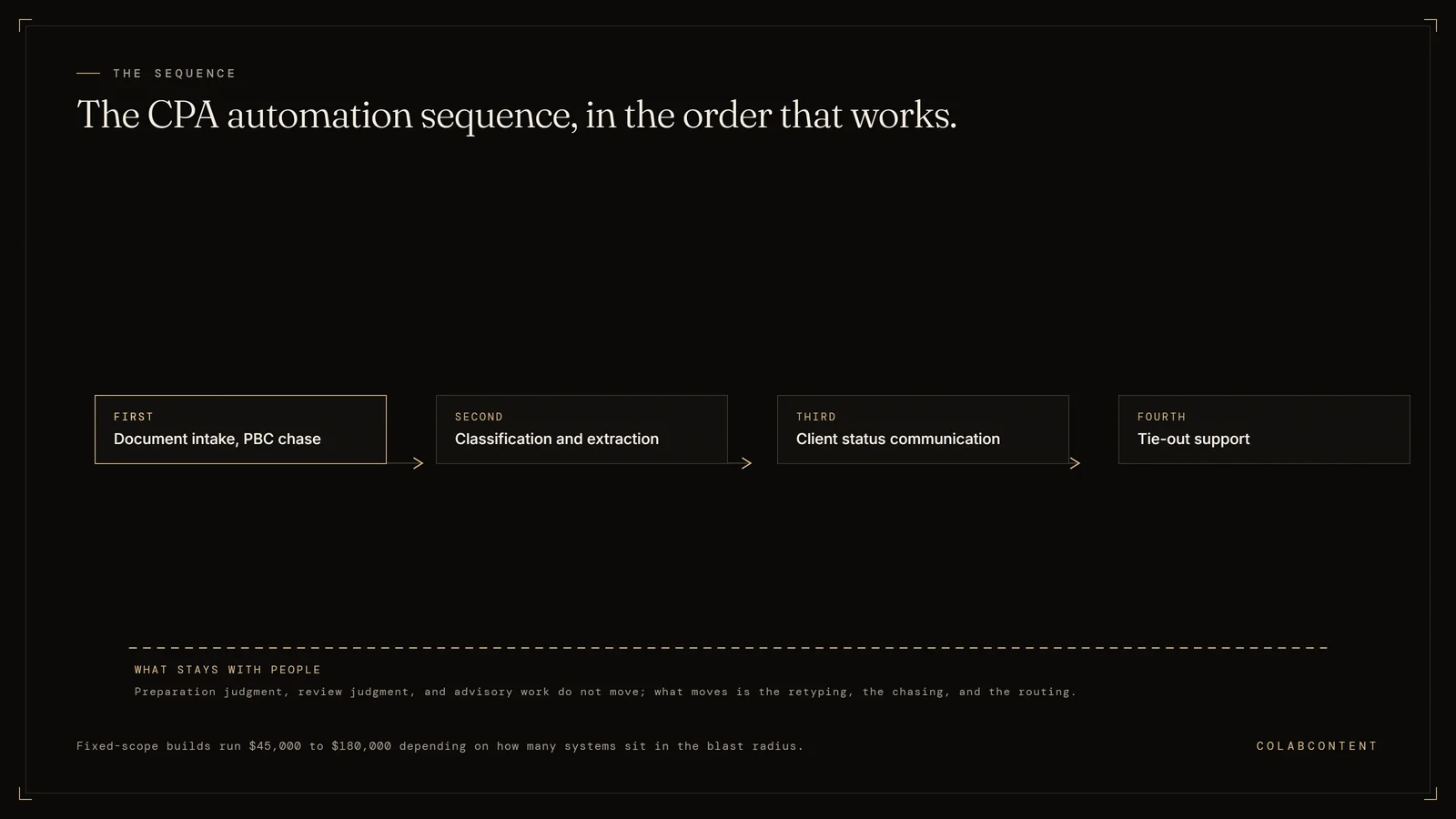
A CPA automation consultant is hired to find the repeatable work inside an accounting firm, build the systems that absorb it, and hand those systems over. In a mid-market practice the sequence that works is document intake and PBC (the prepared-by-client document list) chase first, then classification and extraction, then client status communication, then tie-out support.
This is not the right path for solo practitioners (SaaS economics win), firms whose only need is tax prep automation (Lacerte and UltraTax add-ons cover that), or firms without a named workflow constraint worth $10,000 or more in annual leakage.
Written for firms of roughly 20 to 150 professionals running CCH Axcess, UltraTax, Lacerte, or ProSystem fx alongside a practice management platform. What can genuinely be automated, the order to do it in, what it costs, and how to tell a builder from a reseller before you sign anything.
What the numbers say and where each path fits.
Most firms that go looking for an automation consultant are not actually short on software. They already own a practice management platform, a document management system, a portal, and a tax engine, and each of those products automates something. The gap is between them. Work stalls in the seams: a client uploads a bank statement to the portal, someone has to notice it, decide what it is, rename it, file it, mark the request satisfied, and then tell three other people the engagement can move. No product owns that sequence, because it runs across four vendors.
That is the actual job. A CPA automation consultant is being hired to build the connective layer that the firm's vendors have no commercial reason to build. It is unglamorous work, it is specific to your firm's document taxonomy and your firm's review hierarchy, and it is the reason a generic AI pilot fails: the pilot proves the model can read a K-1, which was never in doubt, and proves nothing about whether your engagement can move on its own.
The second half of the answer is that a real consultant will talk you out of things. Return preparation is not the automation target. Review judgment is not the automation target. If someone tells you a model will prepare and sign off on returns at your firm this year, they are either not serious or not accountable for the result. The defensible scope is the administrative burden wrapped around professional work, and in a firm doing several thousand returns a season, that burden is large enough to justify a real build on its own.
Key Terms
Workpaper automation: using AI to prepare, cross-reference, and review audit and tax workpapers (the working files behind a tax return or audit) against source documents; the workflow where mid-market firms see the fastest time savings. Trial balance reconciliation: automated matching of general ledger balances to subledger detail and bank statements; a high-volume task that AI reduces from hours to minutes. Engagement letter compliance: ensuring every client engagement has a signed, current letter that matches the scope of work performed; a risk management requirement manual tracking routinely misses. Staff leverage ratio: the number of staff and senior associates a partner can supervise productively; AI tools that handle routine preparation increase this ratio without adding headcount.
What a mid-market firm can actually automate.
This is where most firms should start, because it is measurable in a number partners already watch: days from engagement open to complete document set.Automate nowHighest volume, lowest risk
The correct posture is extraction with a confidence score and a human queue for anything below the threshold. Full unattended extraction on tax source documents is not a defensible design.Automate nowWith a review queue
The build is straightforward. The hard part is agreeing internally on what the firm is willing to say automatically and where a human must sign off, which is a policy conversation, not an engineering one.Automate nowPolicy first, then build
Built correctly this compresses the mechanical half of review and leaves the judgment half untouched. Built badly it produces a list of false flags nobody reads by week two, which is the most common way this specific project fails.PartlySurface exceptions, do not clear them
It works because the source is your own documents and every answer can cite the document it came from. A system that answers tax questions from general model knowledge, with no citation into your file, is a liability rather than a tool.Assist onlyCited to your own documents
The value of automating items 01 through 04 is precisely that it returns hours to this category, which is also the highest-margin work in the firm.Do notThis is the profession
The tax-season teardown shows which of these six a real firm's hours were actually going to.
The sequence, and why order decides the outcome.
Firms rarely fail at automation because they picked the wrong technology. They fail because they started in the wrong place, usually the most visible place rather than the highest-volume one. The order below is not arbitrary; each step makes the next one cheaper, because it produces the structured data the next step needs.
- Fix intake first. Everything downstream depends on documents arriving identified and filed. Automating review while intake is still manual means you have automated the fast part of a slow process.
- Then classification and extraction. Once intake is a controlled channel rather than five inboxes and a portal, classification has something consistent to work against, and extraction produces the structured records that make everything after this point possible.
- Then communication, off the state you now have. By this point the system knows what has arrived and what has not, so status messages generate themselves rather than requiring a person to go look.
- Then tie-out and exception surfacing. This step needs structured figures from step two. Attempting it first means building a second extraction pipeline you will throw away.
- Then measure, and only then expand. Take the baseline number before step one, not after. Firms that skip the baseline cannot prove the return and end up defending the spend with anecdotes.
There is a calendar constraint on top of the sequence that is specific to this profession. A system meant to relieve tax season has to be live, tuned, and trained on well before January, which means the scoping conversation belongs in summer or early fall. A build that lands in February does not get adopted, because nobody learns a new tool during the worst six weeks of their year. If you are reading this in October, the realistic plan is to pilot on extension work and target the following season. The tax-season teardown walks the arithmetic of where one firm's chargeable hours actually went, which is the exercise that usually settles which step to start with.
Should we hire someone to automate our firm, or just buy better software?
Explains where practice management platforms like Karbon, Canopy and TaxDome stop, and where a commissioned automation layer picks up: the platforms own the work record, several now layer AI drafting and summarizing on top of it, but the gap they leave is what a consultant is hired to close.
What the platforms cover, and where they stop.
Karbon, Canopy, TaxDome, Jetpack Workflow, Aiwyn, and Pixie are practice management platforms. That category is real, the products are good at what they do, and a firm without one should probably buy one before it considers commissioning anything. They own the work record: who owns which job, what stage it is in, what the client was told, what time was booked against it. Several now layer AI features on top of that record, typically drafting and summarizing client email, turning threads into tasks, and answering questions about work in progress.
The boundary is structural rather than a question of feature maturity. A practice management platform manages the record of work. It does not reach into tax production. It does not read a client upload against last year's actual request set, and it does not agree a workpaper figure to its source. Where these platforms do touch the tax stack, what they move is contacts, documents and work items rather than figures written into the return itself. Karbon's own integration directory, at the time of writing, lists CCH Axcess as coming soon and its live tax integrations as handoff into tax prep tools. That is the boundary most likely to move, so check the vendor's current integration list yourself and test any claim to the contrary in a demo on your own documents rather than on a roadmap slide.
So the diagnostic question is narrow and answerable in one sentence: is your bottleneck the record of work, or the production of work? Firms that cannot answer it usually buy a platform, adopt a fraction of it, and still have the original bottleneck a year later. Our page on what Karbon AI does and where it stops works through that boundary in detail, and the Karbon alternatives comparison covers the platform-versus-platform version of the decision if that is genuinely the layer you need.
The per-seat math, run honestly.
Practice management platforms in this category are sold per user, on a recurring subscription, with the AI capability bundled into the seat rather than billed as its own line. Where vendors differ is which tier it lands on and which specific capabilities are held back as paid add-ons, and that position moves: Karbon currently states that its AI features are available to all customers at no additional cost across its paid plans, while other capabilities on its card sit behind higher tiers. Pull the current number off the vendor's own pricing page rather than trusting any comparison article, including this one. Then run the arithmetic your CFO would run: current professional headcount, times the seat price on the tier you would actually buy, times twelve, times the number of years you expect to run the platform. Karbon's published seat bands and a worked 24-month model at a 75-professional firm, run at the Business tier, are on our Karbon AI page.
The structural point survives whatever the current prices are. A subscription scales with your org chart and never stops. A commissioned build is priced once against a written scope, and if you own the code at handoff it does not have a renewal date. For a firm that is growing headcount, those two cost curves diverge, and they diverge faster the more people you add.
That is not an argument that custom always wins. It is an argument that the comparison has to be made on total cost over the horizon you actually plan to operate on, not on the first invoice. A firm of 25 people evaluating a per-seat platform is looking at a very different curve than a firm of 120. Our build, buy, or commission framework lays out the three-way decision, and off-the-shelf AI SaaS cost at scale works the arithmetic in general terms.
When buying is the right call, plainly.
Buy if you do not have a practice management platform, or the one you have is genuinely failing. Buy if your firm is under roughly 20 professionals, because a fixed-fee build rarely returns its cost at that volume. Buy if you are consolidating vendors and the strategic goal is fewer systems rather than better ones. Buy if nobody internally can name a single bottleneck in one sentence, because you are not ready to specify a build and you will pay a consultant to discover that for you.
Buy first, and revisit, if your data is a mess. A firm with three naming conventions, four places client documents can land, and a document management system nobody trusts is not blocked on AI. It is blocked on data structure, and a build sitting on top of that mess inherits it. A serious consultant will say this on the first call and decline the work. We have written up what that looks like in data readiness for mid-market AI, and there is an honest list of the projects we turn down in what we do not build.
When commissioning is the right call.
Commission when practice management is working and the pain is inside production. Commission when the bottleneck is nameable in one sentence and the same sentence comes back from three different partners independently. Commission when the workflow depends on your firm's own taxonomy, your own prior-year request sets, your own review hierarchy, because those are exactly the things a product calibrated against the average customer cannot represent.
Commission when the integration has to run inside the tax stack rather than beside it. This is the most common reason mid-market firms end up here. A tax team that lives in CCH Axcess or UltraTax will not context-switch into a second interface during season, so an automation that requires them to is an automation that does not get used. Building against the platform's own integration surface puts the work where the preparers already are. The stack-specific detail is in the CCH Axcess AI workflow playbook, the Lacerte automation playbook, the UltraTax integration playbook, and the ProSystem fx workflow playbook. If you want the engineering-level answer before the commercial one, the CCH Axcess API documentation, auth, and rate limit notes are the ones a developer will ask for on day one.
Most firms of any size end up running both. A platform for the work record, a commissioned layer for the production steps the platform was never built to reach. The sequencing question is which one you are more short of right now, and that is usually obvious once someone has actually watched a week of your engagement pipeline instead of reading a feature grid.
Do accounting firms still use RPA?
Yes, and the honest framing is that RPA and language models solve different halves of the same problem rather than one replacing the other. Screen-scraping robotic process automation is still the correct answer when a firm has a stable legacy interface with no API (the connection one piece of software offers to another) and a repetitive, fully deterministic sequence of clicks to perform against it. It is fast to stand up and it works until the interface changes, at which point it breaks silently, which is the complaint every firm that ran an RPA programme in the late 2010s eventually filed.
What changed is the input side. RPA never handled variability, so accounting firms wrapped it in templates and rules and spent more maintaining the exceptions than the bot ever saved. A language model reads a client PDF whose layout is different this year, a bank statement from a bank you have never seen, an email where the answer to your request is buried in the third paragraph. That is the class of input that defeated rule-based automation for two decades.
The design that actually holds up in a firm uses both: a model to read and decide, deterministic code or an API call to act, and RPA only where no API exists. Anything the model is not confident about goes to a human queue rather than through. If a consultant proposes a pure RPA programme in 2026, ask how they handle documents that change format. If they propose a pure model programme, ask what happens when it is wrong and who finds out.
What it costs, and how to vet whoever is selling it to you.
Publishes the fee bands rather than making a firm ask for a quote: a focused build from $10,000 over 4 to 5 weeks, an operations rebuild quoted after the $499 audit over 6 to 8 weeks, and a platform commission for firms coordinating across systems, plus what to check before signing with anyone.
The fee bands, published rather than quoted on request.
Our commissions are fixed fee against a written scope, in three bands. A focused build addressing one clearly defined system, for example a document intake and classification pipeline for a single practice area, runs from $10,000 over 4 to 5 weeks. An operations rebuild covering an end-to-end workflow with cross-system integrations, dashboards, and alerting is quoted after the $499 audit over 6 to 8 weeks. A platform commission coordinating multiple systems with a custom interface for your team is quoted after the $499 audit over 10 to 14 weeks. Payment is two installments, one when the production build starts and one at handoff.
For orientation against the rest of the market (our estimate, from the rates independent consultants and mid-tier firms commonly quote): independent consultants generally bill $150 to $500 an hour, mid-tier firms $300 to $1,000 an hour, and Big Four AI strategy engagements start well above any of that with implementation quoted separately. The structural difference matters more than the rate. An hourly engagement rewards the consultant for taking longer. A fixed fee against a written scope puts the cost of mis-scoping on the consultant, which is where it belongs, because they are the one who wrote the estimate.
After handoff, ongoing care is optional at $997 a month, cancellable any time. A firm with internal technical capacity can decline it entirely, because it owns the source code. The full breakdown by scope sits on AI consulting cost for CPA firms, and the general bands are on the pricing page.
Six structural tests that separate a builder from a reseller.
One. Do they build on your data before you pay? The single most useful filter. A consultant who will put a working prototype on your actual documents and your actual workflow before any fee changes hands is exposing themselves to the risk of being wrong in public. Slideware cannot fake it. We build the prototype in 7 to 10 days, before any fee is owed, and if it does not hold up you walk away owing nothing.
Two. Is the fee fixed against a written scope? Ask what happens if it takes twice as long as they estimated. If the answer is a change order, you are carrying their estimation risk.
Three. Who owns the code at the end? Ask it directly and get the answer in writing. If the reply involves a license, a hosted platform you cannot leave, or per-seat fees, you are buying a dependency and calling it a build.
Four. Who is actually doing the work? Larger shops sell with senior people and staff with junior ones. In this domain a misunderstanding about review hierarchy or workpaper convention quietly breaks an automation months later.
Five. What are they refusing to build? A consultant with no answer to this has not thought about your liability. Ours is written down in what we do not build.
Six. Can you talk to a reference who will be honest? Not a logo wall. A named client, on the phone, who will tell you what went wrong as well as what worked. Ours is below.
What we have actually built, stated plainly.
Being specific about this matters more than usual, because the category is full of claims nobody can check. ColabContent LLC has operated since 2020 and has run an AI practice since 2024, out of Boston. Across clients our systems have handled more than 6,000 live calls.
The nameable reference is Jim Glaser Law. We built five channel-specific voice agents covering PPC, Organic, TV, Meta, and LSA, which gives the firm per-channel attribution on answered calls rather than on form fills. Those agents have handled 3,787 calls and 5,514 minutes. Jimmy will take a reference call and does refer.
The engagement most relevant to an accounting firm is one we can describe but not name: a law firm whose matter, invoice, and IOLTA (the client trust account a law firm must keep separate) trust accounting system runs on a platform we commissioned. It carries 13,296 matters, 4,396 clients, and 5,684 invoices, and the trust ledger reconciles byte-identical. That is a regulated financial-record system with money-handling rules that a state bar audits, which is the closest analogue we have to the standard a CPA firm would hold us to.
Other engagements, anonymized because those clients have not agreed to be named: a multi-location home services operator at 1,486 AI-handled calls and 2,203 minutes, a regional 3PL and warehousing operator at 211 calls, a realty firm at 148 calls, and two marketing agencies that outsource their AI fulfilment to us.
What we will not do is claim a public accounting reference we do not have. If a named CPA-firm reference is a requirement for you, say so on the first call and we will tell you honestly where we stand rather than producing a case study. The rest of our thinking on the vertical is in what actually works in CPA firms, which includes where these projects fail.
Data handling, in writing, before anyone touches a client file.
Client financial records are among the most sensitive data your firm holds, you carry professional liability for mishandling them, and you operate under IRS and state board requirements that a software vendor does not. Any consultant who waves this away has disqualified themselves. The questions belong in writing, before work starts, and they are specific.
Where does data sit during prototyping and during development? Is anything sent to a third-party model provider, under what contractual terms, and does that provider retain or train on your inputs? Who holds credentials during the build, and exactly how is access revoked at handoff? What is logged, where do the logs live, and who can read them?
You can also reduce exposure structurally during the prototype stage by supplying a representative sample of files rather than live client records. It is normally enough to prove the system works, and it means the highest-risk period of the engagement runs on the lowest-risk data.
Ownership is the protection that outlasts the engagement. When the firm holds full source code and architecture documentation, it can run the system inside its own environment, audit exactly what happens to data, and change hosting or providers without renegotiating with anyone. Compare that with a subscription tool, where client data flows through a vendor's infrastructure indefinitely under terms the vendor can revise. There is a longer list of the questions worth asking in security questions to ask before an AI build, and the ownership argument in full in why code handoff matters.
How to know afterward whether it worked.
Decide the measurement before the build starts and take the baseline before anyone writes code. This is the step firms skip, and skipping it is why so many automation programmes end in a disagreement about whether the money was well spent that nobody can settle with evidence.
Use a number your firm already tracks, not a new one invented for the project. Days from engagement open to complete document set. Realization on a defined engagement type. Hours coded to administrative categories per return. Percentage of returns that sit in review more than once. Any of these are fine; what matters is that it existed before the project and that a partner already believes it.
Then be honest about attribution. If you automated intake in October and realization improved in April, other things also changed. The defensible claim is usually narrow and specific, such as a named step that used to take a measurable amount of admin time per engagement and now does not. A consultant who promises a firm-wide percentage improvement before seeing your data is guessing, and you should treat the number as marketing.
If the measurement is not obvious, that is a signal about scope rather than about measurement. It usually means the target is not specific enough to build against yet. Two useful reads on this are how to measure ROI on a mid-market AI engagement and why mid-market AI rollouts stall in month four, which is mostly a story about measurement never having been set up.
Start with the $499 audit.
No slides. We walk your engagement pipeline from the first document request through review sign-off, name the step costing the most reviewable hours, and tell you whether a build is the right lever for it. If packaged software would serve the firm better, we say so on the call.
Frequently Asked Questions
Short answers first, detail underneath. Every answer here matches the FAQ schema on this page word for word, and each one is the answer we give on the audit call. Where a question depends on your own numbers, the $499 AI-Ready Audit report replaces the general answer with your figures.
What does a CPA automation consultant actually do?
They find the repeatable work inside your firm, build systems that absorb it, and hand the systems over. In practice that means sitting with your engagement pipeline, naming the steps where staff retype data that already exists somewhere, and building against your tax and practice management stack. A consultant who opens with a product recommendation before watching your workflow is selling software, not automation.
How much does it cost to hire someone to automate a CPA firm?
Our fixed-fee commissions run from $10,000 for one focused system over 4 to 5 weeks, quoted after the $499 audit for an end-to-end workflow rebuild over 6 to 8 weeks, and quoted after the $499 audit for a multi-system platform over 10 to 14 weeks. For orientation, not a verified survey: independent hourly consultants run $150 to $500 an hour, mid-tier firms $300 to $1,000, and Big Four strategy work starts far above all of it with implementation quoted separately.
Should we automate before or after tax season?
Scope in summer, build in early fall, run a live pilot on real work in November and December, then go into January with a system your staff already trust. A build that lands in February will not be adopted, because nobody learns a new tool during the worst six weeks of their year. If you are already past October, pilot on extensions and target the following season.
Do accounting firms still use RPA, or has AI replaced it?
Both are still in use and they solve different problems. Screen-scraping RPA is still the right answer for a stable legacy interface with no API, and it is still brittle the moment that interface changes. Language models handle the messy input RPA never could, such as a client PDF that arrives in a different layout every year. Most working systems now use both: a model to read and decide, deterministic code or RPA to act.
We already pay for Karbon. Do we still need an automation consultant?
It depends on where the bottleneck sits. If practice management, task tracking, and client email are the friction, Karbon addresses that and a consultant would be redundant. If the pain is inside tax production, PBC chase, classification of client uploads, or tie-out, a practice management platform is not built to reach in there. Firms that buy a platform to solve a production problem usually still have the production problem a year later.
Is our firm too small for a custom automation build?
Under roughly 20 professionals, usually yes. The fixed-fee model earns out when one automated step touches enough volume to return the fee, which typically means a firm somewhere in the established mid-market band. Below that, buy the packaged tools, get your data structures clean, and revisit a commissioned build when a single workflow is consuming hundreds of staff hours a season.
How do we let a consultant work with client tax data safely?
Put four answers in writing before anyone touches a file: where client data lives during development, whether any model provider retains or trains on your inputs, who holds credentials during the build and how access is revoked at handoff, and who owns the code at the end. You can also prototype on a representative sample rather than full client records. Owning the code afterward is what makes the data path auditable permanently.
How do we know the automation actually saved hours?
Pick the measurement before the build starts, from a number your firm already tracks. Days from engagement open to complete document set. Realization on a defined engagement type. Hours coded to administrative tasks per return. Take a baseline from last season, then compare the same number after. If a consultant cannot tell you which existing metric should move, the scope is not specific enough to build against yet.
What if the automation does not work?
You see the prototype on your own documents in 7 to 10 days before any fee changes hands. If it does not hold up against your actual workflow, you owe nothing and there is no build.
Do we own the system at handoff?
Yes. The code, prompts, and documentation transfer to the firm at handoff, and the system runs inside your own environment. There is no license and no per-seat fee to keep it running.
How long does a commissioned build actually take?
A focused build runs 4 to 5 weeks from a written scope. An end-to-end operations rebuild runs 6 to 8 weeks, and a multi-system platform commission runs 10 to 14 weeks, both quoted after the audit.
What is expected of us during the engagement?
One named partner or manager who knows the workflow, a representative sample of real documents, and time for the audit call and a same-day callback. Nobody on your side needs to write code.
Where to look next.
If you are still deciding whether to engage anyone, three pages carry the specifics this one summarizes. The commission process runs the five phases between the first call and handoff, including the prototype built on your own data before any fee is owed. How to choose an AI consultant for a CPA firm is the vetting checklist in long form. And the guide to AI consulting for accounting firms covers the engagement shape from the other direction, for partners who want the overview before the mechanics.
For firm-level context, the CPA practice page lists the workflows most often commissioned in accounting firms, AI consulting cost for CPA firms breaks the fee bands down by scope, and the 2026 CPA AI benchmark covers adoption patterns across firm sizes. If you are weighing an internal hire against an outside build, internal AI hire versus commissioned build is the structured version of that argument.
If a specific product is already on the shortlist, read the comparison before the demo rather than after: Karbon AI against a commissioned build, Jetpack Workflow versus Karbon, and Accelamos versus Karbon cover the practice management layer. For the production layer, the stack playbooks go deeper: CCH Axcess workflow, the CCH Axcess API and rate-limit notes, Lacerte at tax season, UltraTax, ProSystem fx, and Sage Intacct.
And if you would rather see the arithmetic before talking to anyone at all, the tax-season teardown traces where one firm's chargeable season hours actually went and hands over the worksheet we use on paid engagements.