Home/ Playbooks/ Salesforce Litify AI

Litify AI: what ships native, and what firms build on top.

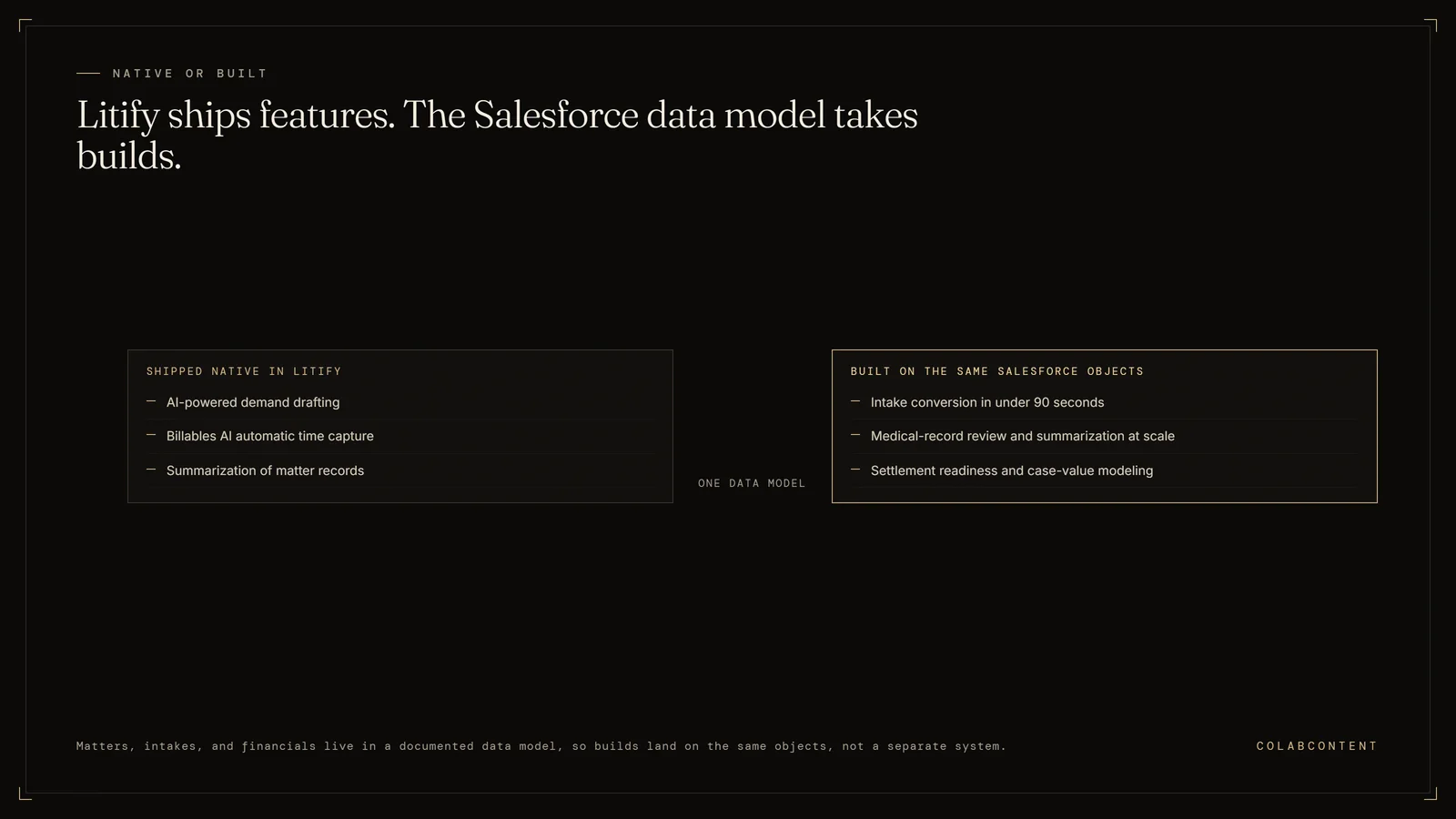
Litify AI is the AI capability inside Litify's legal platform, which runs on Salesforce. It has shipped feature by feature rather than as one assistant, with publicly announced pieces including AI-powered demand drafting and Billables AI for automatic time capture, plus summarization of the matter records already stored in Litify objects. Because it sits on Salesforce, the extension path is unusually open: the firm's matters, intakes, and financial records live in a documented data model, so intake scoring, medical-record summarization, and case-value modeling beyond the native features can be built against the same objects rather than in a separate system.

The boundary of Litify AI on Salesforce: native features cover demand drafting, Billables AI time capture, and matter summarization, while intake conversion scoring, medical-record review at scale, and case-value modeling are built on the same documented Salesforce objects
Native features and custom builds share one documented data model.

Custom AI on top of Salesforce Litify for plaintiff and mass-tort law firms. Intake automation, medical-record summarization, case-value modeling, and settlement-readiness AI on top of Litify's Salesforce Lightning platform.

ForManaging Partner / Director of Intake
StackSalesforce Litify + custom AI layer
Build cycle6-8 weeks

Why this memo.

Plaintiff and mass-tort firms running Litify on Salesforce Lightning have a specific leverage profile that's different from defense-side mid-market firms. The bottleneck is intake speed (every day of delay costs cases to faster-responding competitors), medical-record review velocity, and settlement-readiness packaging at scale. Salesforce Einstein and Litify's native AI features cover some of this; the parts they don't cover are where the largest dollar impact lives.

The Litify on Salesforce surface area we touch.

Salesforce Litify gives us the Lightning Platform's full API surface: Apex, Lightning Web Components, Platform Events, Bulk API. We integrate at the platform level, building Lightning Apps the firm's intake team and case managers use natively without learning a new tool.

This is unusual in our work; most playbooks are written against single-purpose verticalized platforms. Litify on Salesforce gives us more architectural surface to work with, which translates to deeper workflow integration.

Workflow I: Intake conversion in under 90 seconds.

Plaintiff intake speed is the conversion lever. The custom AI receptionist answers, qualifies (case-type screen, conflict-clear, statute-of-limitations check, retainer signal), drafts the engagement letter from the firm's template, creates the Litify matter with correct case-type metadata, kicks off the document collection. Inbound to retainer in under 90 seconds for fits-the-pattern cases.

Workflow II: Medical-record review and summarization at scale.

The expensive workflow at every personal-injury and mass-tort firm. Custom AI reads the medical records (PDF, fax-to-PDF, EHR exports), extracts the timeline, surfaces the causation-relevant entries, drafts the medical chronology in the firm's standard format. Paralegals validate; partners read the chronology, not the records.

Workflow III: Settlement readiness and case-value modeling.

The strategic workflow. AI reads the case state from Litify (medicals, lost wages, liability documents, defendant insurance), models against the firm's historical settlement patterns and venue data, surfaces the settlement-readiness score and the suggested negotiation posture. Attorneys validate and override; the model improves through their feedback.

Integration playbook

How a custom AI layer integrates with Salesforce Litify.

Why this integration matters.

Salesforce Litify sits at the center of the operational stack for many law firms. The workflows that route through it are the workflows where AI investment shows up first on the P&L: intake to matter routing, conflict checks, document automation, matter-to-template matching, timesheet reconciliation. A commissioned AI layer that integrates cleanly with Salesforce Litify addresses those workflows without forcing the operator to migrate off the system of record.

Architecture: where the AI layer sits relative to Salesforce Litify.

The most common integration pattern is a read-and-suggest pattern. The AI layer reads structured records out of Salesforce Litify, runs the workflow it was commissioned to run, and writes back a suggested action that a human reviewer approves inside Salesforce Litify's native UI. The system of record stays Salesforce Litify. The AI layer never bypasses the human-in-the-loop step for production-data writes.

For lighter-touch workflows we have shipped read-only layers that extract structured data out of Salesforce Litify, hand it to a reasoning step, and emit a report. No writes back. The operator uses the report as input to their existing decision process. Time to ship is faster, integration risk is lower.

For heavier workflows where the audit trail is structured and the failure cost is bounded we have shipped fully bidirectional integrations that close the loop end-to-end with structured logging. These engagements take longer (six to seven weeks rather than four to five), require more diligence on the read/write permissions inside Salesforce Litify, and ship with a runbook for human review of edge cases.

The integration mechanics, in plain language.

Integration with Salesforce Litify happens at one of three levels: the API layer, the webhook layer, or the database layer. The right level depends on what permissions the operator's Salesforce Litify instance grants, what data the workflow needs to see, and what data the workflow needs to write.

API layer. Read and write through Salesforce Litify's documented REST or SOAP endpoints. Cleanest, most maintainable, vendor-supported. Works when the data the workflow needs is exposed through the API.

Webhook layer. Subscribe to Salesforce Litify events, react to them in real time, write back through the API. Good for workflows that need to fire when a specific record changes.

Database layer. Direct read against the underlying database, where the API does not expose what is needed. Brittle, requires direct hosting access, used only as a last resort and always with the operator's explicit approval.

Common pitfalls when integrating AI with Salesforce Litify.

Treating the integration as an afterthought. The AI work is the easy part. The integration is the hard part. Operators that under-invest in the integration boundary spend the entire build cycle fighting authentication, rate limits, and edge-case schema. The commission scopes the integration boundary in the first week.

Skipping the human-in-the-loop step too early. Closing the loop end-to-end on day one is a recipe for hidden errors. Every engagement starts with human review of every AI output. Only after the operator has seen the output quality hold for sixty to ninety days does the human-in-the-loop step relax to spot-check.

Underestimating the data-cleanup work. Salesforce Litify contains data the operator has entered over years. Some of it is clean. Some of it is not. The AI layer's quality is bounded by the data it reads. Cleaning happens as part of the build, not as a prerequisite for it. If the data is unworkable we flag it in the diagnosis call.

Building bespoke when a product would suffice. If Salesforce Litify already has a productized AI feature that covers the workflow, the operator should evaluate it before commissioning a custom build. We will tell the operator honestly when that is the right answer.

Reference: prior commissions involving Salesforce Litify.

Specific numbers are bound by NDA but the pattern is consistent across the engagement set: the operator runs the workflow faster, with fewer hands, and with a structured record of every AI-generated suggestion alongside the human approval.

What a Salesforce Litify engagement scope looks like.

A typical Salesforce Litify commission scope: one or two specific workflows, read-and-suggest pattern, four-to-seven-week build cycle, fixed fee in the $45K to $180K band depending on integration depth and workflow complexity. The diagnosis call identifies the workflow. The prototype demonstrates feasibility against the operator's real data inside seven to ten days. The production build ships inside the operator's own cloud tenant under NDA.

The operator owns the Salesforce Litify integration code, the AI prompts, the model selection, and the data pipeline at handoff. We do not retain a license, a recurring fee, or a vendor relationship that the operator depends on.

Extended questions

The questions buyers ask after the first one.

What does Litify AI actually do?

Litify has been adding AI into the platform feature by feature. Publicly announced pieces include AI-powered demand drafting and Billables AI for automatic time capture, alongside summarization of records already held in Litify objects. Ask which features are generally available on your edition, because an announcement date and an availability date are rarely the same date.

Is Litify AI included or an add-on?

Litify prices per user and quotes AI capability inside the package rather than publishing a separate AI price. Get the fully loaded per-user annual number with the AI features enabled, then multiply by your three-year headcount plan. That figure decides build versus buy, not the first-year discount.

Can you customize Litify AI?

This is the question practitioners actually ask on forums, and the answer is that running on Salesforce is Litify's biggest advantage. Your matters, intakes, and financials sit in a documented data model your own build can read and write. Firms needing intake scoring, medical-record summarization, or case-value modeling beyond the native features build against those same objects.

Does Litify AI handle plaintiff and mass tort volume?

Litify is built for high-volume practice, so the native features are aimed at that shape of work. The ceiling appears in the parts specific to your firm: how you score a lead, how you value a case, what makes a file settlement-ready. A vendor cannot ship your underwriting. That is the piece worth commissioning.

What is the risk of building on Litify?

Two real ones. Salesforce governor limits and managed-package boundaries shape what a build can do inside the org, so architecture decisions have to be made up front. And an upgrade can move objects underneath you. Both are managed the same way: keep Litify as the system of record and the AI layer as read and suggest, never as a shadow database.

Litify AI or a commissioned build?

Both, in that order. Turn on the native features, run them for a quarter, and write down the work they did not touch. One anonymized 47-attorney litigation firm ended up with a commissioned platform running matters, invoices, and IOLTA trust: 13,296 matters, 4,396 clients, 5,684 invoices, trust reconciled byte-identical. A build should target only what the platform genuinely leaves behind.

Does the firm own what gets built on Litify?

On a commissioned build, yes. The code, the prompts, the model selection, and the data pipeline transfer at handoff, and the system runs inside the firm's own tenant. That is the structural difference from a subscription: there is no license to renew and no vendor to wait on for a change request.

How long does a Litify build take?

A prototype against the firm's real data in 7 to 10 days, then a production build in 5 to 7 weeks for one or two scoped workflows. The fee is fixed and set before the build starts, in the $45,000 to $180,000 band depending on integration depth.

What is the honest case for doing nothing yet?

If nobody in the firm can name the workflow that is leaking, that is the answer. Buy nothing, commission nothing, and spend a month counting. Firms that skip that step buy a platform, use a fraction of it, and still have the original bottleneck a year later.

Does Litify AI replace an intake team?

No, and the pitch to be suspicious of is the one that says it does. What AI removes from intake is the typing, the record lookup, the duplicate check, and the after-hours gap where a lead goes cold. The decision on whether a case is worth signing stays with a person, and any system that buries that decision inside a score is a liability.

What does an AI layer on Litify run on day one?

The narrow, high-frequency work first: summarizing a new matter file, drafting the first pass of a demand, capturing time nobody logged, and flagging files that have gone quiet. Wide systems fail because nobody trusts them. A narrow one that is right every day earns the room to expand.

Book the 45-minute diagnosis.

Custom AI on your Litify instance.