Home/ Playbooks/ Workiz AI Integration

Workiz AI integration playbook.

Workiz AI integration for PE-backed (owned by a private equity firm) home services platforms sits at the center of operations: it is where structured data lives and where the AI layer reads and writes. ColabContent commissions custom AI layers on top of Workiz at fixed fee (from $10,000), with code owned by the operator at handoff.

This is not the right path for single-location operators (SaaS, software you rent by subscription, economics win), platforms whose only AI need is call routing (IVR products cover that), or platforms without a named dispatch or scheduling constraint worth automating.

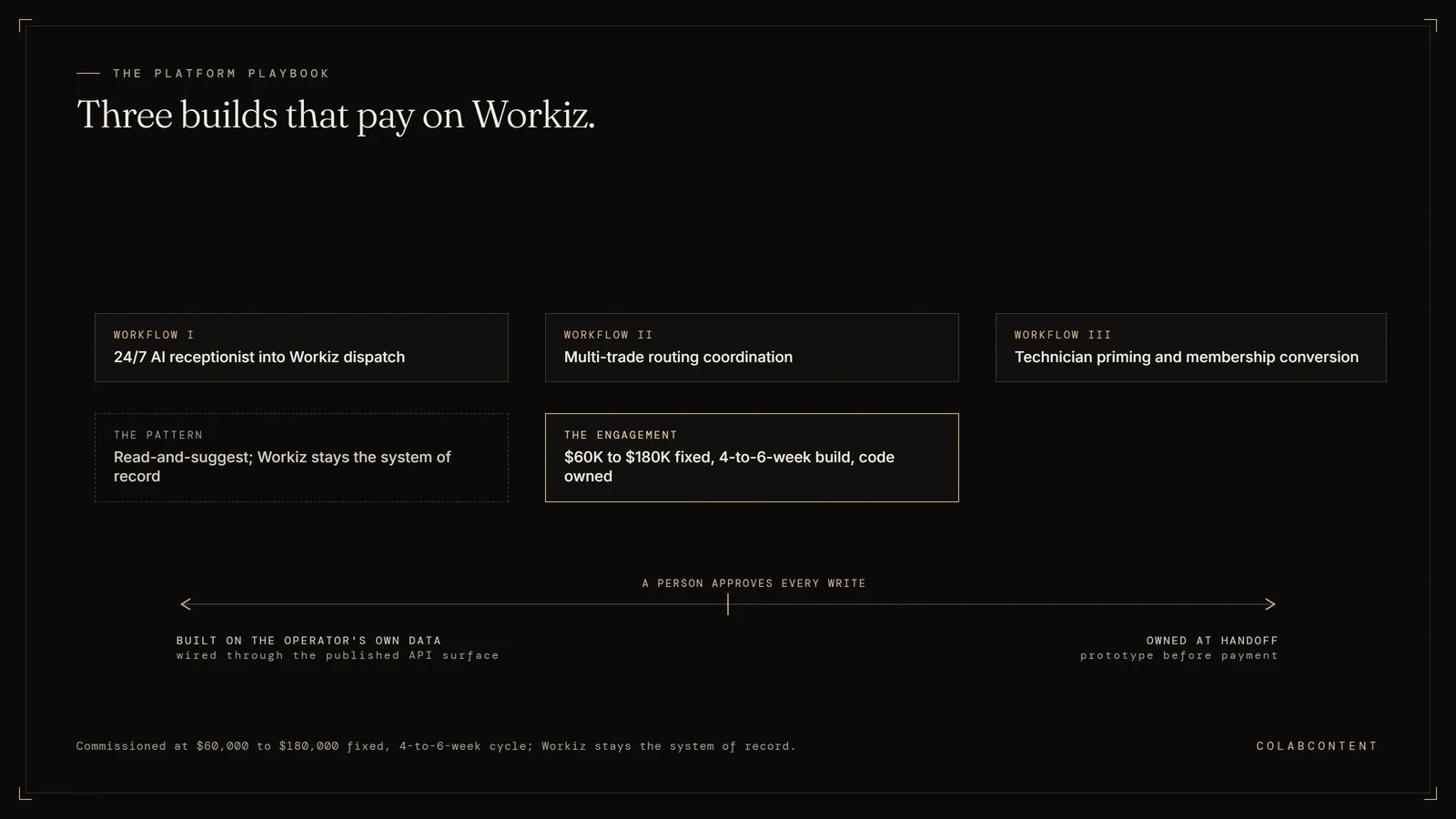
The three AI workflows ColabContent builds on Workiz for home services platforms: a 24/7 AI receptionist wired into dispatch, multi-trade routing coordination, and technician priming with membership conversion
Three builds on Workiz; the FSM stays the system of record.

Custom AI on top of Workiz for HVAC, plumbing, locksmith, garage-door, and appliance-repair operators. 24/7 AI receptionist into Workiz dispatch, technician priming, multi-trade routing. For owner-operators outgrowing Workiz Genius and the off-the-shelf AI tools.

ForOwner-Operator / Ops Manager
StackWorkiz + custom AI layer
Build cycle4 weeks

Key Terms

CSR (customer service representative) handle time: the average duration of a customer service call from pickup to booking confirmation; AI pre-screening and data lookup cut this time significantly. Fleet utilization rate: the percentage of available technician-hours spent on revenue-generating work versus drive time, callbacks, and idle time. Dispatch optimization: using AI to match technicians to jobs based on skill, location, parts inventory, and customer history; the workflow where home services platforms see the fastest capacity gains. Call-to-book ratio: the percentage of inbound calls that convert to booked appointments; AI phone agents lift this ratio by eliminating hold-time abandonment and after-hours missed calls.

The decision framework

The choice turns on three questions: (1) does the platform's dispatch and scheduling workflow match the patterns that existing FSM (field service management software) AI (ServiceTitan Pro, Housecall Pro, FieldEdge) already automates, or does the platform carry multi-trade complexity those products cannot represent; (2) does the platform's data posture allow a SaaS (software you rent by subscription) vendor to process technician and customer data under its own agreements, or do franchise agreements require infrastructure the platform controls directly; (3) over a 24-month horizon, does a compounding per-location subscription cost less than a single fixed payment for a system the platform owns outright. If all three favor a product, the SaaS path is stronger. If any one favors a build, the gap is worth quantifying: the $499 AI-Ready Audit sizes it in dollars and weeks.

What this playbook covers and who it is for.

Workiz serves a specific home-services segment: 5-50 technician operators in HVAC, plumbing, garage-door, locksmith, and appliance-repair, often with multi-trade brands under one operation. Workiz Genius (their AI receptionist product) is competent for the average customer. Mid-market operators with multiple trades, multiple locations, and complex routing logic typically benefit from custom AI on top of Workiz, not just configuration of the off-the-shelf product. If the question underneath the integration question is whether to stay on Workiz at all, Workiz alternatives prices seven options against a commissioned build and prints the 12 month auto-renewal clause Workiz never states in plain language.

The Workiz surface area we touch.

Workiz exposes a REST (a standard way for software to exchange data over the web) API with coverage of clients, jobs, dispatch, technicians, invoicing, and payments. OAuth2 authentication. Webhooks for job lifecycle events. The API is sufficient for the workflows below.

Workflow I: 24/7 AI receptionist into Workiz dispatch.

Same workflow as the ServiceTitan and FieldEdge versions, adapted to Workiz's job model. AI answers, qualifies, books, writes the job into Workiz with the correct service line, customer record, and notes. Multi-trade operators benefit doubly because the AI can correctly route the inbound to the right trade brand within the same Workiz instance.

Workflow II: Multi-trade routing coordination.

The Workiz-specific workflow. Operators running HVAC + plumbing + electrical (or HVAC + locksmith + garage-door) under one Workiz instance benefit from cross-trade dispatch optimization that Workiz's native dispatch doesn't surface. Custom AI reads the unified state, recommends the cross-trade-optimal route, lets the dispatcher accept or override.

Workflow III: Technician priming and membership conversion.

AI reads the customer + job history from Workiz, drafts the prime, pushes to technician mobile during truck-roll. Drives membership conversion at the kitchen table, the highest-multiple revenue stream for the operator, without adding a script the technician has to memorize or a screen they have to check first.

Integration playbook

How a custom AI layer integrates with Workiz.

On Workiz the layer typically reads job and customer history to draft the cross-brand reporting rollup or the priming message a technician sends, with a dispatcher reviewing before anything posts back. Call routing is usually the second workflow a shop adds once that first pattern is trusted.

Why this integration matters.

Workiz sits at the center of the operational stack for many PE (private equity) home services. The workflows that route through it are the workflows where AI investment shows up first on the P&L: call routing, dispatch optimization, estimate generation, membership program management, cross-brand reporting. A commissioned AI layer that integrates cleanly with Workiz addresses those workflows without forcing the operator to migrate off the system of record.

Architecture: where the AI layer sits relative to Workiz.

The most common integration pattern is a read-and-suggest pattern. The AI layer reads structured records out of Workiz, runs the workflow it was commissioned to run, and writes back a suggested action that a human reviewer approves inside Workiz's native UI. The system of record stays Workiz. The AI layer never bypasses the human-in-the-loop step for production-data writes.

For lighter-touch workflows we have shipped read-only layers that extract structured data out of Workiz, hand it to a reasoning step, and emit a report. No writes back. The operator uses the report as input to their existing decision process. Time to ship is faster, integration risk is lower.

For heavier workflows where the audit trail is structured and the failure cost is bounded we have shipped fully bidirectional integrations that close the loop end-to-end with structured logging. These engagements take longer (six to seven weeks rather than four to five), require more diligence on the read/write permissions inside Workiz, and ship with a runbook (the written operating instructions) for human review of edge cases.

The integration mechanics, in plain language.

Integration with Workiz happens at one of three levels: the API layer, the webhook (an automatic notification one system sends another when something changes) layer, or the database layer. The right level depends on what permissions the operator's Workiz instance grants, what data the workflow needs to see, and what data the workflow needs to write.

API layer. Read and write through Workiz's documented REST or SOAP endpoints. Cleanest, most maintainable, vendor-supported. Works when the data the workflow needs is exposed through the API.

Webhook layer. Subscribe to Workiz events, react to them in real time, write back through the API. Good for workflows that need to fire when a specific record changes.

Database layer. Direct read against the underlying database, where the API does not expose what is needed. Brittle, requires direct hosting access, used only as a last resort and always with the operator's explicit approval.

Common pitfalls when integrating AI with Workiz.

Treating the integration as an afterthought. The AI work is the easy part. The integration is the hard part. Operators that under-invest in the integration boundary spend the entire build cycle fighting authentication, rate limits, and edge-case schema. The commission scopes the integration boundary in the first week.

Skipping the human-in-the-loop step too early. Closing the loop end-to-end on day one is a recipe for hidden errors. Every engagement starts with human review of every AI output. Only after the operator has seen the output quality hold for sixty to ninety days does the human-in-the-loop step relax to spot-check.

Underestimating the data-cleanup work. Workiz contains data the operator has entered over years. Some of it is clean. Some of it is not. The AI layer's quality is bounded by the data it reads. Cleaning happens as part of the build, not as a prerequisite for it. If the data is unworkable we flag it in the audit call.

Building bespoke when a product would suffice. If Workiz already has a productized AI feature that covers the workflow, the operator should evaluate it before commissioning a custom build. We will tell the operator honestly when that is the right answer.

Reference: prior commissions involving Workiz.

Specific numbers are bound by NDA (a signed non-disclosure agreement) but the pattern is consistent across the engagement set: the operator runs the workflow faster, with fewer hands, and with a structured record of every AI-generated suggestion alongside the human approval.

What a Workiz engagement scope looks like.

A typical Workiz commission scope: one or two specific workflows, read-and-suggest pattern, four-to-seven-week build cycle, fixed fee from $10K depending on integration depth and workflow complexity. The audit call identifies the workflow. The prototype demonstrates feasibility against the operator's real data inside seven to ten days. The production build ships inside the operator's own cloud tenant (a private cloud account) under NDA (a signed non-disclosure agreement).

The operator owns the Workiz integration code, the AI prompts, the model selection, and the data pipeline at handoff. We do not retain a license, a recurring fee, or a vendor relationship that the operator depends on.

Buyer worksheet

When to commission and when to stay on the off-the-shelf product.

A Workiz shop that already gets good results from the built-in tools should not commission a build just because the option exists. This section covers how to tell whether the gap in the workflow is real or the platform already has it covered end to end.

The four-question sequence operators run before booking.

Operators who arrive at the audit call having run the sequence usually commission the build that same week. The sequence asks four questions in a specific order. First, is the leading constraint actually addressable with AI, or is it a process problem, a staffing problem, or a stack problem that AI would not solve. Second, if AI is the right intervention, is the right buying motion a custom commission, an off-the-shelf product, or an internal hire. Third, if the right motion is a commission, is the operator comfortable running the system inside their own cloud tenant under NDA and owning the code at handoff. Fourth, is the budget for a custom build from $10,000 real this quarter.

Operators who answer yes to all four book the call. Operators who answer no to any one of them either change the question (the leading constraint is different, the budget moves, the cloud posture changes) or take a different path. We do not push operators who land at a "no" on any of the four into a commission they will not be served by.

The three signals operators watch for after handoff.

Twelve months post-handoff, three signals tell the operator whether the commission performed against the target written down after the audit. First, the dollar or hour delta on the workflow the commission addressed, measured against the pre-engagement baseline. Second, the percentage of the workflow the AI layer now handles autonomously versus the percentage that still routes to a human reviewer. Third, the number of times the operator's team has modified the build's prompts, models, or integration code on their own without ColabContent involvement. All three should be improving over time. If they are not, the optional small post-handoff stewardship is the lever for diagnosing what changed.

The honest comparison against the alternatives.

A commission is not the right answer for every operator. The mid-market operator with a workflow that matches a horizontal SaaS product's calibration target is better served by the product. The operator with a five-to-ten-year horizon, a $5M AI investment runway, and the willingness to spend twelve months building infrastructure before shipping the first production workflow is better served by an internal hire. The operator at $500M-plus revenue with stakeholder counts that justify a Big Four engagement is better served by that motion. We will tell the operator which of those alternatives fits if a commission does not.

The honest case for a commission is narrow on purpose. Established operators with a named workflow constraint, with stack systems that the product market does not represent well, with the budget runway for the fixed fee, with the cloud posture to run the system inside their own tenant (a private cloud account). Operators in that narrow band are where the math works.

Why we publish the comparisons, the rankings, and the boundaries.

Most consulting houses do not publish ranked comparisons against their competitors, do not publish the boundary of what they will not build, and do not publish fixed-fee pricing bands. We publish all three because the operators we want to commission for are the operators who reward that transparency with a faster booking. The never-overbook rule means we are not optimizing for top-of-funnel volume. We are optimizing for the right four operators each quarter. Publishing the comparisons, the rankings, and the boundaries selects for those operators.

Integration question

Stuck on the Workiz integration? Send the question.

Tell us the Workiz workflow you want the AI layer to run and where it currently needs a person. An engineer who has built on Workiz before replies by email with a real cost range or a straight no.

Start with the $499 audit.

Custom AI on your Workiz instance: a fixed-fee prototype scoped to one named workflow, running on the shop's own dispatch and job data before any fee is owed, and the shop owes nothing if the prototype misses the target.

Next step

Start with the $499 audit. Bring the FSM (field service management software) platform, the current dispatch workflow, and the capacity metric tracked most closely. The call identifies whether a custom build, a platform feature, or a process change addresses the bottleneck. The call is part of the audit; no obligation after it.

Related reading: Integration Playbooks: What Each System Actually Exposes.

Related reading: AI Consulting for Home Services Platforms.

Frequently Asked Questions

These answers are scoped to the Workiz integration itself: what it actually connects to inside Workiz's own API, what size of home services operation it is built for, the realistic timeline from prototype to production, and who owns the resulting integration code once it ships.

What does a Workiz AI integration actually connect to?

Workiz's own API for jobs, scheduling, and invoicing, wired into an AI layer that reads and writes those records without replacing Workiz as the system of record for the home services business.

Is this integration built for a specific size of home services company?

Yes, PE-backed and independent home services platforms with enough job volume that manual dispatch or invoicing review has become the bottleneck, not a single-truck operation.

What is the build timeline for a Workiz integration?

A working prototype ships in 7 to 10 days on the operator's own job data, with the production build running 4 to 6 weeks after that prototype proves the workflow.

Who owns the integration code after handoff?

The operator does, outright, with no per-seat fee and no ongoing license back to ColabContent; optional $997-a-month care is available afterward but never required.