ServiceTitan AI integration, end to end.
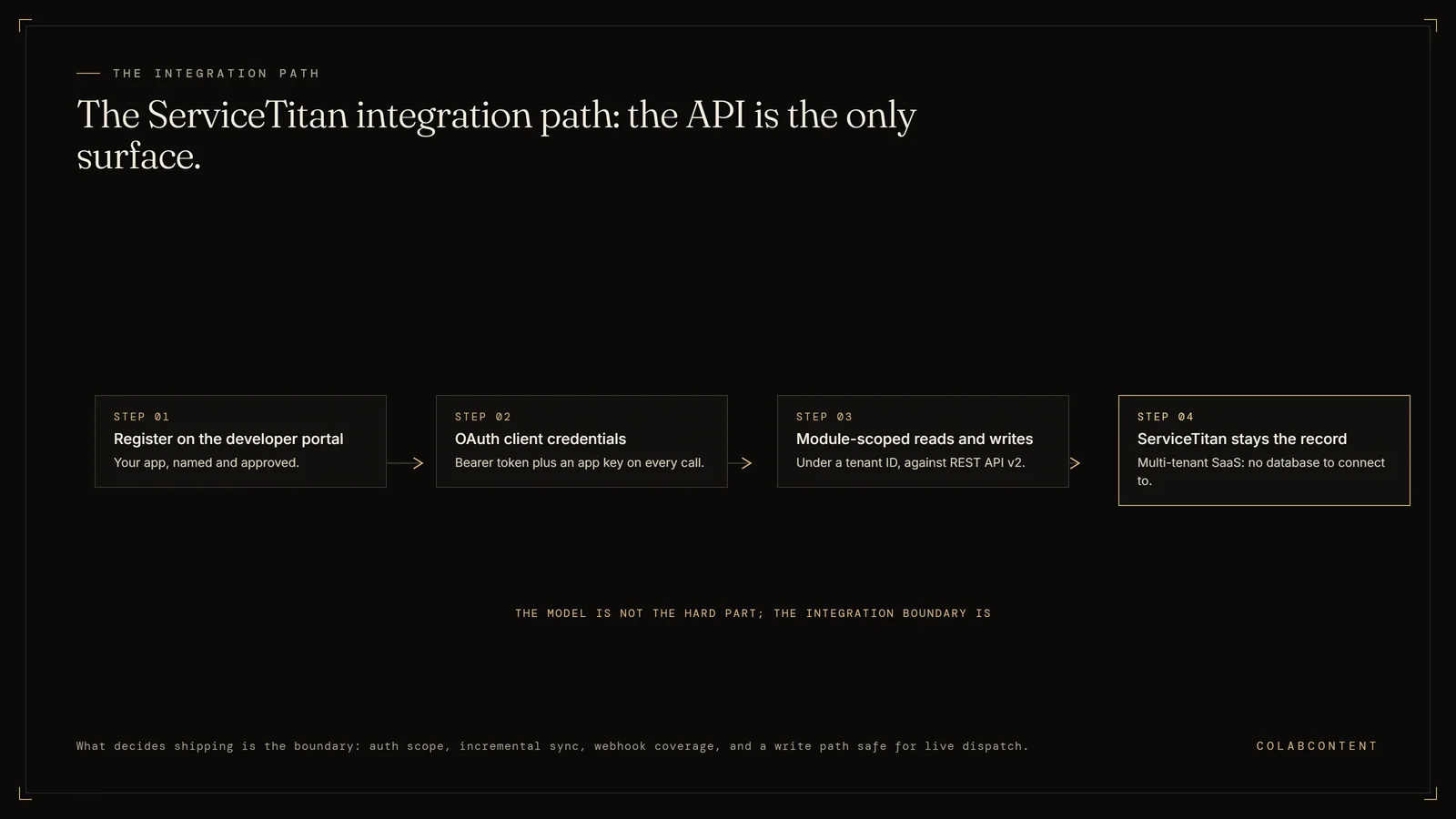
ServiceTitan AI integration means connecting an AI layer to ServiceTitan's REST API v2: your app registers on the developer portal, authenticates with OAuth client credentials, sends a bearer token plus an app key on every call, and reads or writes module-scoped records under a tenant (a private cloud account) ID while ServiceTitan stays the system of record.
The work that decides whether the project ships is not the model, it is the integration boundary: authentication scope, incremental sync, uneven webhook (an automatic notification one system sends another when something changes) coverage, and a write path safe enough to point at live dispatch. This is not the right path for single-location operators (SaaS economics win), platforms whose only AI need is call routing (IVR products cover that), or platforms without a named dispatch or scheduling constraint worth automating.
Written for the technical buyer at a home services platform: the VP of Ops or IT lead who has to say whether an AI layer can actually reach ServiceTitan, and the platform CEO deciding whether to buy a point solution or commission a build. This is the integration document. The commercial comparisons live on two other pages, linked below.
Key Terms
Membership conversion rate: the percentage of one-time service customers who enroll in a recurring maintenance plan; AI-timed follow-up sequences increase this rate. Average ticket value: the mean revenue per completed service call; AI-assisted diagnosis surfaces relevant add-on services the technician might not think to mention. CSR (customer service representative) handle time: the average duration of a customer service call from pickup to booking confirmation; AI pre-screening and data lookup cut this time significantly. Fleet utilization rate: the percentage of available technician-hours spent on revenue-generating work versus drive time, callbacks, and idle time.
The questions below cover how does an AI system integrate with ServiceTitan, how do I connect an AI receptionist to ServiceTitan so it books real jobs and is there a ServiceTitan API sandbox I can build against.
What the numbers say and where each path fits.
Every AI project on ServiceTitan resolves to the same four questions, in this order. What can the app read. What is it allowed to write. How does it know something changed. And who approves the write before it lands on a real dispatch board.
Answer those four and the build is straightforward. Skip them and you spend the engagement fighting token expiry, pagination (fetching results a page at a time instead of all at once), and a schema that does not mean what the field names suggest. The rest of this page is the answer to each one, plus the topology problem that only shows up at multi-brand platforms.
Two things this page is deliberately not. It is not the commercial case for building rather than buying, which is covered in ServiceTitan Pro Services versus commissioned custom AI. And it is not the sponsor-facing decision framework, which is covered in ServiceTitan Pro versus a custom AI build for PE platforms. Those two are the comparisons. This one is the wiring diagram.
Five parts, in the order you hit them.
The tenant grants your app a specific set of permissions, module by module. Ask for the narrowest set the workflow needs, then write down what you asked for, because expanding scope later means going back to the tenant admin.AuthEvery request
Most AI workflows touch three or four modules, and the permission grant has to cover all of them before anything works end to end.ScopePer module
If your AI layer needs a rolling picture of the whole tenant, replicate through the export family on a schedule and query your own copy. Do not paginate transactional endpoints across the entire customer base every night.ReadsTwo families
Scope the change-detection method per workflow, in week one, against the current developer documentation. Assuming a webhook exists and discovering in week four that it does not is how integration timelines slip.TriggersVerify each one
The default we ship is read and suggest: the AI proposes, a named human approves inside ServiceTitan, and both the suggestion and the disposition are logged with a timestamp. Unattended writes come later, per workflow, and only after the approval log shows the output holding.WritesHuman gate first
How a custom AI layer actually sits on ServiceTitan.
Because ServiceTitan publishes a documented REST API with OAuth client credentials, a build can read job and customer records on a schedule and write back through the transactional endpoints once a technician has signed off on the suggested action inside ServiceTitan itself.
Four integration patterns, cheapest to heaviest.
Read only, report out. The layer replicates the records it needs, reasons over them, and emits a report or an email. Nothing is written back. Lowest integration risk, fastest to ship, and the right shape for consolidated cross-brand reporting where the output is a document a human reads on Monday morning.
Read and suggest. The layer reads, produces a recommendation, and writes it somewhere a human sees it inside ServiceTitan, then a person accepts or rejects. This is the default for anything touching dispatch, pricing or a customer commitment. It needs write permission, but every write is a proposal rather than an action.
Event-driven write-back. The layer reacts to a change, does work, and writes a real record. This is where idempotency, retry policy and error routing stop being theoretical. Every write path needs a key that makes a retry safe and a dead-letter destination a human checks.
Front door. The layer sits ahead of ServiceTitan and originates records, most commonly a voice agent answering inbound calls and creating bookings. Heaviest, because the AI is now the first thing a customer touches and a failure is a lost call rather than a bad suggestion. Covered in its own fold below.
Pick the lightest pattern that solves the constraint. Roughly speaking, the cost of an engagement tracks this list far more than it tracks anything about the model.
Authentication, app keys and the integration environment.
The mental model that trips people up first: your integration is an app, not a user. You register it on ServiceTitan's developer portal, the tenant installs it and grants permissions, and from then on the app authenticates as itself using the OAuth client credentials flow. The token that comes back is short-lived, so cache it with an expiry margin and refresh on a timer rather than on a 401.
Alongside the bearer token, requests carry an app key header. Two credentials, both required, and a missing app key produces an authorization failure that looks like a bad token. That single confusion accounts for a surprising share of the first day of any ServiceTitan integration.
ServiceTitan also runs a separate integration environment with its own host and its own credentials. Build there. Test every write path there. The provisioning of that environment is a dependency on the tenant admin and on ServiceTitan, and it is not instant, so raise it in the kickoff call rather than the week you need it. Nothing in a ServiceTitan project is more embarrassing than a finished build waiting on a sandbox.
Credential handling is part of the scope, not an afterthought. Client secret and app key live in a secret store, not in configuration files, and they are rotated on handoff so the operator holds the only live copy. If a vendor cannot describe their key rotation on the audit call, that is worth noticing. There is a fuller list in the security questions to ask before an AI build.
The data model gotchas that cost the most time.
A booking is not a job. In ServiceTitan these are different objects with different lifecycles. A booking is an inbound request that someone converts. A job is scheduled work with an appointment. An AI receptionist that creates bookings and an AI receptionist that creates jobs produce very different mornings for a dispatcher, and the operator needs to choose deliberately rather than inherit whatever the integration defaulted to.
Business unit, job type and campaign are three different dimensions. They get conflated constantly. Capacity and cost roll up by business unit. Work classification is job type. Marketing attribution is campaign. If your AI books everything against a default campaign, you have silently destroyed the attribution the marketing spend is judged on.
Custom fields do not arrive as named properties. They come back as identifier and value pairs, so the layer has to resolve the field definitions before the values mean anything. Build that resolution once, cache it, and refresh it when the tenant adds a field, which they will, without telling you.
Timestamps are UTC and the business is not. Arrival windows, capacity boards and after-hours routing are all local time concepts. Mixing the two produces bugs that only appear near midnight or at a daylight saving boundary, which is exactly when nobody is watching. Normalise once, at the edge, and never let a local time string into the reasoning layer.
Call records and jobs have no native join. Telecom holds the call. JPM holds the job. Tying an inbound call to the job it produced is a matching problem you solve with the number and a time window, and it is the piece most attribution projects underestimate. Getting it right is what makes per-channel reporting possible at all.
None of this is exotic. It is just undocumented in vendor marketing, and it is the difference between a four-week build and a twelve-week one. If the underlying records are messy before you start, read data readiness for mid-market AI first; cleanup happens inside the build, but it has to be scoped.
Rate limits, retries and idempotency.
ServiceTitan enforces rate limits per app and per tenant. Treat a 429 as normal control flow rather than an exception: respect the retry hint, back off, and queue. An AI layer that hammers the API during a nightly sync will get throttled, and the failure mode is a partial dataset the reasoning step happily draws conclusions from. Partial data producing a confident wrong answer is worse than an outage, because nobody notices.
Every write needs an idempotency strategy. Network timeouts happen, retries happen, and a duplicate job means a second truck. Where the API accepts an external identifier, set one deterministically from the source event. Where it does not, check for the record before creating it, and accept that the check plus create is not atomic so the log has to catch the rare double.
Log every call: request, response, latency, and the decision the layer made from it. When an operator asks in month six why the system booked a particular job, the answer has to be retrievable in under a minute. That log is also what tells you when a workflow is ready to graduate from human approval to unattended.
The AI receptionist pattern, wired properly.
This is the most requested ServiceTitan AI workflow and the one most often wired badly. A voice agent that answers, sounds pleasant, and emails a summary to the office has not integrated with anything. The integration is what happens to the call afterwards.
A correctly wired receptionist does four things against the API. It identifies the caller against CRM (customer relationship management software) customers and locations so a repeat customer is not re-entered as a new record. It reads real dispatch capacity so it only offers arrival windows that exist, rather than promising a slot the board cannot honour. It writes a booking or a job against the correct business unit, job type and campaign. And it hands off to a human on anything it is not confident about, with the partial context attached, rather than guessing.
Capacity is the step that separates a demo from a system. Offering times without reading capacity is how an AI receptionist quietly overbooks a Saturday and turns a technology win into an operational complaint.
On volume: a multi-location home services operator we work with has run 1,486 AI-handled calls and 2,203 minutes on a commissioned voice layer. Across all clients the total is more than 6,000 live calls handled. We are not going to give you a percentage lift, because we do not have a clean measurement of one, and a number invented for a web page is worth nothing to you.
One architectural detail worth borrowing from another vertical. At Jim Glaser Law, a nameable client, the build runs five channel-specific voice agents, one each for PPC (pay-per-click ads), Organic, TV, Meta and LSA (local services ads), across 3,787 AI-handled calls and 5,514 minutes. Because each channel terminates on its own agent, the firm gets per-channel attribution on answered calls rather than on form fills. The same structure maps onto ServiceTitan cleanly: separate tracking numbers per campaign, an agent per channel, and the campaign written onto the booking at creation. That is per-channel cost per booked job, which is a number most home services platforms currently estimate.
Multi-brand topology: one tenant or many.
This is the question that makes a PE-backed (owned by a private equity firm) platform integration different from a single contractor integration, and it has to be answered before anyone writes code.
One tenant, a business unit per brand. One app install, one credential set, one ID space. Cross-brand logic is straightforward because everything is already in the same namespace. The constraints are shared: pricebook, permissions and configuration decisions apply across brands whether or not that suits each brand.
A tenant per brand. Each brand keeps its own configuration and its own autonomy, which is usually why it happened. The integration cost is real: separate app installs, separate permission grants, separate tokens to manage, and record identifiers that collide across tenants. Customer 4471 exists in three brands and is three different people. Any layer reasoning across brands needs its own composite identity from day one.
Neither topology is wrong. What is wrong is discovering which one you have in week three. It changes the identity model, the sync design and the reporting layer, and retrofitting it is the single most expensive mid-build change on this platform.
The related case, common in a roll-up, is a brand that is not on ServiceTitan at all. An acquisition running FieldEdge, Housecall Pro or Workiz will not be migrated for months, and the platform still needs consolidated numbers in the meantime. That is an orchestration (the software that sequences each step) problem across systems rather than a ServiceTitan problem, and it is the case where a commissioned layer is most clearly the right answer, because no vendor's native AI reaches outside its own product. The parallel playbooks are FieldEdge AI integration, Housecall Pro AI and Workiz AI integration.
What ServiceTitan's own AI already covers.
Answer this honestly before commissioning anything, because for a meaningful share of operators the correct answer is to buy what ServiceTitan sells and stop.
ServiceTitan markets AI under the Titan Intelligence brand and sells AI capability inside its Pro product line, including an AI virtual agent for inbound calls. These are real products, they are supported, and they are integrated with the platform in a way no third party can match, because they are inside it. If your requirement is a well-configured version of a workflow ServiceTitan already ships, buying is faster, cheaper and lower risk than commissioning. We will say so on the call.
Where the native products stop is the tenant boundary and the product boundary. They reason about what is inside ServiceTitan, for a customer shaped like the average ServiceTitan customer. Logic that spans separate tenants, or reaches into a second field service system, or encodes a policy specific to one platform's roll-up (a group of businesses bought and combined by one owner) thesis, is outside what a productised feature can do. That is not a criticism of the product. It is the definition of a product.
The commercial version of this comparison, including pricing shape and speed to value, is on the two pages this playbook deliberately does not duplicate: Pro Services versus commissioned custom AI and ServiceTitan Pro versus a custom build. If you have not decided build or buy yet, start with build, buy or commission.
Scoping a custom ServiceTitan project.
A note on the word project, because it is overloaded here. In ServiceTitan, a Project is an actual entity in the job management module that groups related jobs, invoices and estimates for larger work. If your requirement is custom reporting or automation across projects, that is a specific integration surface with its own quirks. If you mean a custom development project on top of ServiceTitan, that is this section.
A ServiceTitan commission at ColabContent looks like this. The 20-minute audit call names one constraint in a sentence. A prototype runs against the operator's real data, in the integration environment, inside seven to ten days, and it either demonstrates the workflow or it does not. If it does, the production build follows on a four to seven week cycle at a fixed fee from $10,000. Integration depth sets the number: a read-only reporting layer at the bottom, bidirectional write-back across several brands and a second field service system at the top.
What the operator holds at handoff: the integration code, the prompts, the model selection, the sync design and the credentials. No retained licence, no recurring platform fee, no dependency on us to keep it running. The reasoning behind that is in why code handoff matters, and the full pricing structure is on the pricing page.
What we do not build on ServiceTitan: a replacement for its CRM, dispatch or invoicing; a second technician mobile app; or a general-purpose chat assistant over the tenant. The leverage is in named workflows with a measurable leak, not in a chat box that does many things adequately. The $499 AI-Ready Audit scopes which of the four patterns fits before any code is written.
For the commercial side of the same decision, see ServiceTitan Pro versus a custom AI build.
Call-Center Leakage Calculator.
Your inputs, your numbers. Sizes the inbound leak before anyone talks architecture, so the integration is aimed at something worth integrating for.
Run the calculator →Your own inputs
No follow-up unless asked
The questions below cover how does an AI system integrate with ServiceTitan, how do I connect an AI receptionist to ServiceTitan so it books real jobs and is there a ServiceTitan API sandbox I can build against.
Frequently Asked Questions
These are the questions operators ask most often about integrating an AI layer with ServiceTitan, from how the connection works to what it costs, and how long a commissioned build actually takes to ship, start to finish, from the first scoping call to the day the operator owns the code.
How does an AI system integrate with ServiceTitan?
Through the documented REST (a standard way for software to exchange data over the web) API v2 published at developer.servicetitan.com. The AI layer is registered as an app, authenticates with OAuth client credentials (a standard way for one system to prove its identity to another without a person typing a password), and sends a short-lived bearer token plus an app key header on every request. It then reads and writes module-scoped resources under a specific tenant ID. Most production AI integrations read on a schedule through the export endpoints and write back through transactional endpoints after a human approves the suggestion.
How do I connect an AI receptionist to ServiceTitan so it books real jobs?
The receptionist needs three things from the API. Read access to CRM customers and locations so it can recognise an existing caller. Read access to dispatch capacity so it only offers slots that actually exist. And write access to create a booking or a job against the correct business unit and campaign. Write through the booking or job endpoints, not into a note field, or dispatch never sees the appointment.
Is there a ServiceTitan API sandbox I can build against?
Yes. ServiceTitan provides a separate integration environment with its own host and its own credentials, distinct from the production tenant. Build and test every write path there before touching live data. Ask your ServiceTitan contact to provision the integration tenant in week one, because waiting on that provisioning is a common cause of a slipped integration timeline.
What does ServiceTitan AI already cover, and where does it stop?
ServiceTitan ships AI under its Titan Intelligence brand and sells AI features inside the Pro product line, including an AI virtual agent for inbound calls. Those features are calibrated for a contractor operating inside ServiceTitan and they stop at the tenant boundary. If the logic has to span several brands, several tenants, or a system ServiceTitan does not own, you are outside the product and into integration work.
Can an AI layer write into ServiceTitan, or should it only read?
It can write, and for a booking workflow it has to. The safe default is read and suggest: the AI proposes, a human approves inside ServiceTitan, and every suggestion plus its disposition is logged. Move a workflow to unattended writes only after the approval log shows output quality holding, and keep every write idempotent (safe to repeat without creating a duplicate) so a retry cannot duplicate a job.
Should a multi-brand platform run one ServiceTitan tenant or one per brand?
Both topologies exist in PE-backed (owned by a private equity firm) platforms and the API treats them very differently. One tenant with a business unit per brand gives you a single credential set and one ID space. Separate tenants per brand mean separate app installs, separate tokens, and record IDs that collide across brands. Decide the topology before integration code is written, because the identity model is expensive to retrofit.
How much does a custom ServiceTitan AI project cost?
ColabContent scopes ServiceTitan work as a fixed-fee commission from 10,000 dollars, set after an audit call once the integration depth is named. Depth drives the number, not model choice. A read-only reporting layer sits at the bottom of the band. A bidirectional write-back integration spanning several brands and a second field service system sits at the top.
How long does a ServiceTitan integration take from audit to handoff?
The audit call names the constraint. A prototype follows in 7 to 10 days on the integration environment, then a four to seven week build to handoff.
What is expected of the platform team during the engagement?
Name the constraint, provision the ServiceTitan integration tenant, and name one point of contact who holds the admin login for scope decisions.
What happens if the ServiceTitan integration does not work?
The prototype runs on the integration tenant for seven to ten days before any build fee is owed. If it does not demonstrate the workflow named on the audit call, the platform owes nothing and keeps the work. After handoff, the same failure standard applies: a write path that does not clear the agreed accuracy bar stays in read-and-suggest mode until it does.
Stuck on the ServiceTitan integration? Send the question.
ServiceTitan publishes a documented API, so tell us the endpoints or workflow you have in mind. An engineer who has built on that API before replies by email, most often the same day, with a real answer.
Start with the $499 audit.
Bring the tenant topology (whether the ServiceTitan account is set up as one shared account or several separate ones), the workflow that leaks, and whoever holds the ServiceTitan admin login. We will tell you which of the four patterns fits, and whether you should be buying instead.
Where to look next.
If the open question is still build or buy, the two commercial comparisons are the right next read: ServiceTitan Pro Services versus commissioned custom AI covers the configuration-versus-construction line, and ServiceTitan Pro versus a custom AI build covers it in the terms a sponsor asks about. For the five failure patterns we see most often at platform level, there is five things PE platforms get wrong about ServiceTitan AI. If the question is commercial rather than technical, our roundup of ServiceTitan alternatives priced against a commissioned build puts Housecall Pro, Jobber, Service Fusion, FieldEdge, BuildOps and ServiceTrade on one page with a three and five year cost model.
If the question is budget, what AI consulting costs for home services gives the ranges by engagement shape, and how to choose an AI consultant for home services gives the diligence questions worth asking any vendor, including us. Operators comparing firms usually land on AI consultants for PE-backed home services platforms.
For the wider operating context, the home services platforms industry brief covers where AI pays back across a roll-up, AI for PE-backed home services platforms covers the sponsor-level view (sponsor: the private equity firm backing the platform), and the home services platform AI benchmark collects the data we publish on the sector. If your platform is mid-roll-up with brands on different systems, workflow automation describes the orchestration (the software that sequences each step) shape, and how we work describes what the first three weeks look like.
Two platform-level reads sit alongside this one. The PE add-on 100-day integration playbook covers the timeline after an acquisition closes, from day 1 stabilization to the 30-day baseline. Which field service system a PE platform should standardize on covers the decision underneath it, including the case for standardizing on none of them.